Fundamental
Prepare and test your skills

Fundamental
Prepare and test your skills
Suppressing Data Access Logs for Service Accounts
Free sample question with answers and detailed explanation below. The Associate Cloud Engineer practice bank has an additional 2,014 practice questions.Try 10 free realistic questions: instant score, no credit card, and no account required.
An organization is enabling Data Access audit logs for a high-throughput Google Cloud database service to satisfy security auditing requirements for human user access. An automated backend application uses a dedicated service account to execute thousands of read queries every minute. Logging all of these automated queries would generate an unsustainable volume of logs and significantly increase storage costs.
How should the cloud engineer configure audit logging to capture user access while preventing the service account from generating log entries?
Explanations
In IAM & Admin > Audit Logs, select the service, enable DATA_READ audit logs, and add the service account to the Exempted Principals list for those log types.
In IAM & Admin > Audit Logs, select the service, enable DATA_READ audit logs, and add the service account to the Exempted Principals list for those log types.
What Data Access Audit Log Exemptions Are
Data Access audit log exemptions are configuration rules defined within Identity and Access Management (IAM) audit policies that explicitly suppress the generation of Data Access audit logs for specified principals, such as users, groups, or service accounts. Unlike Admin Activity audit logs, which are always written and cannot be disabled, Data Access audit logs are disabled by default for most services because high-volume workloads can generate vast amounts of log data, leading to substantial ingestion and storage expenses.
How It Meets the Requirements
- Enables Data Access visibility: Selecting the target service in IAM & Admin > Audit Logs and checking DATA_READ activates auditing for operations that inspect or query resource data, satisfying the compliance requirement for user monitoring.
- Prevents log creation at the source: Adding the automated service account to the Exempted Principals list for that service prevents the service from emitting audit logs for that identity entirely.
- Optimizes storage costs and performance: Because exempted logs are never generated at the service level, the project avoids Cloud Logging ingestion and storage charges while eliminating unnecessary processing load on the database infrastructure.
Exempted Principals Stop Logs at Source
Process Flow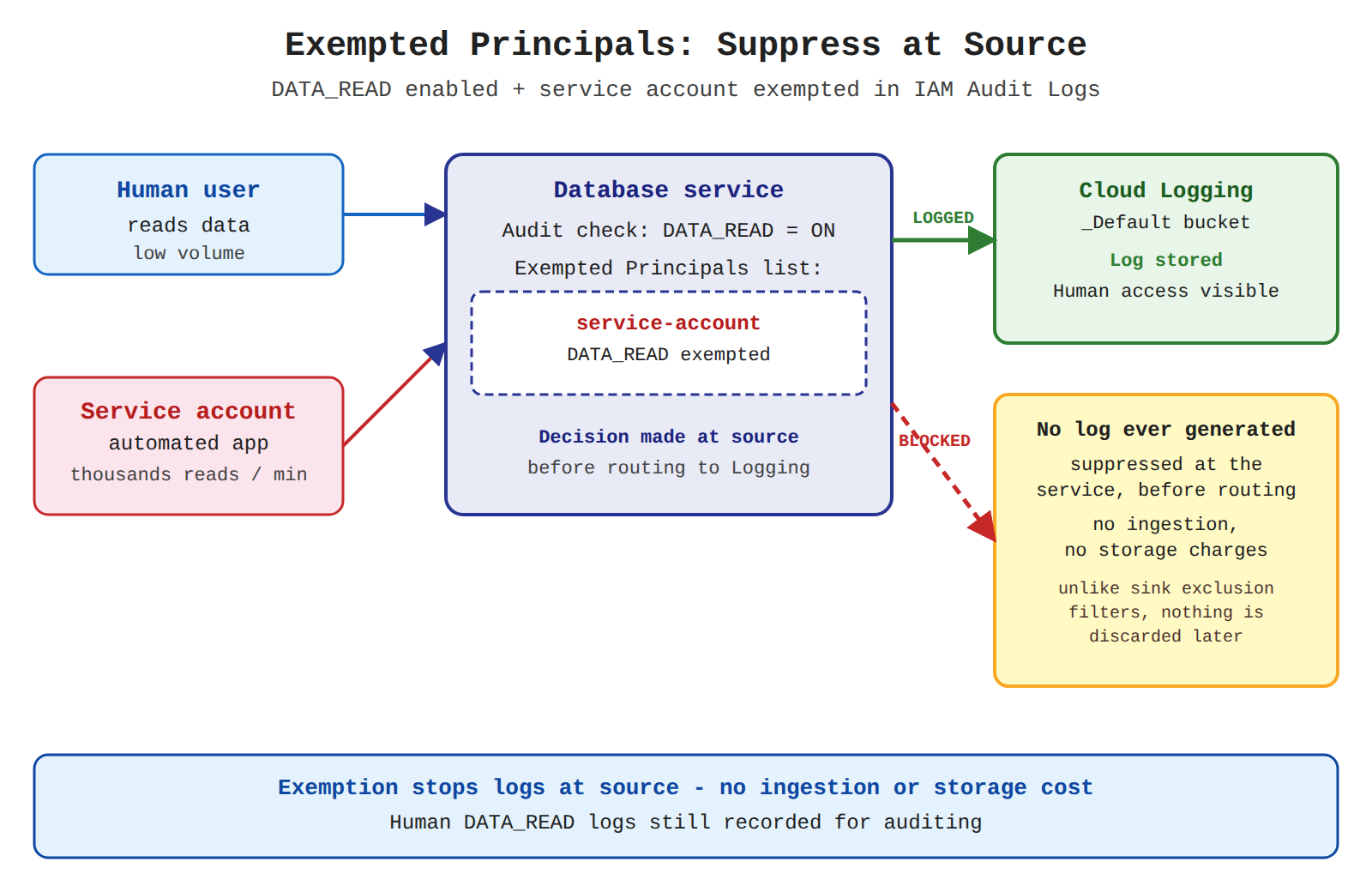
Key Advantages of Audit Configuration Exemptions
- Source-level suppression: Completely suppresses log creation before messages are routed or ingested, conserving internal network bandwidth and processing power.
- Granular scoping: Can be targeted to specific services and specific log types (
DATA_READ,DATA_WRITE,ADMIN_READ). - Cost mitigation: Directly prevents billable log volume from entering Cloud Logging log buckets.
- Balanced compliance: Ensures security visibility over interactive human actions while filtering out high-velocity, trusted service account automation.
Why This Is Optimal
Configuring principal-based exemptions via the Audit Logs interface is Google Cloud's recommended practice for managing high-throughput service account traffic. Rather than generating millions of log entries only to drop them later during ingestion, audit configuration exemptions stop log creation at the source, preventing unnecessary billing and resource overhead.
In IAM & Admin > IAM, locate the service account and remove the roles/logging.logWriter role from its permissions.
In IAM & Admin > IAM, locate the service account and remove the roles/logging.logWriter role from its permissions.
What the Logs Writer Role Does
The Logs Writer role (roles/logging.logWriter) provides permissions for a principal or service to write custom application log entries directly to Cloud Logging via the logging.logEntries.write API. It is commonly assigned to virtual machine service accounts, Google Kubernetes Engine nodes, or containerized applications pushing custom runtime logs.
Why It Doesn't Meet the Requirement
- Does not control Cloud Audit Logs: Cloud Audit Logs are generated automatically by Google Cloud service infrastructure on behalf of API callers. The client identity executing database queries does not require
roles/logging.logWriterfor an audit log to be produced. - Fails to suppress audit logs: Removing this role has zero effect on whether the database service emits
DATA_READorDATA_WRITEaudit records when the service account executes queries. - Disrupts application logging: If the service account hosts an application that outputs standard runtime diagnostic logs via Cloud Logging, revoking this role will break application logging without solving the audit logging cost problem.
Key Characteristics of Cloud Audit Log Creation
- Infrastructure-driven: Google Cloud systems write audit logs automatically to capture who did what, where, and when across resources.
- Caller-independent permissions: Audit logs are generated regardless of the IAM privileges the caller possesses within Cloud Logging.
- Tamper-resistant: Principals cannot bypass or alter audit trails simply by lacking Cloud Logging write roles.
This Answer Would Be Correct If
The service account were running custom application code on Compute Engine that actively pushed duplicate or unnecessary debug logs to Cloud Logging via an SDK, and you wanted to prevent the application from writing those custom log streams.
In Cloud Logging > Log Router, edit the _Default sink and add an exclusion filter matching the service account's email address.
In Cloud Logging > Log Router, edit the _Default sink and add an exclusion filter matching the service account's email address.
What Log Router Exclusion Filters Do
Log Router exclusion filters are rules configured on Cloud Logging sinks (such as the default _Default log sink) that prevent matching log entries from being ingested into log storage buckets. When logs arrive at the Log Router, the filter evaluates incoming entries against defined query expressions and discards matching entries before they are retained.
Why It Doesn't Meet the Requirement
- Does not stop log generation at the source: The scenario specifically requires preventing the automated service account from generating log entries. Exclusion filters operate downstream—the originating service must still construct and emit the audit log entry before the Log Router drops it.
- Imposes unnecessary processing load: Because logs are discarded after they are generated, high-volume database services still experience processing load from producing and transmitting millions of log entries across internal services.
- Less efficient than audit exemptions: While exclusion filters succeed in preventing log storage charges in Cloud Logging buckets, they do not provide the upstream performance and architectural benefits of audit log exemptions.
Key Characteristics and Limitations of Exclusion Filters
- Post-generation evaluation: Only filters logs after they have already been generated and pushed to the Cloud Logging ingestion pipeline.
- Bucket ingestion control: Primarily designed to discard lower-priority or noisy application logs before they consume log storage allotments.
- Separate management plane: Managed within Cloud Logging routing configurations rather than through unified IAM audit policies.
This Answer Would Be Correct If
The requirement were to ingest audit logs temporarily for troubleshooting, or to drop log entries based on complex payload fields (such as specific HTTP status codes, query text, or resource labels) that cannot be configured through IAM principal-based exemptions.
In IAM & Admin > Audit Logs, select the service and disable Admin Activity audit logs while leaving Data Access logs enabled.
In IAM & Admin > Audit Logs, select the service and disable Admin Activity audit logs while leaving Data Access logs enabled.
What Admin Activity Audit Logs Are
Admin Activity audit logs record API calls and administrative operations that modify resource configuration or metadata, such as creating, deleting, or updating cloud infrastructure or modifying IAM access control policies. They form the foundational security baseline for auditing administrative actions across Google Cloud.
Why It Doesn't Meet the Requirement
- Cannot be disabled: Google Cloud strictly prohibits disabling Admin Activity audit logs; they are always enabled by default for all services across all projects.
- Targets the wrong log type: The high-volume workload involves routine data queries executed by an automated service account. These queries fall under Data Access (
DATA_READ), not Admin Activity. - No impact on storage costs: Admin Activity logs are stored in the
_Requiredlog bucket free of charge and do not contribute to billable log volume or storage expenses.
Key Characteristics of Admin Activity Audit Logs
- Immutable and mandatory: Automatically captured across all services and cannot be modified, disabled, or exempted.
- Always free: Retained without ingestion or storage charges for 400 days in the
_Requiredlog bucket. - Control plane focus: Records administrative actions that alter infrastructure state, rather than data plane read/write queries.
This Answer Would Be Correct If
This configuration is never correct under any circumstances because Google Cloud does not provide an option to disable Admin Activity audit logs for any service.
Additional Context
Cloud Audit Logs distinguish between control-plane actions (Admin Activity) and data-plane operations (Data Access). While Data Access logs can be customized, enabled, or suppressed using principal exemptions to control costs, Admin Activity logs are permanently active.
Try 10 interactive questions like this one, free
Answer them yourself and get your score the moment you finish. No account needed.
Full access includes
- 2,014 practice questions across all 4 exam domains
- Every answer explained: why it is right, and why the others are not
- Scout, an AI tutor that answers your follow-up questions
- Readiness tracking by domain, so you know when to book the exam
Related free sample questions
Keep the momentum going with these hand-picked practice scenarios
FundamentalAssociate Cloud Engineer
Private Logs Viewer Role
Configuring audit logs
FundamentalAssociate Cloud Engineer
Data Access Audit Logs
Configuring audit logs
FundamentalAssociate Cloud Engineer
Promoting Ephemeral IP to Static
Reserving static external or internal IP addresses
FundamentalAssociate Cloud Engineer
Cloud Monitoring Dashboard and Uptime Check
Provisioning and setting up products in Google Cloud Observability
FundamentalAssociate Cloud Engineer
Dataflow Autoscaling Rationale Chart
Reviewing job status (e.g., Dataflow, BigQuery)
AdvancedProfessional Cloud Network Engineer
Cloud NAT Rules and Dynamic Port Allocation
Configuring public Cloud NAT IP addressing and assigning automatic and manual Cloud NAT IP addresses.
Last updated