Diagram
Azure Policy Evaluation and Enforcement Flow
Process Flow
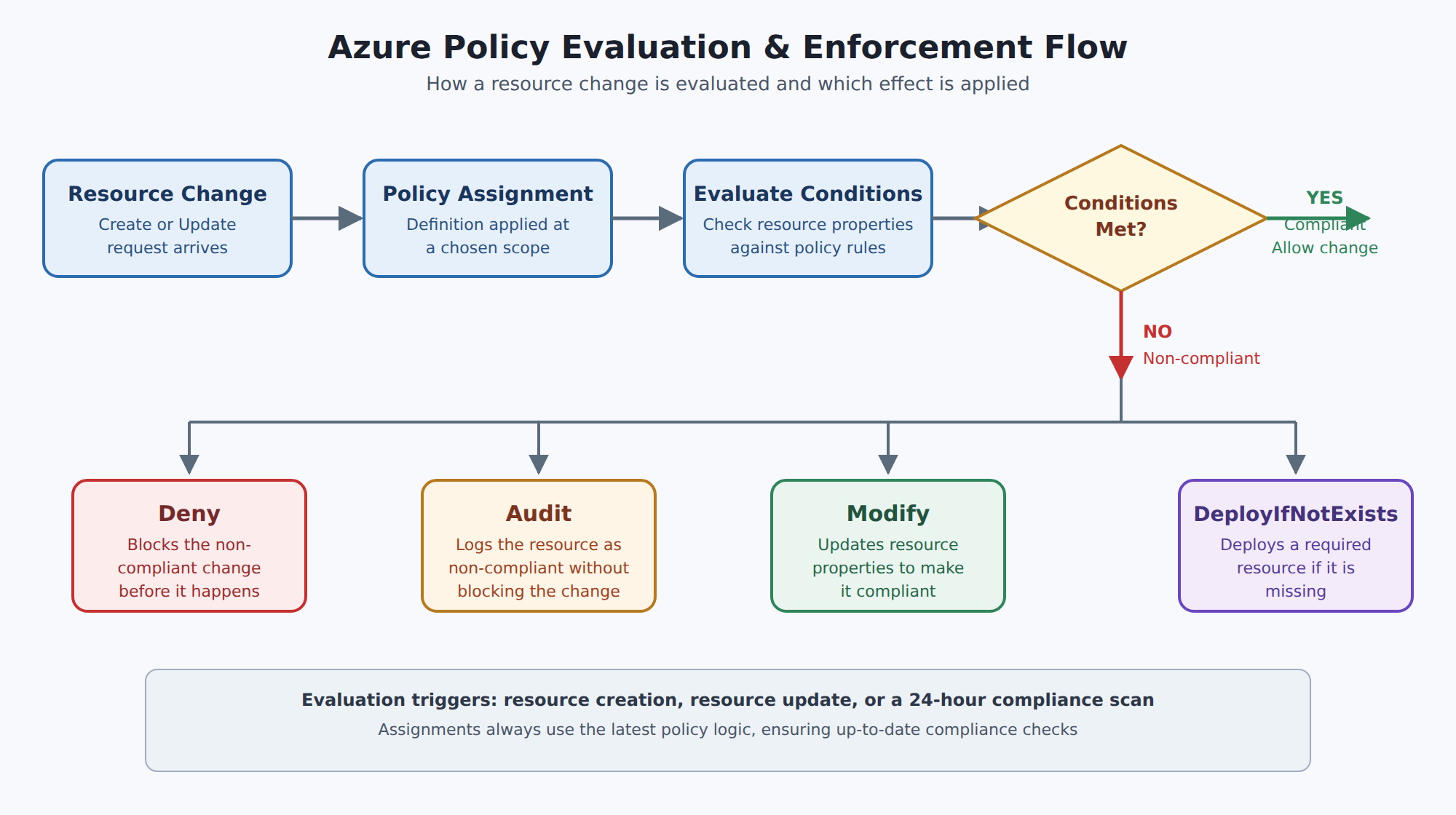
A horizontal process flow showing a resource change request being evaluated against an assigned policy definition, then branching to one of four effects: Deny, Audit, Modify, or DeployIfNotExists.
In the Domain
Implement and Manage Policies
Once assigned, Azure Policy evaluates resources during creation, update, or on a 24-hour schedule to check compliance. If a resource does not meet a rule, Azure Policy applies an effect defined in the policy, which can Deny the change, Log the non-compliance, Modify the resource before or after changes, or Deploy related compliant resources. Effects are the core mechanism that controls how Azure responds to violations of policy rules.
Azure offers many built-in policies for common governance needs, such as ensuring resource deployment only to certain regions, enforcing consistent tagging standards, and requiring diagnostic logs to be sent to a Log Analytics workspace. When built-ins do not cover your scenarios, you can create custom policies tailored to specific organizational requirements. By understanding definitions, initiatives, assignments, evaluations, and remediation, you can effectively implement and manage policies to keep your Azure environment secure and compliant.
Domain 2 of 3
Describe the purpose of Azure Policy
Read the Domain summaryPractice this Domain
10 practice questions
Practice this DomainLast updated