Diagram
IaC Deployment Pipeline with Azure DevOps
Process Flow
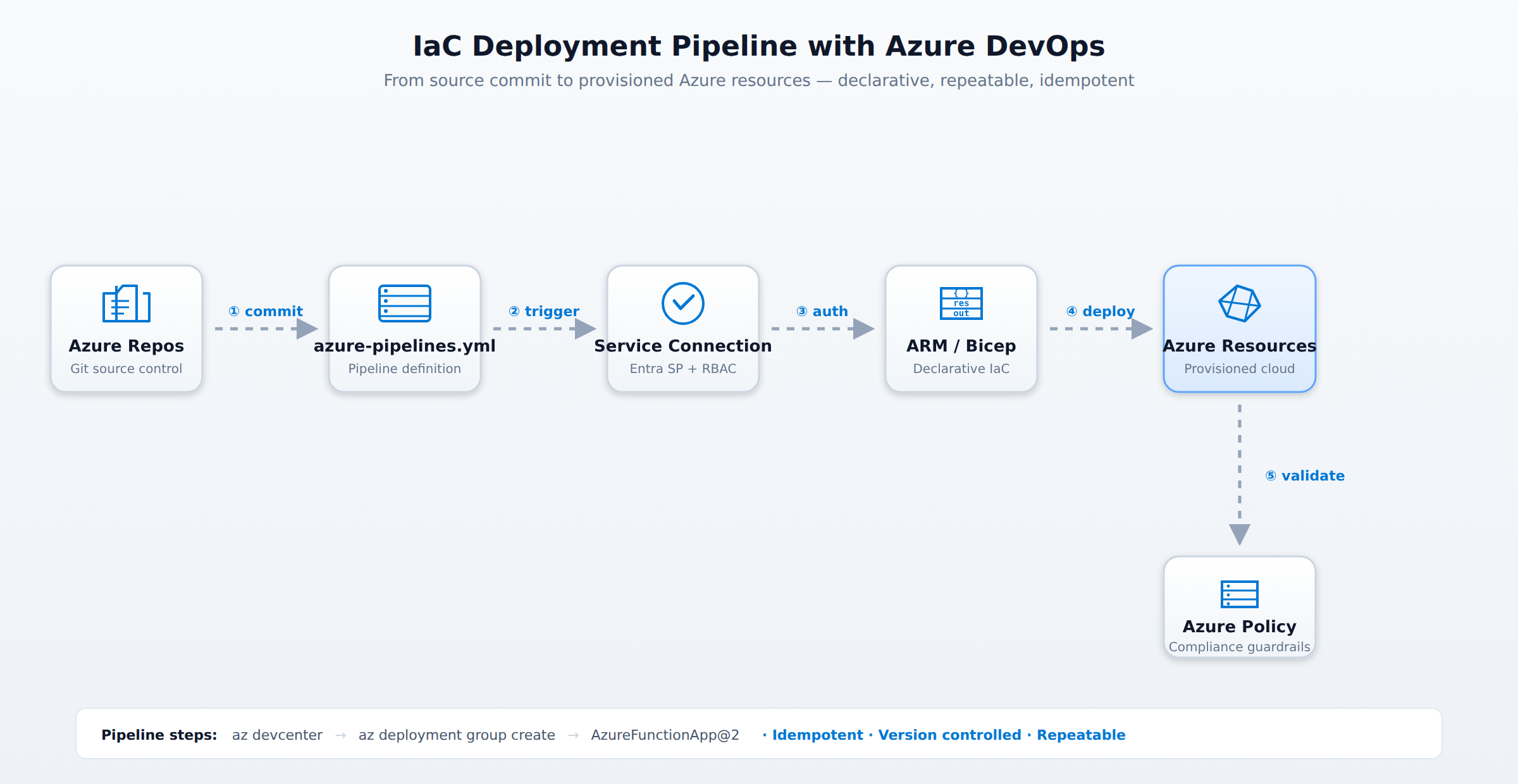
A horizontal process flow showing an IaC deployment pipeline with Azure DevOps: code committed to Azure Repos triggers Azure Pipelines, which authenticates via a service connection and deploys ARM or Bicep templates to Azure resources. Animated pulses travel left to right through each stage in sequence.
In the Domain
Implement IaC with Azure DevOps
Implementing IaC with Azure DevOps begins by storing infrastructure templates and scripts in a Git-based repository using Azure Repos. Keeping your code in a centralized version control system establishes a single source of truth and allows teams to use branching and pull requests for peer reviews. This ensures that every change is tracked and that environments are constructed consistently from approved code.
To automate deployments, Azure Pipelines connects to your Azure subscription through a secure service connection. Azure DevOps automatically provisions a Microsoft Entra service principal to facilitate this connection. Security is maintained by granting this service principal the Deployment Environments User role using role-based access control (RBAC), ensuring it only has the minimum necessary permissions.
Domain 4 of 5
Describe infrastructure as code (IaC)
Read the Domain summaryPractice this Domain
10 practice questions
Practice this DomainLast updated