Are you a guardian of your domain? Lean how to leverage your aptitude in security to protect Microsoft Azure technologies, with a goal of earning the Microsoft Certified: Azure Security Engineer Associate certification!
Prepare and test your skills

Prepare and test your skills
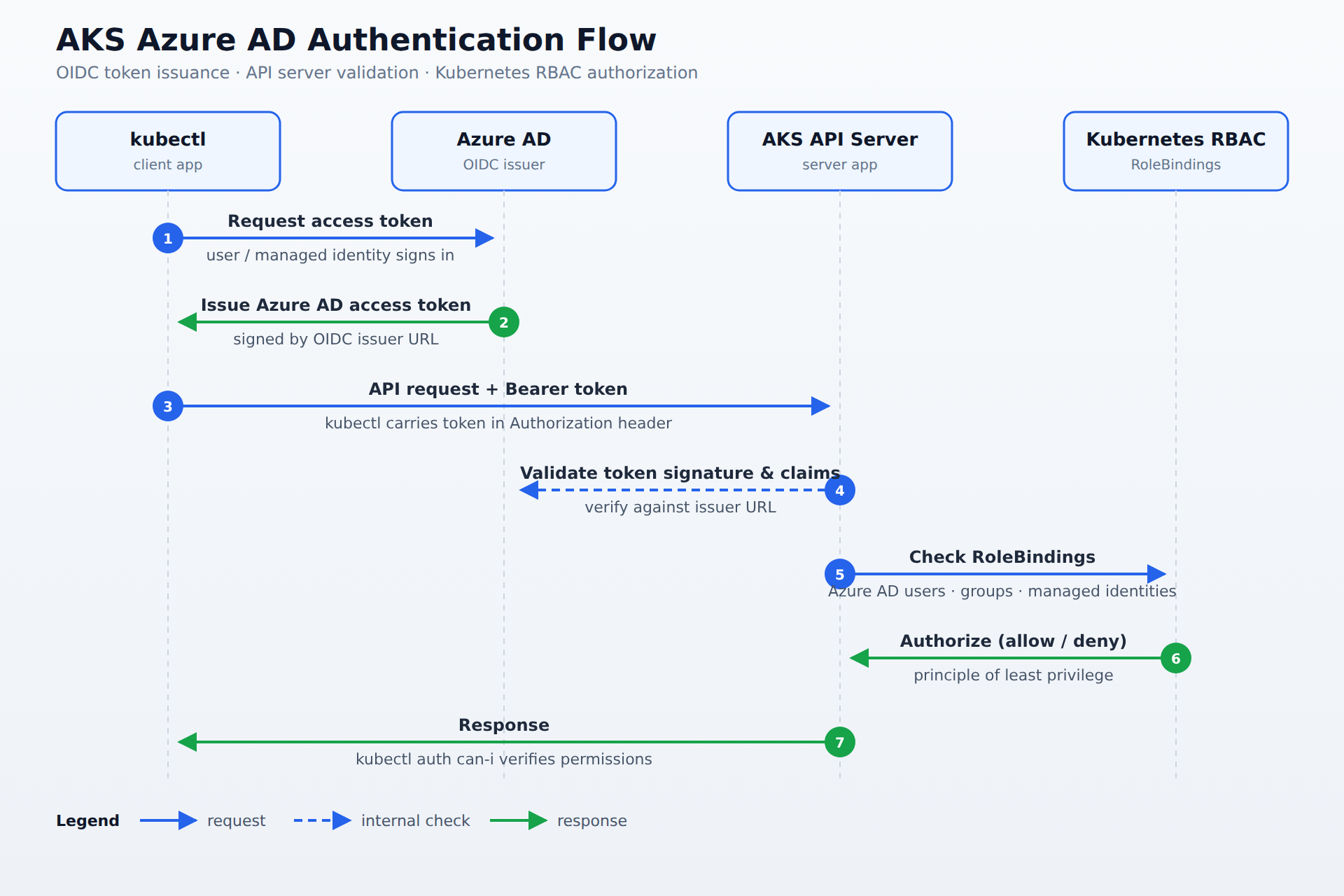
A sequence diagram showing kubectl requesting an Azure AD access token, Azure AD issuing it via OIDC, the AKS API server validating the token signature and claims, and Kubernetes RBAC authorizing the request through RoleBindings.
Configuring authentication requires registering a server application and a client application in Azure AD. The server application represents the AKS API server and requires a Client ID, Client Secret, and Redirect URI, while the client application represents administrative tools like kubectl and requires a Client ID and permission to request tokens.
The AKS API server is configured using OpenID Connect flags that specify the Azure AD server app ID, server app secret, client app ID, and tenant ID. It then validates access tokens before granting API access by using the Azure AD issuer URL to verify token signatures and claims.
Authorization is managed through Kubernetes RBAC using RoleBindings and ClusterRoleBindings. These bindings are assigned to Azure AD users, Azure AD groups, or managed identities to control the specific actions that authenticated identities can perform within the cluster.
Azure Kubernetes Service (AKS) can be secured by integrating Azure Active Directory (Azure AD) for authentication and using Kubernetes RBAC for authorization. OpenID Connect (OIDC) is the protocol that lets AKS trust Azure AD to authenticate users and applications. This integration enforces identity-based access control and supports the principle of least privilege. By combining these features, you ensure that only the right people and services can access your cluster.
To start, you must register two applications in Azure AD: a server application and a client application. The server application represents the AKS API server and needs the following:
kubectl and requires:Next, configure the AKS API server to use Azure AD by enabling OIDC flags when you create or update the cluster. You specify:
--aad-server-app-id and --aad-server-app-secret--aad-client-app-id--aad-tenant-id
This tells AKS to validate Azure AD access tokens before granting API access. The API server uses the issuer URL from Azure AD to verify token signatures and claims.Once authentication is in place, you define RoleBindings and ClusterRoleBindings to control what authenticated identities can do in the cluster. You assign these bindings to:
cluster-admin role only to a specific group or give a managed identity just enough access to deploy workloads. Fine-grained RoleBindings help maintain strict access control.Finally, validate your setup by signing in with an Azure AD account and running Kubernetes commands. Use kubectl auth can-i to check permissions and ensure that unauthorized actions are blocked. Monitoring and auditing your bindings and sign-ins helps maintain ongoing security and compliance.
 StudyCerts
 StudyCerts