Intermediate
Prepare and test your skills

Intermediate
Prepare and test your skills
Automating Feedback with Notifications and GitHub Issues
Maintaining clear communication during the software delivery lifecycle requires a structured flow of feedback. By customizing notifications and automating how alerts move between systems, teams can identify and address problems without manually tracking every update. The main goal is to connect development actions, like code commits or failed builds, directly to the communication tools and project management boards that developers monitor daily.
Configuring Notification Subscriptions
To keep stakeholders informed without overwhelming them, configure Azure DevOps notification subscriptions. These subscriptions route targeted alerts about pull requests, build outcomes, and deployments directly to the team members responsible for those areas. By establishing clear routing rules, teams reduce resolution times because the right person is notified immediately when an event occurs. This targeted flow of data keeps work traceable and ensures that critical pipeline failures are never missed in a flood of irrelevant emails.
Using Service Hooks for Automation
While notifications keep people informed, service hooks drive automated actions across different platforms by binding Azure DevOps events to external systems. When a specific event triggers—such as a failed pull request or a completed build—the service hook sends an automated payload to external tools. For example, a service hook can automatically generate a work item in Azure Boards or post a status update to a Slack channel the moment a deployment fails. This integration removes manual steps from the triage process and ensures that system states are synchronized across all development environments.
Setting Up GitHub Issue Templates
Feedback from users and automated systems must be structured to be useful, which is where GitHub issue templates become essential. These templates standardize the way contributors report bugs and request new features by requiring specific details before an issue can be submitted. When a user opens a new issue, the template prompts them for pre-defined details like steps to reproduce, environment configurations, and expected results. This consistent data collection allows triage teams to quickly categorize, prioritize, and assign work without wasting time asking for missing information.
Automating Issue Creation
To maximize responsiveness, teams can automate the creation of issues directly from build and deployment failures. When an automated testing pipeline detects an error, it triggers a workflow that automatically opens a new GitHub issue or Azure Boards work item. This early detection mechanism ensures that bugs are captured in the failed state before they can reach production environments. By replacing manual error logging with automated tracking, developers can focus their energy on writing code and fixing defects rather than administrative tasks.
Automated Issue Creation Workflow
Process Flow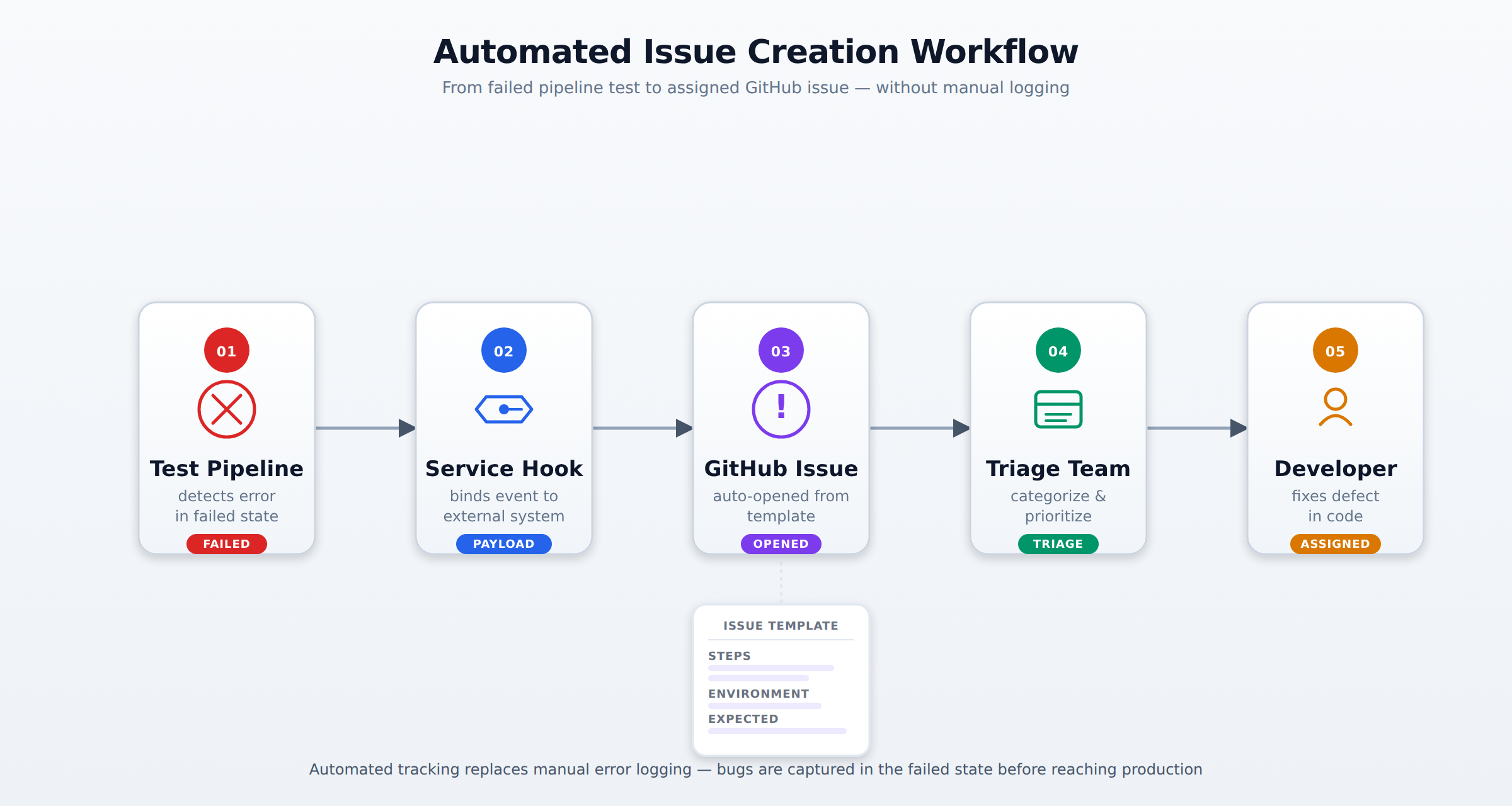
A horizontal process flow showing a failed pipeline test triggering a service hook that opens a structured GitHub issue, which is then triaged and assigned to a developer. Animated packet flow conveys the order and direction of events.
Frequently Asked Questions
What are Azure DevOps notification subscriptions and how do they help teams stay informed?
Azure DevOps notification subscriptions route targeted alerts about pull requests, build outcomes, and deployments directly to the team members responsible for those areas. By establishing clear routing rules, teams reduce resolution times because the right person is notified immediately when an event occurs. This targeted flow of data keeps work traceable and ensures that critical pipeline failures are never missed in a flood of irrelevant emails.
What are service hooks in Azure DevOps and what automated actions can they perform?
Service hooks drive automated actions across different platforms by binding Azure DevOps events to external systems. When a specific event triggers, such as a failed pull request or a completed build, the service hook sends an automated payload to external tools. For example, a service hook can automatically generate a work item in Azure Boards or post a status update to a Slack channel the moment a deployment fails.
What is the purpose of GitHub issue templates in project management?
GitHub issue templates standardize the way contributors report bugs and request new features by requiring specific details before an issue can be submitted. When a user opens a new issue, the template prompts them for pre-defined details like steps to reproduce, environment configurations, and expected results. This consistent data collection allows triage teams to quickly categorize, prioritize, and assign work without wasting time asking for missing information.
How can teams automate issue creation from build and deployment failures?
Teams can automate the creation of issues directly from build and deployment failures. When an automated testing pipeline detects an error, it triggers a workflow that automatically opens a new GitHub issue or Azure Boards work item. This early detection mechanism ensures that bugs are captured in the failed state before they can reach production environments, allowing developers to focus on writing code rather than administrative error logging.
How learners score on this domain
Last updated