Fundamental
Prepare and test your skills

Fundamental
Prepare and test your skills
How Machine Learning Creates Business Value
Scaling organizational decision-making through automation means using software to handle repetitive, high-volume work the same way every time. Instead of a person checking data and triggering each next step manually, an automated workflow moves data from a source system to each destination in order. This increases efficiency because the same checks and actions run consistently even as volume grows.
Orchestration and Scheduling
Orchestration and scheduling are two related forms of automation that work together to run work at scale. Orchestration is the automated coordination of several systems, while scheduling is the automated triggering of that coordinated work. A data pipeline is itself an orchestration of data transformations described by a directed acyclic graph (DAG), called a data processing DAG. When one pipeline depends on the output of other pipelines, each pipeline becomes a sub-DAG inside a larger orchestration DAG that coordinates all of them.
Exam tip: Orchestration coordinates what happens across systems, while scheduling triggers when that coordinated work starts.
Dependencies in Automated Workflows
Dependencies in automated workflows define how pipelines connect inside an orchestration DAG. A fan-in dependency occurs when multiple pipelines, such as pipelines A, B, and C, merge into a single downstream pipeline D. A fan-out dependency occurs when a single pipeline D triggers multiple downstream pipelines, such as pipelines E, F, and G. When pipelines share data only to avoid recalculating it, a failure in the upstream pipeline cascades downstream, forcing dependent pipelines to wait or preventing them from running at all.
Improving Automation in Stages
Improving automation in stages is the practice of simplifying orchestration by reducing and reorganizing dependencies over time. Complexity grows with the number of dependencies between pipelines, so migration is an opportunity to examine the orchestration DAG and optimize it incrementally. A profit-and-loss (P&L) pipeline shows why this matters: the P&L pipeline calculates monthly sales that a marketing pipeline needs for growth analysis, so delays or errors in P&L block marketing from running.
DAG Optimization in Three Stages
TimelineA left-to-right timeline showing three orchestration DAG stages: move as is with chained P&L to marketing, parallelize with copied monthly sales running concurrently, and extract to a shared monthly sales pipeline fanning out to P&L and marketing.
Optimization follows an ordered progression:
- Move as is: Move the existing orchestration to Google Cloud without changing pipeline steps, so added compute power speeds up execution.
- Parallelize where feasible: Analyze dependencies and copy a shared sub-DAG, such as monthly sales calculation, into each dependent pipeline so pipelines run concurrently.
- Extract common tasks: Reorganize orchestration by extracting the shared sub-DAG into its own independent pipeline that fans out to dependents, so the monthly sales pipeline triggers the P&L and marketing pipelines.
Duplicating logic in the parallelize stage creates code management overhead because both copies must stay in sync. Extracting a shared pipeline creates a cleaner orchestration DAG where each pipeline is its own sub-DAG, and it removes that duplication.
Automating Repetitive Business Decisions
Automating repetitive business decisions means connecting business systems so an event in one system consistently produces the correct updates in the others. Application Integration (opens in a new tab) enables this pattern by linking a customer relationship management (CRM) application such as Salesforce to data and planning systems such as BigQuery (opens in a new tab) and ServiceNow. When a new opportunity is created in Salesforce, the integration retrieves details like account ID and name, checks them in a BigQuery table, and updates the opportunity with a tracking order number.
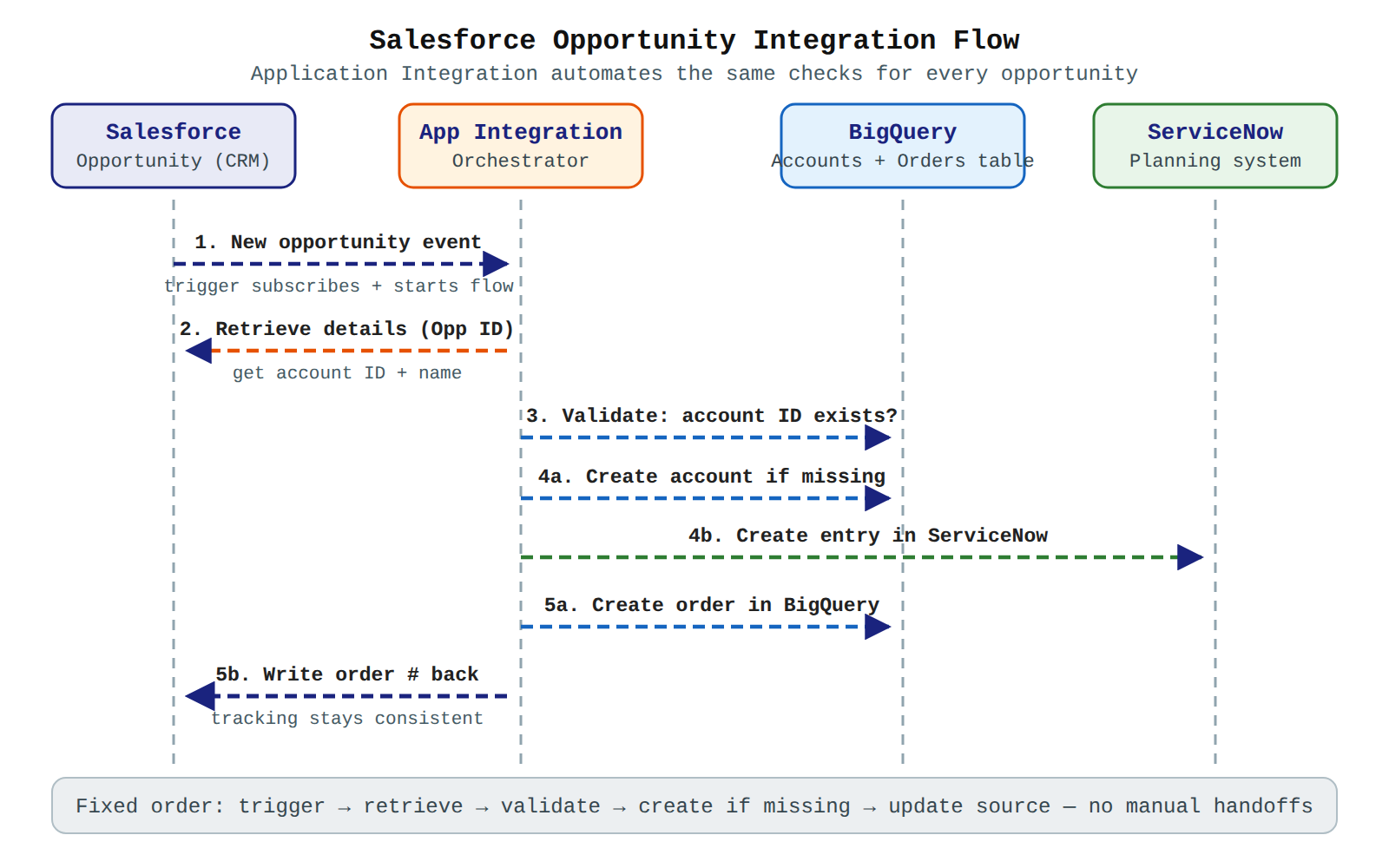
A sequence diagram with Salesforce, Application Integration, BigQuery and ServiceNow lifelines showing five ordered messages: trigger event, retrieve details, validate account, create if missing, and write back order number.
Data flows from the trigger to each connector step in a fixed order:
- Trigger: A Salesforce trigger subscribes to a new opportunity event and starts the integration.
- Retrieve details: Data flows from the trigger payload to the Salesforce connector, which retrieves additional opportunity details using the opportunity ID.
- Validate: Data flows from Salesforce to BigQuery, where the integration checks whether the account ID already exists in the BigQuery table.
- Create if missing: If the account does not exist, the integration creates a new entry in both the BigQuery table and the attached ServiceNow instance.
- Update source: The integration creates a new order in BigQuery and writes the order number back to the Salesforce opportunity, so tracking stays consistent across teams.
Because the same validation, creation, and update steps run for every opportunity, different teams see the same result without manual handoffs. Dataflow (opens in a new tab) pipelines and other data pipelines (opens in a new tab) use the same idea at data scale: defined dependencies carry data from upstream producers to downstream consumers in order.
Extracting value from unstructured data sources is the use of machine learning to turn formats like natural language text, images, audio, and video into structured, actionable information. Unstructured data does not fit neatly into rows and columns, so traditional analysis cannot easily count it, search it, or use it for decisions. Machine learning models read this content and produce outputs such as predictions, classifications, generated text, and embeddings that systems can store and analyze.
This capability creates business value because it unlocks intelligence that was previously inaccessible. A company can analyze customer reviews, support messages, documents, and media at large scale instead of reading a small sample by hand. The result is structured information that flows back into business systems and supports faster, more consistent decisions.
Remote Models for Large-Scale Inference
A BigQuery ML (opens in a new tab) remote model is a reference inside BigQuery that points to a model hosted in Vertex AI Inference (opens in a new tab), which runs on Gemini Enterprise Agent Platform (opens in a new tab). You create the reference with the CREATE MODEL statement and then run inference with the ML.PREDICT function. Remote models can perform supervised or unsupervised learning, and they are useful for large models that need the GPU hardware support provided by Agent Platform.
Data flows from BigQuery tables to Agent Platform for processing, and prediction results flow back to BigQuery for analysis. The workflow depends on Agent Platform for compute, while BigQuery remains the place where data lives and where SQL is written. This removes the need to manually build data pipelines to move data to Agent Platform and bring prediction results back.
The ordered workflow is:
- Create reference: Run
CREATE MODELin BigQuery to create a reference to the hosted Agent Platform model. - Send data for inference: Call
ML.PREDICTwith BigQuery data as input, which sends the request from BigQuery to Agent Platform. - Process and return results: Agent Platform runs inference using the BigQuery data and returns structured predictions to BigQuery.
Use this approach when most models are already hosted by Agent Platform or when inference needs GPU support. It also connects BigQuery to generative AI models that generate text and embeddings and to Cloud AI APIs that perform AI tasks on unstructured content.
Batch Prediction and Online Prediction
Batch prediction and online prediction are two ways to get results from models, divided by data size and speed needs. BigQuery ML includes built-in support for batch prediction without using Agent Platform, which is optimized for large-scale use cases. Online prediction returns a result for a small, immediate request, and BigQuery ML can deliver low-latency results on small input data.
You can achieve faster online prediction through seamless integration with Gemini Enterprise Agent Platform. You can manage BigQuery ML models within the Gemini Enterprise Agent Platform environment, which eliminates the need to export models before deploying them as endpoints. You can also register a BigQuery ML model in Model Registry to run batch prediction in Agent Platform using a BigQuery table as input, but only by using the Agent Platform API and setting InstanceConfig.instanceType to object.
The choice depends on where the work runs and how fast an answer is needed:
| Prediction option | Where it runs | Choose when |
|---|---|---|
| BigQuery ML built-in inference | Inside BigQuery | The work is large-scale batch prediction on BigQuery tables |
| Gemini Enterprise Agent Platform endpoint | On an Agent Platform endpoint | The work needs faster online prediction for small, immediate requests |
Exam tip: Built-in BigQuery ML inference is optimized for large-scale batch prediction, while an Agent Platform endpoint is the path to faster online prediction.
Managing, Reusing, and Trusting Models
Managing models in Gemini Enterprise Agent Platform means keeping BigQuery ML models in the Agent Platform environment instead of moving them. The models gain access to all Agent Platform MLOps capabilities and to features such as Vertex AI Feature Store (opens in a new tab), which helps manage data features used for training and prediction. This management path avoids exporting models only to deploy them again.
Models can also be reused outside BigQuery by exporting BigQuery ML models to Cloud Storage for availability on other model hosting platforms. Exporting moves the model artifact from BigQuery to Cloud Storage, and the destination platform then hosts the model. Choose in-platform management when you want MLOps and Feature Store benefits, and choose export when another platform must serve the model.
Model quality depends on input quality. A model is only as good as the data and prompts it receives, so inaccurate or incomplete input can cause suboptimal performance or false outputs. Verify that input data and prompts are accurate before developing applications, and review responsible AI guidance for generative AI limitations to mitigate misuse and unintended issues.
Leveraging large datasets for pattern recognition means training machine learning (ML) models on massive collections of examples so they can find complex trends beyond human capacity. On Google Cloud, large datasets are stored and queried in BigQuery (opens in a new tab), processed in pipelines built with Dataflow and Apache Beam, and used to train and evaluate models on Agent Platform (opens in a new tab). The size, range, and labeling of the training data decide how well a model can recognize the patterns that matter.
How Training Data Drives Pattern Recognition
How training data drives pattern recognition is simple: a model learns by example, so the examples define the patterns it can detect. Adding more examples or a wider range of examples gives the model more evidence to work with. For an image classification model, wider angles, different resolutions, or different points of view improve recognition. Labels matter too: classes or labels with too few examples cannot be predicted consistently or confidently, and machines cannot interpret label names or subtle differences between them, such as "door" and "door_with_knob." Data must therefore be provided to teach those distinctions.
Iterating on a Model with Evaluation Metrics
Model evaluation metrics are the starting point for debugging a model that is not meeting expectations. Low precision and recall scores can indicate that the model needs additional training data or has inconsistent labels, while perfect precision and recall can indicate that the test data is too easy to predict and might not generalize well. After changing the training data and creating a new model, the evaluation metrics of the existing model and the new model can be compared.
For models that label items, such as classification or detection models, the following changes can improve results:
- Add more examples or a wider range of examples to the training data.
- Remove classes or labels that have too few examples, because insufficient examples prevent consistent, confident predictions.
- Provide data that teaches the machine the nuances between similar labels, since machines cannot interpret label names on their own.
- Augment the data with more true positives and true negatives, especially examples close to a decision boundary, to reduce model confusion.
- Specify a custom data split for training, validation, and test, because Agent Platform assigns items randomly and near-duplicates can land in both the training and validation sets, causing overfitting and poor test performance.
- Use a confusion matrix, when the evaluation metrics include one, to check whether the model confuses two labels or predicts one label far more often than the true label, then review whether the examples are labeled correctly.
- Allow a longer training time, a higher maximum number of node hours, when the previous training time was short, because more training can produce a higher-quality model.
Exam tip: Perfect precision and recall do not always mean a strong model — they can mean the test data is too easy to predict and the model may not generalize well.
Processing Large Datasets at Scale
Processing large datasets at scale requires transforming data before a model can learn from it, and Dataflow pipelines built on Apache Beam move and process that data. A data pipeline is itself an orchestration of data transformations described by a directed acyclic graph (DAG), called a data processing DAG. When one pipeline depends on the output of other pipelines, an orchestration DAG coordinates the multiple pipelines, and each pipeline becomes a sub-DAG inside the larger graph.
Dependencies between pipelines take two forms. In fan-in, multiple data pipelines merge into a single vertex of the orchestration DAG. In fan-out, one data pipeline triggers multiple other pipelines. Both can appear together, and failures cascade: if a pipeline that produces shared data fails, every dependent pipeline either waits or cannot run at all.
Applying Pattern Recognition to Unstructured Sources
Applying pattern recognition to unstructured sources means using models to extract structure from large volumes of material such as legacy source code. Mainframe Assessment Tool uses Gemini-powered agents to parse a mainframe codebase, identify decision logic, and generate human-readable business rules in Gherkin, a plain-text domain-specific language (DSL) used in behavior-driven development (BDD). Each extracted rule carries a confidence percentage, a justification, tags, and code references that link the rule back to the source code.
Rules move through an ordered review lifecycle so only validated rules feed modernization specifications. A rule begins in Awaiting review, then moves to Validated after approval or Pending validation while waiting for confirmation, and finally to Obsolete when it no longer applies. Only rules in the Validated state are trusted for downstream specifications.
Key Facts
- Scaling organizational decision-making through automation uses orchestrated workflows with fan-in and fan-out dependencies to run repetitive, high-volume decisions consistently.
- Application Integration links Salesforce to BigQuery and ServiceNow so a new Salesforce opportunity triggers validation in BigQuery and writes a tracking order number back to Salesforce.
- A BigQuery ML remote model created with
CREATE MODELsends BigQuery data to Gemini Enterprise Agent Platform withML.PREDICTand returns structured predictions to BigQuery. - Built-in BigQuery ML inference is optimized for large-scale batch prediction, while a Gemini Enterprise Agent Platform endpoint provides faster online prediction for small, immediate requests.
- Machine learning pattern recognition improves with more and wider training examples, careful labeling, confusion-matrix review, custom data splits, and longer training time.
Frequently Asked Questions
What is the difference between orchestration and scheduling in automated workflows?
Orchestration is the automated coordination of several systems, while scheduling is the automated triggering of that coordinated work. A data pipeline is itself an orchestration of data transformations described by a directed acyclic graph (DAG), and scheduling starts that coordinated work so the same checks and actions run consistently as volume grows.
When should I use built-in BigQuery ML inference instead of a Gemini Enterprise Agent Platform endpoint?
Built-in BigQuery ML inference should be used for large-scale batch prediction on BigQuery tables, while a Gemini Enterprise Agent Platform endpoint should be used when faster online prediction is needed for small, immediate requests. Built-in inference runs inside BigQuery, whereas the endpoint runs on Agent Platform.
How does Application Integration connect Salesforce, BigQuery and ServiceNow to automate business decisions?
Application Integration links Salesforce to BigQuery and ServiceNow so a new opportunity event in Salesforce triggers validation in BigQuery and writes a tracking order number back to Salesforce. When a new opportunity is created, the integration retrieves opportunity details, checks whether the account ID exists in the BigQuery table, creates entries in BigQuery and ServiceNow if missing, then creates a new order in BigQuery and updates the Salesforce opportunity so tracking stays consistent across teams.
Sample Question
A home services company stores thousands of recorded customer phone calls and PDF invoices in Cloud Storage. The business intelligence team wants to extract actionable insights from these unstructured files to meet the following goals:
- Convert customer audio recordings into text and organize details like customer requests and pricing quotes into a database schema.
- Extract key billing fields from PDF invoices so they can be joined with existing structured customer tables in BigQuery.
How should the company use Google Cloud machine learning capabilities to transform this unstructured data into structured information?
Train a tabular regression model on the raw audio and PDF files to predict continuous numerical values for customer requests and billing fields
Write classical programming rules and manual keyword filters to parse the audio waveforms and extract text from the PDF layouts
Use the Speech-to-Text API to transcribe the audio calls, the Document AI API to extract fields from the PDF invoices, and BigQuery ML generative AI functions to organize the extracted text into structured tables
Use the Cloud Translation API to convert the audio files into text and apply a standard SQL text search index to structure the PDF invoice fields
How learners score on this domain
Last updated