Fundamental
Prepare and test your skills

Fundamental
Prepare and test your skills
Business Value of Serverless Products
Serverless computing on Google Cloud shortens time-to-market by letting developers ship business logic without provisioning servers, planning capacity, or managing infrastructure. Google Cloud automatically provisions resources, scales capacity up and down with demand, and charges on a pay-per-use basis. Teams spend time writing code instead of operating servers, which leads to faster experiments, faster releases, and higher developer productivity.
How Serverless Removes Operational Work
Serverless removes operational work by shifting infrastructure responsibility from the development team to Google Cloud. Developers write code their way and deploy it through application development (opens in a new tab) to a fully managed platform, while Google Cloud handles routing, load balancing, and container instance autoscaling. Traffic flows from clients to the serverless service, and the service routes each request to the appropriate back-end container. Because each deployment automatically scales to the number of instances needed for incoming requests, teams do not have to predict traffic or maintain idle servers, so small teams can build full-stack applications with storage, databases, and machine learning services without building operations expertise first.
Cloud Run for Fast Container Releases
Cloud Run (opens in a new tab) is a fully managed application platform for running code, functions, or containers on top of highly scalable infrastructure. Traffic flows from incoming requests to appropriate back-end containers, and Google Cloud manages load balancing and autoscaling for each revision. When a revision receives no traffic, it scales to zero container instances by default, and you pay only for the time your code runs. You can set minimum instances to keep an instance idle or warm when fast startup matters.
Cloud Run supports familiar technologies such as Nginx, Express.js, and Django, so teams can reuse existing skills to build websites (opens in a new tab), access a SQL database on Cloud SQL, and render dynamic HTML pages. Cloud Run containers are ephemeral, so persistent data flows from the container to Google Cloud services such as Cloud Storage, Firestore, or Cloud SQL. Choose Cloud Run when you want container flexibility with serverless operations and automatic scale-to-zero.
App Engine for Fast Web Service Releases
App Engine (opens in a new tab) is a serverless platform for creating apps designed to run services across multiple runtimes and platforms. App Engine handles the same types of web workloads as Cloud Run, but Cloud Run builds on more than a decade of App Engine experience and adds more flexibility and improved integrations with Google Cloud and third-party services. Cloud Run runs on much of the same infrastructure as the App Engine standard environment and incorporates features from both the standard and flexible environments. Choose App Engine when you want an opinionated application platform, and evaluate Cloud Run for new projects or modernization when you need broader workload support and advanced capabilities such as GPUs.
Cloud Run Functions for Fast Event-Driven Releases
Cloud Run functions (opens in a new tab) is a serverless execution environment for creating single-purpose functions that respond to events. A function stays idle until an event invokes it, then the platform provisions compute, runs the function, and connects it to other cloud services. This event-driven model is ideal for innovation tasks such as gluing services together, processing uploads, or adding small features without deploying a whole application. Choose Cloud Run functions when the work is a discrete reaction to an event rather than a full application or container.
| Product | What you deploy | Choose when speed matters for |
|---|---|---|
| Cloud Run | Code, function, or container | Containerized apps and websites that need automatic scaling and scale-to-zero |
| App Engine | App services across runtimes | Standard web app services with managed operations |
| Cloud Run functions | Single-purpose function | Small, event-driven pieces of logic that connect services |
Exam tip: Cloud Run scales to zero by default to save cost, while minimum instances keeps capacity warm for low-latency startup.
Serverless architectures let a business run applications without provisioning or managing servers, clusters, or virtual machines. Google Cloud owns the underlying infrastructure, while the customer focuses on code, containers, and business logic. The three core serverless application products are Cloud Run, App Engine, and Cloud Run functions. Together they deliver faster operations and lower cost through no infrastructure management, automatic scaling from zero to peak, and pay-for-use billing.
Elimination of Infrastructure Management
Elimination of infrastructure management means Google Cloud provisions resources, maintains the platform, and handles day-to-day operations for serverless workloads. A developer deploys source code, a function, or a container through application development (opens in a new tab), and Google Cloud runs it on Cloud Run (opens in a new tab) or the related serverless platforms on top of highly scalable infrastructure. Traffic flows from clients to the serverless service, and the service routes each request to the appropriate back-end container or function instance. This division of ownership removes patching, capacity planning, and server maintenance from the business team.
Google Cloud manages the operational tasks that surround the code:
- Resource provisioning: compute capacity is created automatically when demand arrives.
- Load balancing: incoming requests are routed to healthy back-end containers without customer configuration.
- Logging and monitoring: request logs and container logs flow automatically to Cloud Logging, and service metrics flow automatically to Cloud Monitoring.
- Health and availability: the control plane manages instance health and replaces unhealthy capacity.
Because these tasks are built in, teams can build full-stack applications with storage, databases, and machine learning services without hiring specialists to operate servers.
Automatic Scaling From Zero to Peak Demand
Automatic scaling from zero to peak demand means the platform adds and removes capacity in response to traffic without manual rules. In Cloud Run, each revision is automatically scaled to the number of container instances needed to handle all incoming requests. When request volume rises, additional instances start instantly to absorb the peak. When a revision receives no traffic, it is by default scaled to zero container instances.
Cloud Run Scale-to-Zero Lifecycle
State / Lifecycle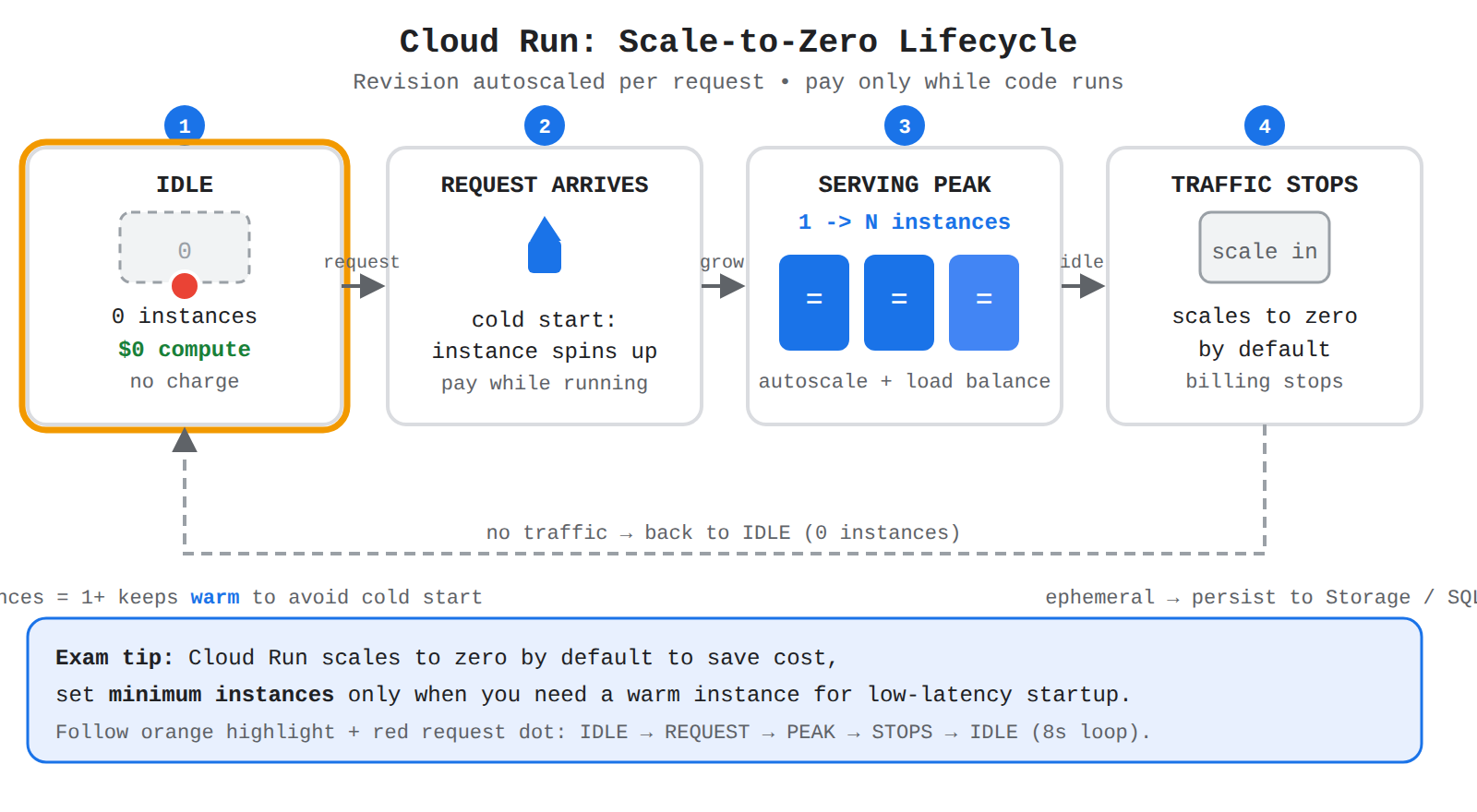
Four states IDLE, REQUEST ARRIVES, SERVING PEAK, TRAFFIC STOPS in a loop. Animation moves a request dot along the arrows while each state highlights in order.
This behavior is different from traditional autoscaling, which often requires fine-tuning thresholds and policies. Serverless autoscaling is instant and elastic, so it can move from idle with zero instances to serving with many instances and back to idle without operator action. If a workload cannot tolerate a cold start, the team can set minimum instances to keep one or more instances warm and ready for the next request. Choose scale-to-zero for variable or infrequent traffic, and choose minimum instances when fast response matters more than eliminating idle capacity.
Exam tip: Cloud Run scales to zero by default; set minimum instances only when you want to keep a warm instance ready for traffic.
Cost Efficiency of the Pay-for-Use Model
The pay-for-use model means the business pays only for the compute time that code actually consumes. With Cloud Run, billing is based on the time code runs, so zero instances during idle periods means no compute charges for that period. With Cloud Run functions (opens in a new tab), single-purpose functions respond to events and consume resources only while the event is being processed. With App Engine (opens in a new tab), applications run across supported runtimes without reserving servers ahead of time.
This model removes the waste of paying for idle virtual machines waiting for traffic. Costs rise and fall directly with customer demand, which helps unpredictable workloads, seasonal peaks, and new experiments. Operational visibility is also included, because there is no charge for metrics on the fully managed version of Cloud Run and monitoring requires no setup. The result is lower total cost for spiky workloads and clearer alignment between spending and actual use (opens in a new tab).
Google Cloud serverless options differ mainly by what you deploy and what starts the work. Cloud Run runs containers or code on a fully managed platform, App Engine hosts web apps and services across multiple runtimes, and Cloud Run functions runs single-purpose functions that respond to events. All three reduce infrastructure management and scale automatically, but they fit different architectural needs.
Cloud Run for Containerized Portability
Cloud Run is a fully managed serverless platform for running code, functions, or containers on scalable infrastructure. It is the best fit when you want containerized portability: you package an app in a container and run it without managing servers. Traffic flows from incoming requests to Cloud Run, which automatically routes requests and load balances them across container instances. Cloud Run can handle the same workloads as App Engine services, but it offers more flexibility and improved integrations with Google Cloud and third-party services, and it can handle workloads that cannot run on App Engine.
Use Cloud Run (opens in a new tab) for highly scalable containerized applications, dynamic websites, APIs, and services built with frameworks such as Nginx, Express.js, or Django. It scales each revision to zero by default and can keep minimum instances warm to reduce cold starts, and you pay only for the time your code runs. Containers are ephemeral, so persistent data should flow from the container to Cloud Storage, Firestore, or Cloud SQL.
App Engine for Scalable Web Platforms
App Engine is for creating apps designed to run services across multiple runtimes and platforms. It provides a managed platform for scalable web applications and services. App Engine has two environments. The standard environment supports automatic scaling, scale-to-zero, configurable warm-up requests, and request timeouts of 10 minutes for automatic scaling or 24 hours for manual or basic scaling. The flexible environment does not scale to zero, does not use warm-up requests, has a 60-minute request timeout, and supports custom runtimes through container images and sidecar containers.
Use App Engine (opens in a new tab) when you want a managed web platform that can run services across multiple runtimes. Cloud Run is the newer evolution of Google Cloud serverless and is recommended for new projects and modernization, because Cloud Run can handle the same workloads with more flexibility.
Cloud Run Functions for Event-Driven Automation
Cloud Run functions is a serverless execution environment for building and connecting cloud services. It creates single-purpose functions that respond to events. A function remains idle until an event triggers it, then compute flows to the function, the function runs its logic, and results flow to connected services. Use Cloud Run functions (opens in a new tab) for event-driven automation, such as running a small piece of code when an event occurs or connecting services together. Cloud Run functions is recommended for new functions wherever possible. Choose it when the work is a focused, event-triggered task rather than a full containerized application or a multi-service web platform.
Comparing Serverless Options by Deployment and Trigger
The three services split by what you deploy and what triggers the work. The main decision is what you are running. If you already have a container or need portability and framework choice, choose Cloud Run. If you need a managed web platform that runs services across runtimes, App Engine fits. If you need a small function to react to an event, choose Cloud Run functions. For new Google Cloud users, Cloud Run is the preferred alternative over App Engine.
Choosing Serverless Compute on Google Cloud
Decision TreeA decision tree branching on workload type to choose Cloud Run functions for event-driven tasks, Cloud Run for flexible container apps, or App Engine for opinionated web platforms.
| Service | What you deploy | Best use case | Scaling and runtime notes |
|---|---|---|---|
| Cloud Run | Container, code, or function | Containerized portability; scalable web apps and APIs | Automatic scaling; scale-to-zero by default; request timeout configurable up to 60 minutes (default 5 minutes); supports sidecar containers and configurable health checks |
| App Engine | App with services and versions | Scalable web platforms across multiple runtimes | Standard: automatic scaling, scale-to-zero, configurable warm-up, 10-minute or 24-hour timeouts. Flexible: no scale-to-zero, 60-minute timeout, custom runtimes, sidecar containers |
| Cloud Run functions | Single-purpose function | Event-driven automation and connecting services | Serverless execution environment; responds to events; recommended for new functions |
Exam tip: Cloud Run is for containerized apps, App Engine is for managed web platforms across runtimes, and Cloud Run functions is for single-purpose event-driven automation.
Key Facts
- Serverless computing shifts provisioning, patching, load balancing, logging, monitoring, and capacity planning to Google Cloud so developers focus on business logic.
- Cloud Run automatically scales each revision from zero instances when idle to many instances at peak, bills only for the time code runs, and can keep minimum instances warm to avoid cold starts.
- Cloud Run containers are ephemeral, so persistent data flows from Cloud Run containers to Cloud Storage, Firestore, or Cloud SQL.
- App Engine standard supports scale-to-zero and 10-minute or 24-hour timeouts, while App Engine flexible does not scale to zero and has a 60-minute timeout.
- Cloud Run functions runs single-purpose functions that stay idle until an event invokes them, which fits event-driven automation and connecting cloud services.
Frequently Asked Questions
When should I use Cloud Run, App Engine, or Cloud Run functions on Google Cloud?
Choose Cloud Run for containerized apps and websites that need automatic scaling and scale-to-zero, App Engine for standard web app services with managed operations across multiple runtimes, and Cloud Run functions for small, event-driven pieces of logic that connect services. Cloud Run is recommended for new projects and modernization because it can handle the same workloads as App Engine with more flexibility and improved integrations.
How does Cloud Run scaling and billing work when there is no traffic?
Each Cloud Run revision automatically scales to the number of container instances needed for incoming requests and scales to zero container instances by default when it receives no traffic. You pay only for the time your code runs, so idle periods with zero instances incur no compute charges. You can set minimum instances to keep an instance warm when fast startup matters more than eliminating idle capacity.
How does serverless computing on Google Cloud reduce operational work and speed up time-to-market?
Serverless computing shifts provisioning, capacity planning, patching, load balancing, logging, monitoring, and instance health management to Google Cloud so developers focus on writing business logic. Developers deploy code, functions, or containers to a fully managed platform that automatically provisions resources and scales capacity up and down with demand on a pay-per-use basis. This removes the need to predict traffic or maintain idle servers, which leads to faster experiments, faster releases, and higher developer productivity.
How learners score on this domain
Last updated