Fundamental
Prepare and test your skills

Fundamental
Prepare and test your skills
IAM Access Control and Two-Step Verification
Identity and Access Management (IAM) (opens in a new tab) is the Google Cloud service that controls who can take what action on which cloud resource. Cloud Identity (opens in a new tab) is a separate identity as a service platform that centrally manages users and groups. Together, Cloud Identity proves who a user is, and IAM controls what that identity is allowed to do.
Principals: The Identities That Request Access
A principal in IAM is any identity that can request access to a resource, such as a user, group, or workload. A principal cannot perform any action until IAM permits it, so every member of an organization must have an identity that Google Cloud recognizes. Central management through Cloud Identity also enables single sign-on (SSO) to thousands of third-party applications.
IAM recognizes several types of principals:
- Google Account for an end user who signs in to Google Cloud
- Service account for an application or Google Cloud workload that needs its own identity
- Google Group that collects multiple users under one membership for easier management
- Google Workspace or Cloud Identity account that represents a managed organizational user
Roles and Permissions: The Actions That Are Allowed
A role in IAM is a collection of permissions that defines a set of allowed operations. A permission allows one specific operation on a resource, such as creating a virtual machine or reading a storage bucket. When a role is granted to a principal, the principal receives every permission contained in that role.
Roles based on job functions simplify access management by grouping the permissions needed for a common job into one predefined set. An administrator assigns the job-function role instead of granting individual permissions, which improves productivity and limits access to only what the job requires. Custom roles built from predefined roles can better align permissions with an organization's specific requirements.
IAM Allow Policies: How Principals and Roles Connect to Resources
An IAM allow policy is the object that binds a set of principals to a role on a specific resource. When access is needed, the administrator creates the policy and attaches it to the resource, so the policy applies to that resource and controls which principals receive the role for that resource. This binding creates centralized control because who gets access, what actions are allowed, and which asset is affected are defined in one place.
IAM Allow Policy Binds Who to What
Entity RelationshipAn entity-relationship model showing an IAM allow policy binding principals to a role on a resource, where roles collect permissions and resources form an Organization-Folder-Project hierarchy.
The resource that the policy attaches to sits in the Google Cloud resource hierarchy. The Organization resource (opens in a new tab) is the apex of the hierarchy and provides central visibility and control over every resource that belongs to the organization. An organization can contain folders that group related projects, and each project contains service resources such as Compute Engine virtual machines, Pub/Sub topics, Cloud Storage buckets, and Cloud VPN endpoints.
Exam tip: A role collects permissions, while an IAM allow policy binds principals to that role on a specific resource — access is granted only where the policy is attached.
The principle of least privilege means every principal receives only the minimum permissions needed to do its job. In Google Cloud, least privilege is implemented through IAM role grants on resources. By limiting permissions, least privilege reduces the attack surface because a compromised account can reach fewer resources and cause less damage.
How IAM Roles and Resource Scope Enforce Least Privilege
Identity and Access Management (IAM) controls access by granting roles to principals on resources. A role is a collection of permissions, and a single permission cannot be granted directly; granting a role gives the principal every permission in that role. The same principal can receive multiple roles to cover different tasks.
Roles can be granted at different scopes, such as project, folder, instance, or repository. To follow least privilege, the administrator chooses the narrowest scope and the smallest set of roles that still allow the task. Custom roles are supported when predefined roles include more permissions than needed.
Scoped Role Example: Secure Source Manager
Secure Source Manager (opens in a new tab) shows how least privilege works with resource-level roles. Instance roles give permissions on the Secure Source Manager instance, while repository roles give permissions on individual repositories. The two levels are granted separately, so a principal can have access to an instance without having access to every repository.
| Action | Instance role | Project role | Repository role |
|---|---|---|---|
| Create repositories | Secure Source Manager Instance Repository creator | Secure Source Manager Repo Creator | — |
| View a repository | Secure Source Manager Instance Accessor | — | Secure Source Manager Repo Reader |
| Use a repository and create issues and pull requests | Secure Source Manager Instance Accessor | — | Secure Source Manager Repo Writer |
| Manage repositories | Secure Source Manager Instance Repository creator | — | Repo Admin |
This combination shows that access is built from multiple scoped grants, not one broad project role. Custom roles are also supported when predefined roles do not match the needed permissions.
Detecting and Removing Excess Permissions with CIEM
Cloud Infrastructure Entitlement Management (CIEM) helps find identities that have more permissions than they need. CIEM provides insight into permissions of federated identities from external identity providers such as Entra ID, Okta, and on-premises Active Directory. CIEM identifies federated identities with roles that have excess permissions on Google Cloud resources, and it can also be used with AWS IAM Identity Center to expose vulnerabilities in federated identities on AWS resources.
Security teams view offending access grants and recommended remediations on the Security Command Center Findings page. Teams then track remediation through cases, response playbooks, and security operations. The IAM page in the Google Cloud console lets administrators investigate permissions of principals from other identity providers. CIEM is powered by IAM recommender functionality.
Enforcing Least Privilege for SSH and VM Access
OS Login (opens in a new tab) is a Compute Engine feature that evaluates IAM permissions every time a user attempts to establish an SSH session. This differs from metadata-based SSH keys, which are evaluated only once when the key is uploaded and remain valid until removed. With OS Login, the user's key is tied to the user account lifecycle, so suspending or deleting the account in Cloud Identity or Google Workspace revokes SSH access.
OS Login also requires the iam.serviceAccounts.actAs permission on any attached service account and checks it on every connection. This per-connection check helps prevent SSH access from being used for privilege escalation. Administrators control root access by granting the OS Login Admin User role for root or the OS Login User role for regular privileges.
Additional best practices for least privilege on virtual machines (VMs) include:
- Grant privileged roles on a per-VM or just-in-time basis instead of permanently at the project level
- Grant view-only roles like Compute Viewer at the project level, and grant privileged roles only for individual VMs or temporarily
- Avoid attaching a service account to a VM unless the workload requires access to Google Cloud resources
- Use a single-purpose service account and grant it access only to the resources the workload needs
- Require just-in-time access instead of permanent access to the VM and service account
- Limit root privileges by granting the OS Login User role when root is not required
Exam tip: OS Login checks IAM permissions every time a user starts an SSH session, while metadata-based SSH keys are checked only when the key is uploaded.
Balancing Least Privilege with Emergency Access
Emergency access is a deliberate exception to least privilege that provides last-resort access and prevents total loss of access. Emergency access users are created in Cloud Identity or Google Workspace, have super admin privilege, are not tied to a specific employee, are exempt from the Joiner, Mover, and Leaver lifecycle, and are exempt from single sign-on. Super admins have full access to all resources within an organization.
Because emergency access users are highly privileged, best practices strictly limit them. Organizations keep a minimum of two and a maximum of five emergency access users per Cloud Identity or Google Workspace account, place them in a separate organizational unit, and protect them with FIDO security keys for 2-Step Verification. Organizations also reduce the number of super admins by using pre-built or custom administrative roles, retaining only a minimal number of super-admin users, discouraging everyday use, and auditing administrative activity.
Two-Step Verification (2SV) (opens in a new tab) is a security control that requires two separate proofs of identity before access is granted to a Google Cloud account. The first proof is something the user knows, typically a password, and the second proof is something the user has, such as a phone or physical security key. This second layer means a stolen password alone is not enough for an attacker to sign in.
Why Passwords Alone Are Not Enough
Passwords alone are a single, reusable secret that can be stolen, guessed, or tricked out of a user. An attacker can obtain a password through phishing emails, fake sign-in pages, data breaches, or malware that records keystrokes. Once the password is stolen, the attacker can sign in from anywhere as if they were the legitimate user. Two-Step Verification breaks this pattern by requiring an additional check that the attacker does not possess.
How Two-Step Verification Adds a Second Layer
Two-Step Verification protects a sign-in by separating authentication into two ordered checks that must both succeed. Access to the account or cloud resource is granted only after both steps are completed by the same user on the same sign-in attempt.
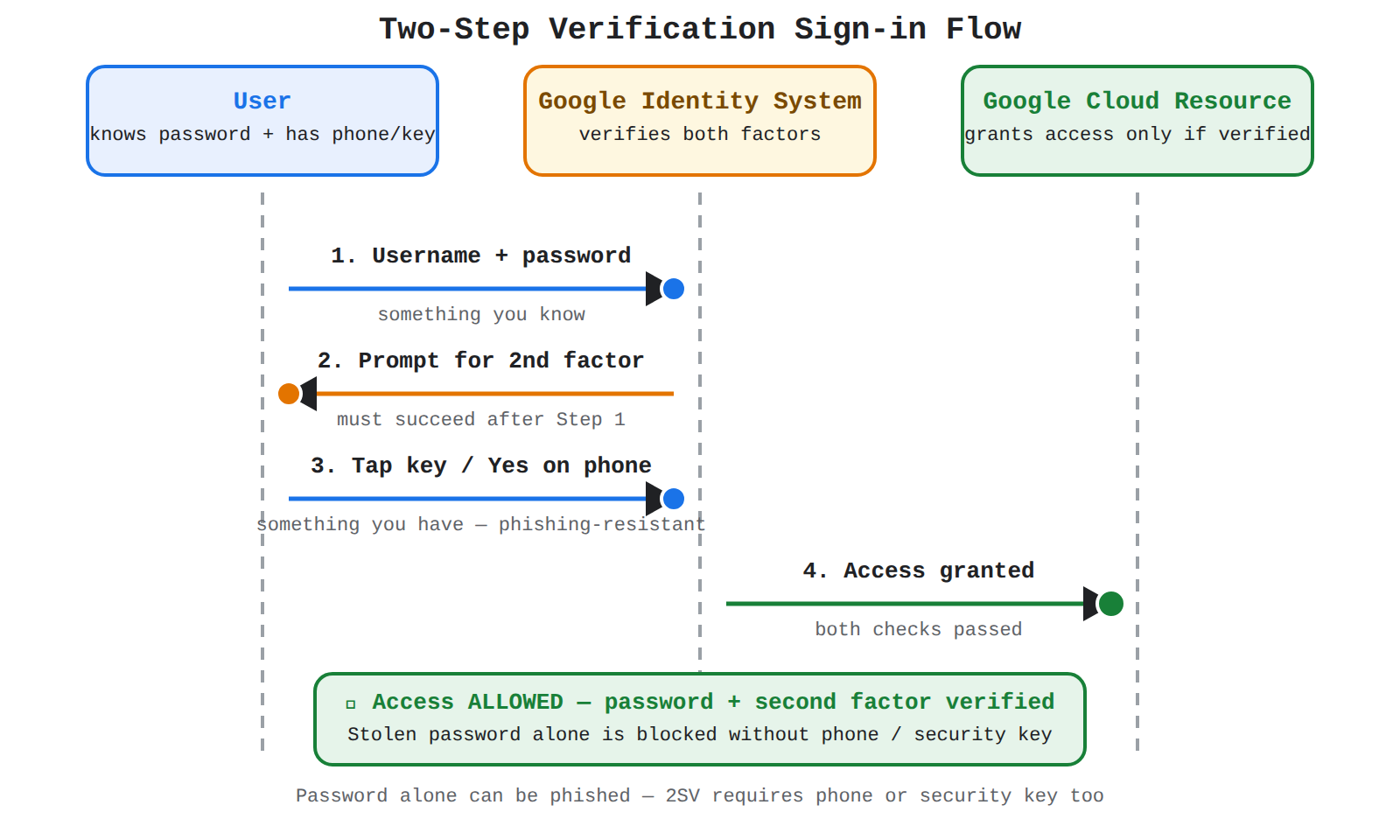
A sequence diagram with User, Google Identity System, and Cloud Resource lifelines showing password check, second-factor prompt and response, then access granted in order.
- Password check: The user enters a username and password, which are verified by Google's identity system.
- Second-factor check: The identity system prompts the user for a second proof, such as tapping a mobile prompt or inserting a physical security key.
- Access decision: The identity system grants access to the account only after both the password and the second factor are verified.
In this flow, authentication data moves from the user to Google's identity system, and the access decision flows back from the identity system to the Google Cloud resource. The dependency is strict: the second step depends on the first step succeeding, and access depends on both steps succeeding.
Physical Security Keys and Mobile Prompts
Physical security keys and mobile prompts are two common second factors used with Two-Step Verification. A physical security key is a small hardware device that the user plugs in or taps to prove presence at sign-in. A mobile prompt is a notification sent to a trusted phone that asks the user to confirm the sign-in attempt.
| Second factor | What the user needs | How verification works |
|---|---|---|
| Physical security key | Hardware key registered to the account | User inserts or taps the key, which cryptographically confirms the real sign-in site |
| Mobile prompt | Trusted smartphone signed in to the account | User taps Yes on a prompt sent to the phone to approve the sign-in attempt |
Both options stop an attacker who only has the password, because the sign-in cannot complete without the phone or key. Physical security keys provide stronger protection against phishing because the key will not respond to a fake website, while mobile prompts provide strong, easy-to-use protection that blocks most credential theft.
Exam tip: A password alone can be phished, but Two-Step Verification with a physical security key or mobile prompt blocks sign-in unless the attacker also has that second device.
Key Facts
- Identity and Access Management (IAM) grants access through an IAM allow policy that binds principals to a role on a specific resource.
- The Organization resource is the apex of the Google Cloud resource hierarchy and provides central visibility and control over all folders, projects, and service resources.
- The principle of least privilege reduces attack surface by granting only the minimum permissions and narrowest resource scope needed for a task.
- OS Login checks IAM permissions on every SSH connection, while metadata-based SSH keys are checked only when uploaded.
- Two-Step Verification (2SV) requires both a password and a second factor such as a physical security key or mobile prompt, so a stolen password alone cannot complete sign-in.
Frequently Asked Questions
What is the difference between Identity and Access Management (IAM) and Cloud Identity in Google Cloud?
Cloud Identity proves who a user is by centrally managing users and groups, while Identity and Access Management (IAM) controls what that identity is allowed to do on which cloud resource. A principal cannot perform any action until IAM permits it, so every member of an organization must have an identity that Google Cloud recognizes.
How does an Identity and Access Management (IAM) allow policy connect principals, roles, and resources?
An Identity and Access Management (IAM) allow policy binds a set of principals to a role on a specific resource. When the administrator creates the policy and attaches it to the resource, the policy applies to that resource and defines in one place who gets access, what actions are allowed, and which asset is affected.
Why does Two-Step Verification (2SV) stop an attacker who has stolen a Google Cloud account password?
Two-Step Verification (2SV) requires two separate proofs of identity before access is granted, typically a password the user knows and a second factor the user has such as a phone or physical security key. A stolen password alone is not enough to sign in because access is granted only after both the password and the second factor are verified on the same sign-in attempt.
Sample Question
A retail organization is expanding its footprint on Google Cloud and wants to better protect its administrator and developer accounts against phishing and credential theft. The security leadership team has defined the following requirements for accessing the Google Cloud console:
- Prevent unauthorized account access even if an employee's password is compromised.
- Require users to verify their identity during sign-in using a secondary method, such as touching a hardware token or approving a notification on a signed-in phone.
Which security measure should the organization implement to meet these requirements?
How learners score on this domain
Last updated