Fundamental
Prepare and test your skills

Fundamental
Prepare and test your skills
Bucket Allow Policy With Least Privilege Role
Free sample question with answers and detailed explanation below. The Cloud Digital Leader practice bank has an additional 3,070 practice questions.Try 10 free realistic questions: instant score, no credit card, and no account required.
A company is configuring a production environment in Google Cloud. A newly hired data analyst has already authenticated using their corporate Google Account and now requires authorization to perform their daily tasks. The cloud administrator must configure access based on the following requirements:
- The analyst must be able to upload files to a single, specific Cloud Storage bucket.
- The analyst must not have access to any other resources within the project or organization.
- The configuration must strictly follow the principle of least privilege.
How should the administrator configure Identity and Access Management (IAM) to meet these requirements?
Explanations
Update the allow policy on the specific Cloud Storage bucket to bind a predefined role with only the required permissions to the analyst's principal
Update the allow policy on the specific Cloud Storage bucket to bind a predefined role with only the required permissions to the analyst's principal
What an IAM allow policy and predefined role binding is
In Google Cloud, Identity and Access Management (IAM) manages fine-grained authorization by controlling who (the principal) can do what (the role) on which target (the resource). An allow policy is a configuration object attached directly to a Google Cloud resource that contains role bindings, which link authenticated principals to specific IAM roles. Predefined roles are managed by Google Cloud services and bundle the specific permissions required to perform common, targeted business tasks.
Bucket Allow Policy Role Binding
Annotated Structure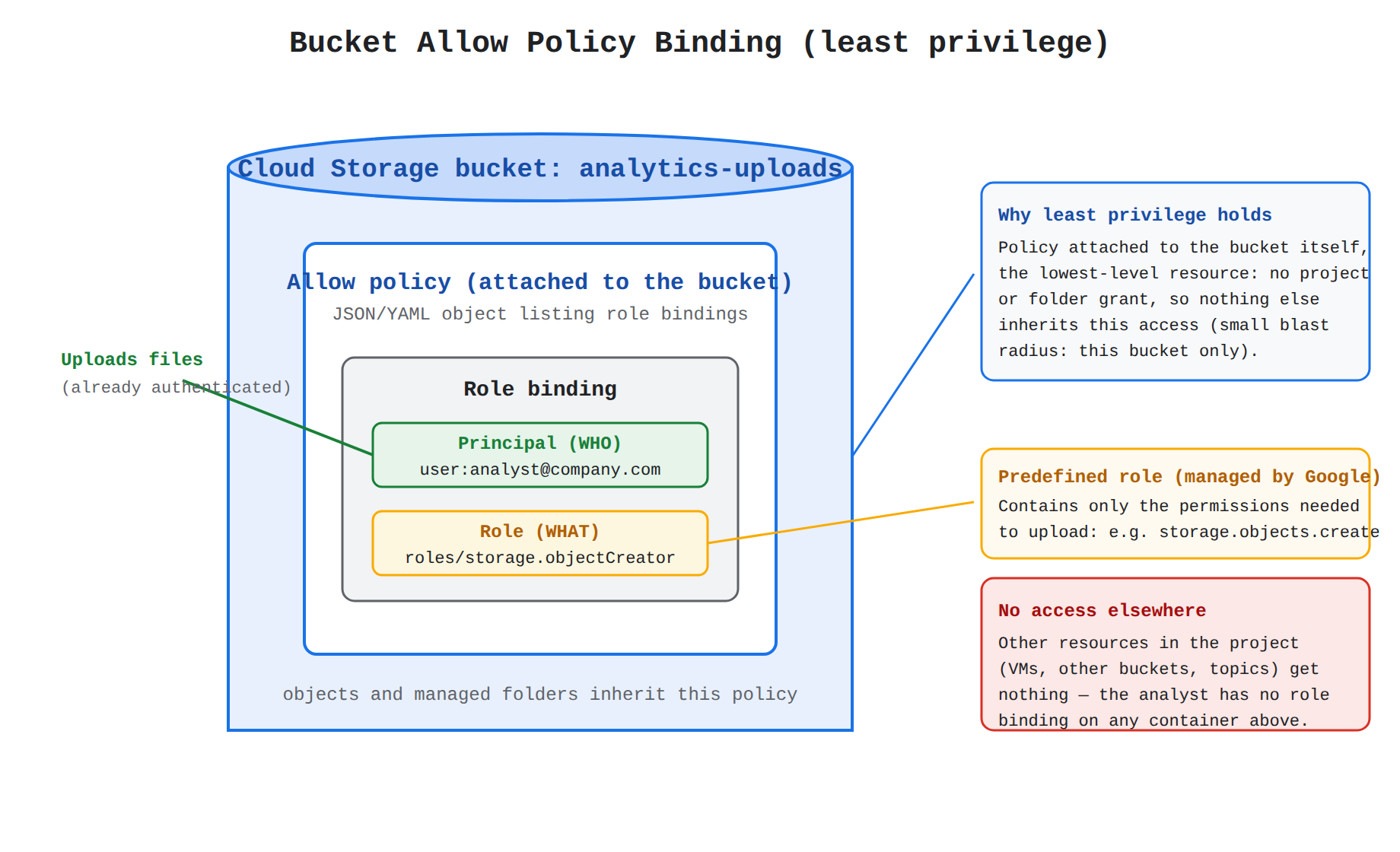
How it meets the requirements
- Single Cloud Storage bucket access: Attaching the allow policy directly to the service-specific resource (the individual bucket) limits the scope of authorization exclusively to that bucket.
- No access to other resources: Because the role is granted at the lowest possible level rather than on a higher-level container like a project or folder, no other resources inherit the access.
- Principle of least privilege: Selecting a predefined role that contains only the permissions needed to upload objects ensures the analyst receives the exact access required to accomplish their assigned task and nothing more.
Key advantages and capabilities
- Granular access control: Service-specific allow policies prevent lateral movement and unauthorized access to sibling resources inside the same project.
- Lower maintenance overhead: Google Cloud automatically maintains and updates predefined roles when new features or API methods are introduced.
- Clear separation of security phases: Once the user's identity is verified through authentication, the allow policy strictly governs authorization whenever the user makes an API request.
- Reduced blast radius: If the analyst's account is ever compromised, the potential impact is restricted to a single storage bucket rather than the entire production environment.
Why this is optimal
Applying a narrowly scoped predefined role on the lowest-level resource is the industry standard for enforcing the principle of least privilege. It avoids the security risks of overly broad basic roles and prevents unintended policy inheritance across the wider Google Cloud resource hierarchy.
Grant the basic Editor role to the analyst's principal on the parent project so the Cloud Storage bucket inherits the permissions
Grant the basic Editor role to the analyst's principal on the parent project so the Cloud Storage bucket inherits the permissions
What basic roles and project-level inheritance do
Basic roles—which include Owner (roles/owner), Editor (roles/editor), and Viewer (roles/viewer)—are highly permissive roles that provide broad access across all Google Cloud services. When a role is granted on a container resource such as a project, policy inheritance causes all child resources within that project to automatically inherit the allow policy of their parent container.
Why it doesn't meet the requirement
This approach violates the principle of least privilege in two critical ways:
- Excessive permission scope: The Editor role includes thousands of permissions across almost every Google Cloud service, allowing the analyst to create, modify, and delete resources far beyond simple storage uploads.
- Excessive resource scope: Granting the role at the project level authorizes the analyst to access every storage bucket, virtual machine, and database inside that project rather than isolating access to a single bucket.
Key characteristics and limitations
- Not recommended for production: Basic roles are too broad for production environments and can lead to accidental data deletion or security breaches.
- Downward inheritance: Child resources cannot block or opt out of allow policies inherited from parent projects unless explicit deny policies are configured.
- High security risk: Over-permissioned identities violate compliance guardrails and expose sensitive workloads to unnecessary risk.
This answer would be correct if
The scenario involved a small, isolated testing or sandbox environment where a developer needed broad, unrestricted permissions to rapidly prototype across multiple services within a project without production security constraints.
Bind a predefined storage role to the analyst's principal on the organization resource so authorization applies across the hierarchy
Bind a predefined storage role to the analyst's principal on the organization resource so authorization applies across the hierarchy
What organization-level role bindings do
The organization resource is the root node at the very top of the Google Cloud resource hierarchy, sitting above all folders, projects, and service-specific resources. When an administrator attaches an allow policy with a role binding at the organization level, policy inheritance ensures that those permissions cascade down to every folder, project, and individual resource across the entire company.
Why it doesn't meet the requirement
Although this option uses a predefined storage role, granting it on the organization resource violates the requirement to restrict the analyst to a single Cloud Storage bucket. Because descendant resources inherit the allow policies of their ancestors, the analyst would be authorized to upload files to every Cloud Storage bucket in every project throughout the entire organization.
Key characteristics and limitations
- Top-down policy inheritance: The effective allow policy on any resource is the union of the allow policy set directly on that resource plus all allow policies inherited from its ancestors.
- Broad blast radius: Granting roles at the organization level is reserved for enterprise-wide administrators (such as an Organization Administrator or Security Admin) who must manage policies across all company assets.
- Least privilege violation: To follow the principle of least privilege, roles should always be granted at the lowest-level resource in the hierarchy that satisfies the user's operational needs.
This answer would be correct if
The user was a centralized storage administrator or automated auditing workload that required uniform access to manage or inspect all Cloud Storage buckets across every folder and project in the enterprise.
Assign the individual upload permission directly to the analyst's principal without using a role on the bucket's allow policy
Assign the individual upload permission directly to the analyst's principal without using a role on the bucket's allow policy
What IAM permissions do
In Google Cloud IAM, permissions are the foundational units of authorization that determine which specific operations are allowed on a resource. Permissions are typically formatted as service.resource.verb (for example, resourcemanager.projects.list) and usually correspond one-to-one with specific REST API methods.
Why it doesn't meet the requirement
In Google Cloud, administrators cannot directly grant individual permissions to a principal. IAM architecture requires permissions to be bundled into roles. An allow policy only accepts role bindings that associate a principal with a role (such as a predefined role or a custom role), never raw, standalone permissions.
Key characteristics and limitations
- Role-based bundling: Even if a user only needs a single permission, that permission must be delivered inside a predefined role or a custom role.
- API enforcement: Whenever an authenticated principal attempts an action, IAM checks the resource's allow policy to verify whether the principal is bound to a role that contains the required permission.
- Custom role alternative: If no predefined role is narrow enough for a specific security requirement, administrators can create a custom role containing only the exact permissions needed and bind that role to the principal.
This answer would be correct if
The administrator was first creating a custom role by selecting individual permissions to include in that role definition, and then binding that newly created custom role to the analyst's principal on the bucket's allow policy.
Try 10 interactive questions like this one, free
Answer them yourself and get your score the moment you finish. No account needed.
Full access includes
- 3,070 practice questions across all 6 exam domains
- Every answer explained: why it is right, and why the others are not
- Scout, an AI tutor that answers your follow-up questions
- Readiness tracking by domain, so you know when to book the exam
Related free sample questions
Keep the momentum going with these hand-picked practice scenarios
FundamentalCloud Digital Leader
Identity Platform Authentication Features
Differentiate between authentication, authorization, and auditing.
FundamentalCloud Digital Leader
Cloud Audit Logs Immutable Audit Trail
Differentiate between authentication, authorization, and auditing.
FundamentalCloud Digital Leader
Dataflow Apache Beam Unified Pipelines
Describe the main Google Cloud products that modernize data pipelines, including Pub/Sub and Dataflow.
FundamentalCloud Digital Leader
Dialogflow Conversational AI Agents
Discuss the range of Google Cloud AI and ML solutions and products available, and how to select the most appropriate solution for different business use cases.
FundamentalCloud Digital Leader
Cloud Billing Reports Filters and Group By
Discuss how organizations can visualize their cost data by using Cloud Billing Reports.
IntermediateProfessional Cloud Database Engineer
VPC Service Controls vs IAM Least Privilege
Configure networking, key management, encryption, and security
Last updated