Eager to master hybrid server management? Discover how to administer Windows Server Hybrid Core Infrastructure on Azure, setting your path towards the Microsoft Certified: Azure Hybrid Infrastructure Administrator Associate certification!
Prepare and test your skills

Prepare and test your skills
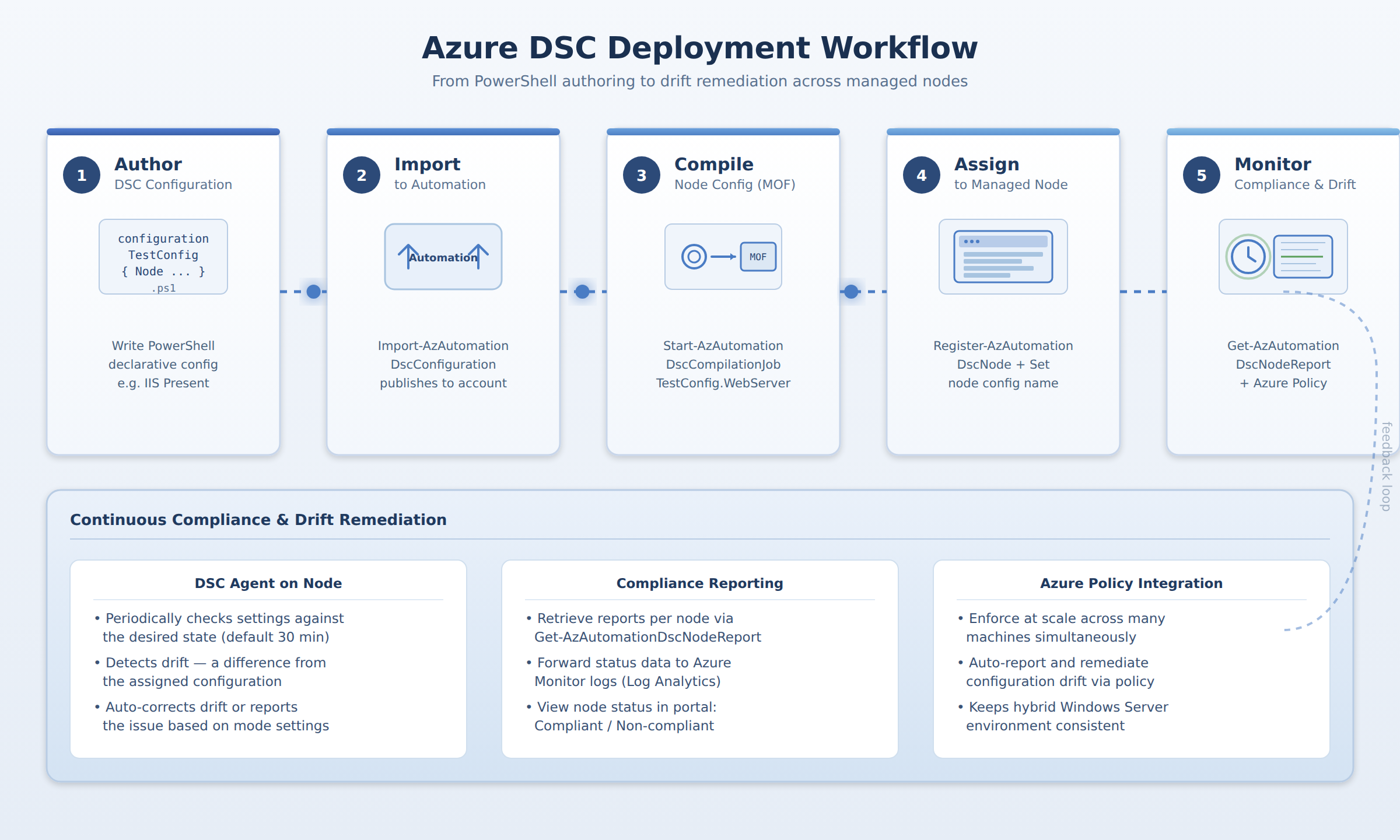
A five-step horizontal process flow showing how a PowerShell DSC configuration is authored, imported into Azure Automation, compiled, assigned to a managed node, and then monitored for compliance and drift remediation.
Desired State Configuration (DSC) is a PowerShell platform used to define and enforce computer configurations through PowerShell scripts. Configurations are imported into Azure by using a PowerShell command that points to the script file and publishes it to an Azure Automation State Configuration account. Once imported, the configuration must be compiled into a node configuration before it can be assigned to target machines.
Azure Automation State Configuration can manage both Azure virtual machines and on-premises Windows Servers as registered nodes. Once registered with the Automation service, each node is assigned a compiled node configuration that specifies the settings the machine must follow.
The DSC agent on a managed node regularly checks its settings against the desired state and can either automatically correct any detected drift or simply report the issue. Compliance reports can be retrieved from the Automation service for individual nodes. For broader management, integration with Azure Policy can automatically report on and remediate configuration drift across multiple machines at once.
Desired State Configuration (DSC) is a PowerShell platform that lets you define and enforce how a computer should be configured. You write these definitions, called configurations, in PowerShell scripts. For example, a script can declare that a specific Windows feature, like IIS, must be present on a server. To use these configurations in Azure, you import them into a service called Azure Automation State Configuration. This is done using a PowerShell command that points to your script file and publishes it to your Automation Account.
Once a configuration is imported, it must be compiled into a ready-to-use format called a node configuration. This compilation job is started within Azure Automation. Next, you need to register your target machines, which can be Azure VMs or on-premises Windows Servers, as managed nodes with the Automation service. Finally, you assign the specific compiled node configuration to each registered node. This tells the Automation service which configuration that specific machine should follow.
After a configuration is assigned, the DSC agent on the managed node regularly checks its own settings against the desired state defined in the configuration. You can control how often this check happens and what the node should do if it finds a difference, or drift. The node can automatically correct the drift to match the desired state, or it can just report the issue. You monitor this process by retrieving compliance reports from the Automation service for each node. For broader enforcement, you can integrate with Azure Policy to automatically report on and remediate configuration drift across many machines at once, ensuring your hybrid Windows Server environment stays consistent.
 StudyCerts
 StudyCerts