Eager to master hybrid server management? Discover how to administer Windows Server Hybrid Core Infrastructure on Azure, setting your path towards the Microsoft Certified: Azure Hybrid Infrastructure Administrator Associate certification!
Prepare and test your skills

Prepare and test your skills
In a hybrid environment, name resolution allows resources on-premises and in Azure to find each other using readable domain names. When an on-premises client requests the address of an Azure resource, the query first reaches a local DNS server. Because the local server does not natively know Azure's private addresses, administrators configure a conditional forwarder to send these specific queries to Azure. Traffic flows across the hybrid connection to an Azure DNS Private Resolver or a custom DNS virtual machine located in Azure. This resolver then queries Azure Private DNS zones to find the correct private IP address and returns it to the on-premises client.
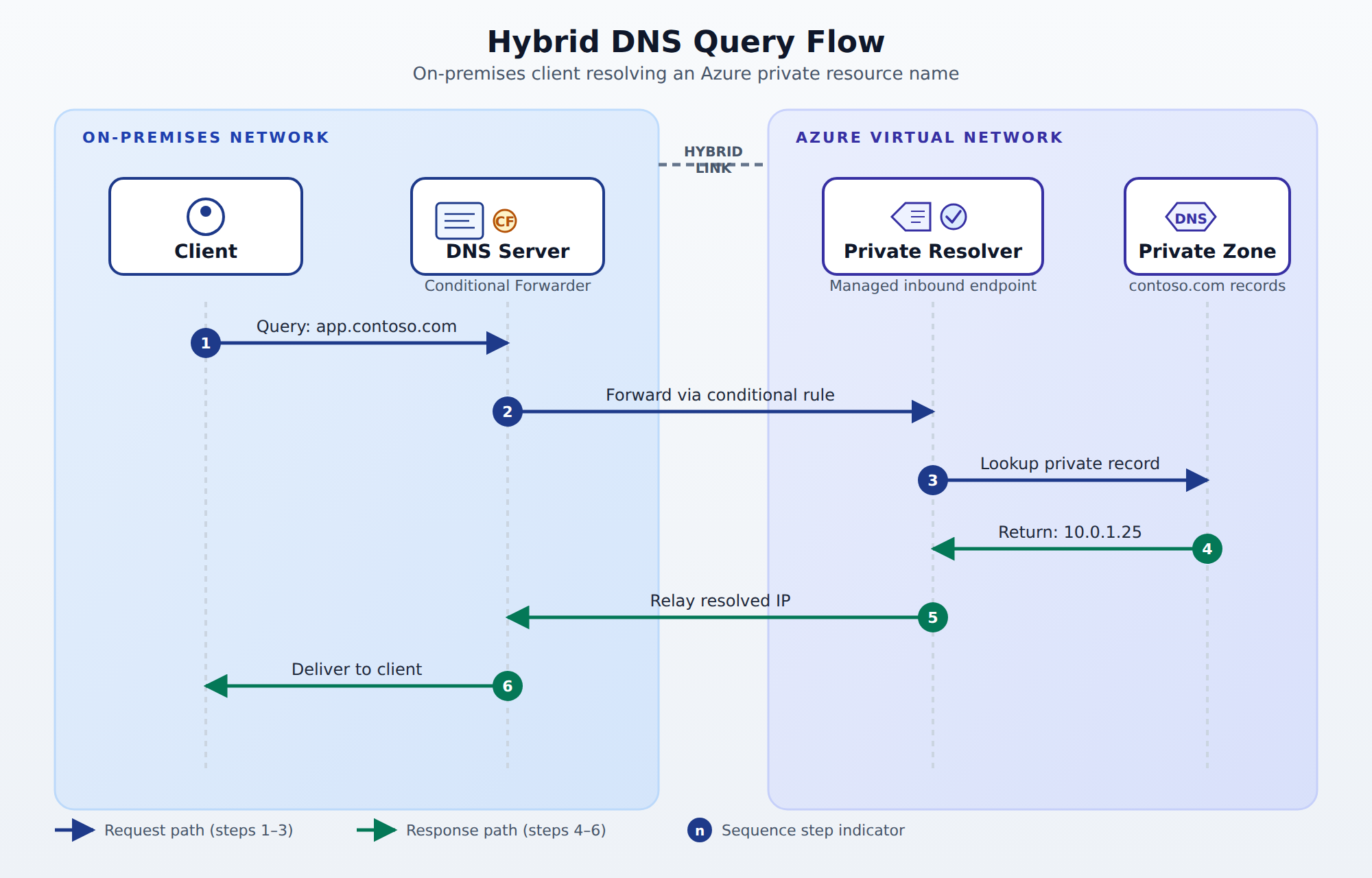
A sequence diagram showing a DNS query traveling from an on-premises client through a local DNS server with a conditional forwarder, across a hybrid connection to an Azure DNS Private Resolver, which queries an Azure Private DNS zone and returns the private IP address back to the client.
Administrators must choose how to handle incoming DNS queries in Azure based on management overhead and control. One option is to deploy custom DNS servers on Azure virtual machines, which provides maximum control over DNS configurations but requires manual updating, patching, and scaling. A better option for most hybrid environments is the Azure DNS Private Resolver, which is a fully managed cloud service. This service integrates directly with your virtual network (VNet), scales automatically to handle query load, and requires no virtual machine management. Choose the managed resolver when you want to minimize maintenance while still maintaining secure, bi-directional name resolution.
On-premises networks rely on DHCP servers to automatically assign IP addresses to devices as they connect to the network. When client devices sit on a different subnet than the DHCP server, a DHCP Relay Agent must be configured on the local router or Windows Server. The relay agent intercepts the client's broadcast request and forwards it directly to the DHCP server across subnet boundaries. To manage these addresses at scale, administrators use IP Address Management (IPAM) to monitor and audit IP address spaces across the entire hybrid infrastructure. IPAM integrates directly with your DHCP and DNS servers, providing a single console to track address utilization and prevent IP address conflicts.
Unlike on-premises networks that use traditional DHCP servers, Azure virtual networks manage IP allocation natively through the Azure system. Virtual machines receive their IP addresses automatically from the defined subnet range using Azure DHCP. Administrators must carefully plan subnet sizing and address spaces to ensure there is no overlap between on-premises networks and Azure VNets. If IP address ranges overlap, routing traffic between the two environments will fail because routers cannot determine where the destination exists. Therefore, proper IP address planning is a critical dependency before establishing any physical hybrid connection.
To connect an on-premises data center to Azure, organizations choose between a Site-to-Site (S2S) VPN and Azure ExpressRoute. A Site-to-Site VPN sends encrypted traffic over the public internet using an Azure VPN Gateway and an on-premises VPN device. This option is cost-effective, quick to set up, and works well for smaller workloads or backup connections. In contrast, Azure ExpressRoute bypasses the public internet entirely, establishing a private, high-speed physical connection through a service provider. Choose ExpressRoute when your workloads demand high bandwidth, extremely low latency, and maximum security.
Windows Server can act as a connectivity hub using the Routing and Remote Access Service (RRAS) to connect different networks. Remote workers use RRAS to establish secure virtual private network connections directly to the corporate network from their personal devices. For web-based applications, the Web Application Proxy (WAP) role service can be deployed in a perimeter network to act as a reverse proxy. WAP pre-authenticates external users through Active Directory Federation Services (AD FS) before letting them access internal web servers. This structure ensures that unauthenticated internet traffic is blocked at the network boundary, protecting internal resources.
A Site-to-Site (S2S) VPN sends encrypted traffic over the public internet using an Azure VPN Gateway and an on-premises VPN device, making it a cost-effective choice for smaller workloads or backup links. Azure ExpressRoute bypasses the public internet entirely to establish a private, high-speed connection through a service provider for workloads that demand high bandwidth, extremely low latency, and maximum security.
Organizations should choose Azure DNS Private Resolver when the priority is minimizing management overhead while maintaining secure, bi-directional name resolution. Azure DNS Private Resolver is a fully managed cloud service that integrates directly into virtual networks and scales automatically, whereas custom DNS virtual machines require manual patching, updating, and scaling.
Web Application Proxy (WAP) acts as a reverse proxy deployed in a perimeter network to block unauthorized traffic at the boundary. It pre-authenticates external users through Active Directory Federation Services (AD FS) before allowing them to access internal web-based applications.
Address spaces must not overlap because routing traffic between on-premises networks and Azure will fail if routers cannot determine where the destination exists. Proper address planning and subnet sizing are critical dependencies that must be completed before establishing a hybrid connection.
 StudyCerts
 StudyCerts