Eager to master hybrid server management? Discover how to administer Windows Server Hybrid Core Infrastructure on Azure, setting your path towards the Microsoft Certified: Azure Hybrid Infrastructure Administrator Associate certification!
Prepare and test your skills

Prepare and test your skills
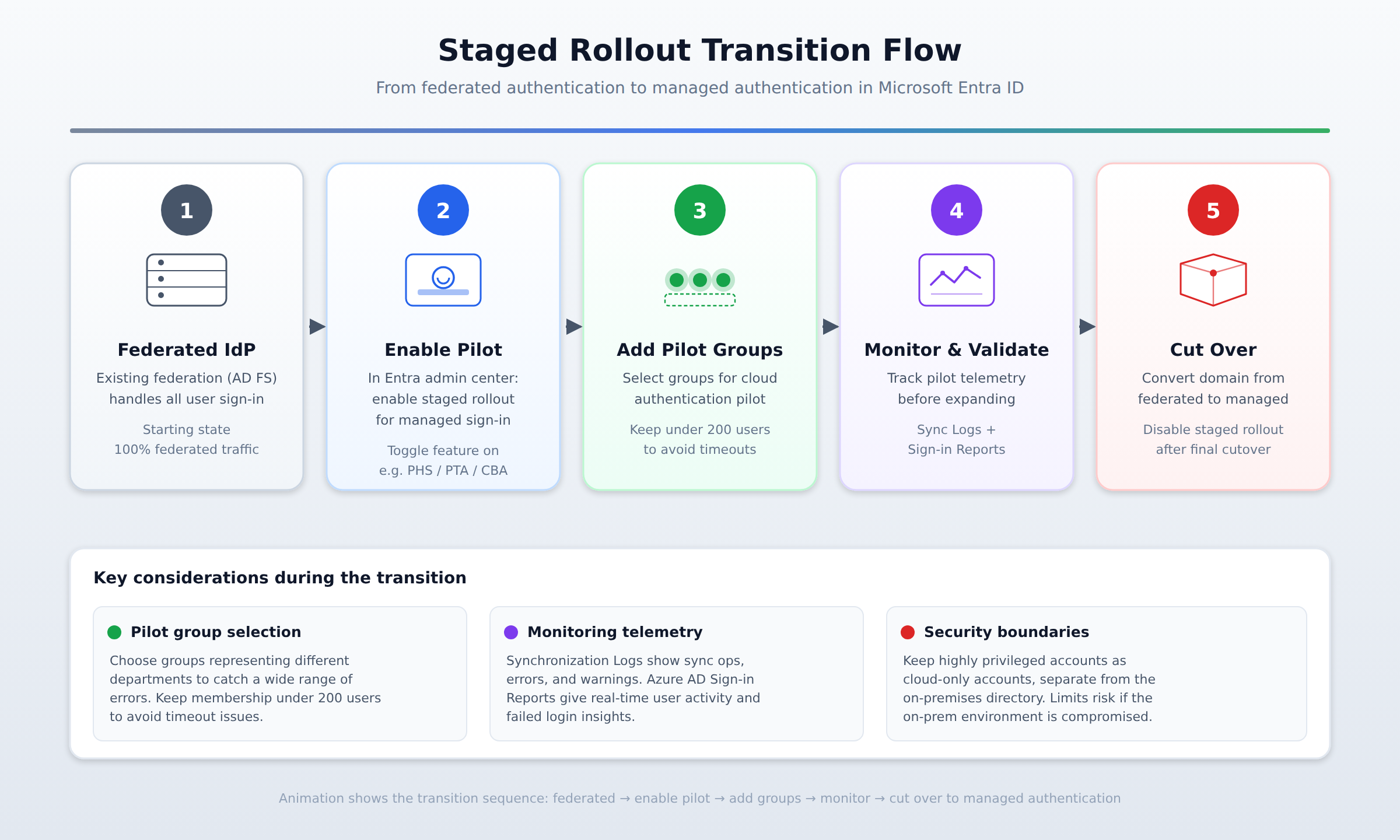
A horizontal process flow showing the staged rollout transition from federated authentication through pilot configuration, monitoring, and final cutover to managed authentication in Microsoft Entra ID.
The staged rollout feature allows an organization to transition from an existing federated identity provider to managed authentication in Microsoft Entra ID. It reduces deployment risk by selectively piloting cloud authentication with a small group of users before fully switching the entire domain.
Pilot group membership must be kept under 200 users to avoid timeout issues. This restriction applies when adding specific pilot groups to test cloud authentication features such as certificate-based authentication.
Administrators track system health and user experience using Synchronization Logs and Azure AD Sign-in Reports. Synchronization Logs capture data on active operations, errors, and warnings, while Azure AD Sign-in Reports provide real-time insights into user activities and failed login attempts.
The staged rollout feature in Azure AD Connect allows an organization to transition from their existing federated identity provider to managed authentication in Microsoft Entra ID. By using this feature, administrators can selectively pilot cloud authentication with a small group of users before fully switching the entire domain. This staged approach reduces deployment risks because user authentication requests are gradually redirected to the cloud instead of transitioning all users at once.
To set up the pilot environment, an administrator performs the following steps in order:
During the pilot phase, traffic flows from the designated users to the cloud, making continuous monitoring essential. Administrators track system health and user experience using two primary tools: Synchronization Logs and Azure AD Sign-in Reports. The logs provide critical data on active synchronization operations, errors, and warnings, while the sign-in reports offer real-time insights into user activities and failed login attempts. This telemetry allows administrators to adjust configuration parameters, such as timeout settings or group memberships, to resolve issues before expanding the rollout.
Selecting the right pilot group is critical for finding potential authentication issues across different departments. Administrators should choose pilot groups that represent different parts of the organization to catch a wide range of errors. It is also important to maintain clear security boundaries by keeping highly privileged accounts as cloud-only accounts. Keeping these accounts separate from the on-premises directory limits security risks if the on-premises environment is compromised.
Once the pilot phase succeeds and telemetry shows stable performance, the organization can transition to full production. The administrator completes the migration by executing these final steps:
 StudyCerts
 StudyCerts