Are you a guardian of your domain? Lean how to leverage your aptitude in security to protect Microsoft Azure technologies, with a goal of earning the Microsoft Certified: Azure Security Engineer Associate certification!
Prepare and test your skills

Prepare and test your skills
To protect data as it travels over the internet, you must configure secure transport layer security (TLS) for services like Azure App Service and API Management. Administrators must set the minimum TLS version to TLS 1.2 or higher and disable older, insecure versions like TLS 1.0 and TLS 1.1. This configuration can be done through the Azure Portal or automated with the Azure CLI. Additionally, selecting modern, strong cipher suites for the connection further secures the channel against cryptographic attacks.
Using a custom domain name with an App Service requires a valid SSL/TLS certificate. The best practice is to manage this certificate's lifecycle within Azure Key Vault. You first store the certificate in the Key Vault. Then, you enable a managed identity on the App Service and grant it permission to read certificates from the vault. This setup allows the App Service to securely retrieve the certificate without storing any secrets in its configuration, and you can then bind that certificate to your custom domain directly from the App Service settings.
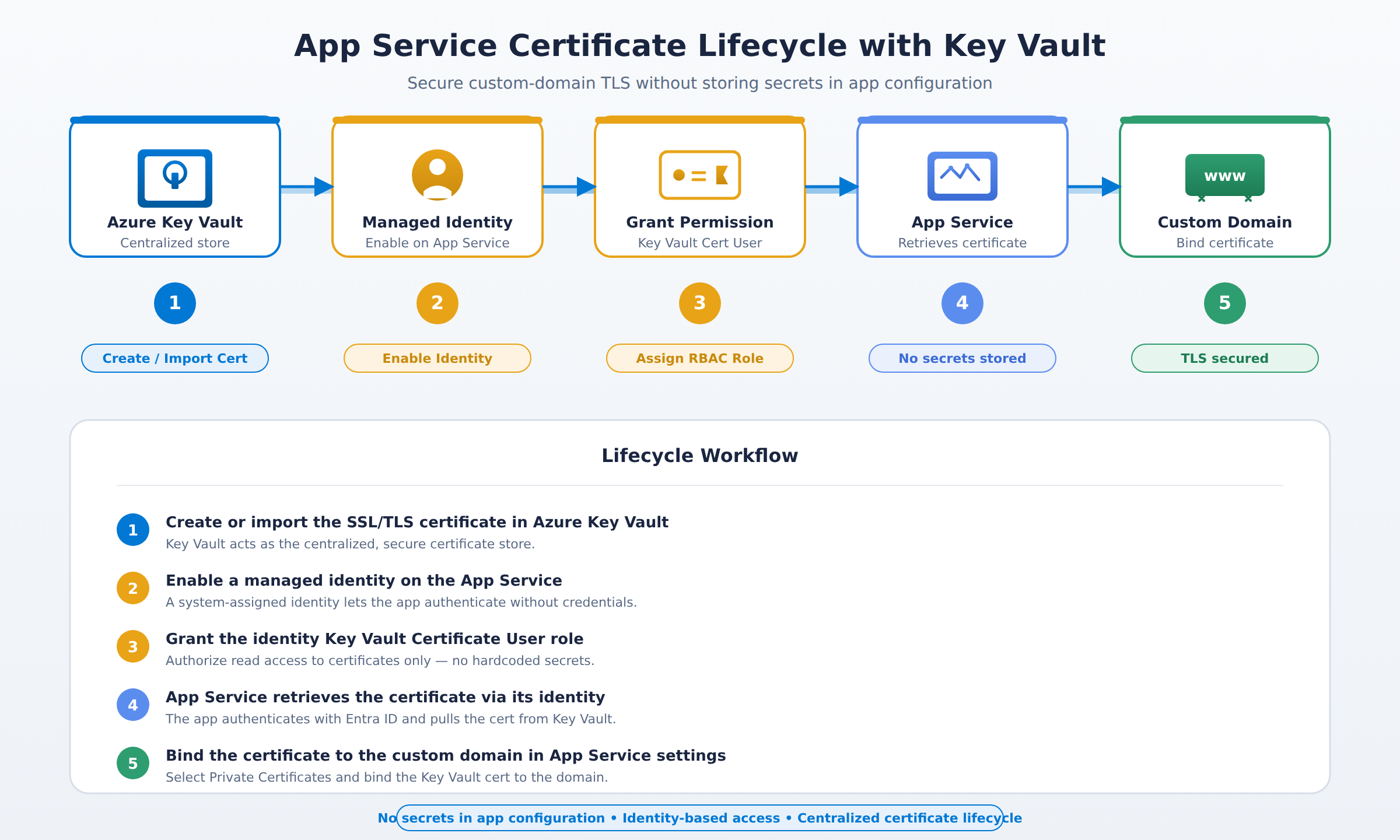
A five-step process flow showing how an SSL/TLS certificate is created in Azure Key Vault, a managed identity is enabled on the App Service, the identity is granted Key Vault Certificate User permission, the App Service retrieves the certificate, and the certificate is bound to a custom domain.
For scenarios requiring the highest level of trust, you can implement mutual TLS (mTLS). This requires clients to present a valid certificate, proving their identity to the server, in addition to the server proving itself to the client. In API Management, you can enforce this by validating incoming client certificates. The trusted root certificates needed for this validation are stored securely in Azure Key Vault. For applications built with specific frameworks, libraries can be used to automatically configure mTLS for outbound calls, ensuring end-to-end encrypted and authenticated communication.
Azure Firewall is a managed, cloud-based network security service that protects your Azure Virtual Network resources. It acts as a central checkpoint, inspecting and filtering all traffic flowing between your network and the internet. You manage it through Azure Firewall Manager, which provides a single pane of glass for security policy and routing management across multiple firewalls and virtual networks. Firewall policies define collections of rules—for network traffic, applications, and network address translation (NAT)—that you can consistently apply to multiple firewall instances, simplifying large-scale deployments.
Azure Application Gateway is a web traffic load balancer that operates at Layer 7 (the application layer) of the OSI model. It makes routing decisions based on additional attributes of an HTTP request, such as the URL path or host headers. This allows you to route traffic to different pools of backend servers based on the content of the request. A key security feature is its integrated Web Application Firewall (WAF), which provides centralized protection for your web applications against common exploits and vulnerabilities. The gateway terminates SSL/TLS connections at its frontend, offloading encryption processing from your backend servers.
Azure Front Door is a global entry point that uses the Microsoft global network to optimize the performance and reliability of your web applications. It routes client requests to the most performant backend service based on factors like geographic location and backend health. Front Door also provides a Content Delivery Network (CDN) service, caching static content at strategically placed edge locations around the world to deliver it faster to users. Like Application Gateway, Azure Front Door includes a Web Application Firewall (WAF) to protect your global applications from malicious traffic at the network edge.
A Web Application Firewall (WAF) is a critical security control that sits between a web application and the internet to monitor and filter HTTP traffic. It protects against common attacks like SQL injection, cross-site scripting (XSS), and others defined by the OWASP Top 10. In Azure, you can deploy a WAF either on Azure Application Gateway (for regional protection) or on Azure Front Door (for global, edge protection). You manage protection through WAF policies, where you choose between pre-conigned managed rule sets and custom rules you define yourself to meet your application's specific needs.
Azure DDoS Protection Standard provides enhanced Distributed Denial of Service (DDoS) mitigation features compared to the always-on Basic protection tier. You should recommend Standard when protecting business-critical applications that must remain available during a targeted attack. It offers real-time attack telemetry, alerting, and post-attack mitigation reports. The service integrates directly with your application's Virtual Network, applying automatic tuning and machine learning to adapt protection policies to your specific traffic patterns, providing a more robust defense against complex, volumetric attacks.
An Azure Web Application Firewall (WAF) can be deployed regionally on Azure Application Gateway or globally at the network edge on Azure Front Door. Both options inspect HTTP traffic to protect applications from threats like SQL injection and cross-site scripting (XSS) through managed or custom rule policies.
Azure App Service retrieves certificates by enabling a managed identity on the App Service and granting it permission to read certificates stored in Azure Key Vault. This allows the App Service to bind the certificate to a custom domain without storing any secrets directly in its configuration.
You should use Azure DDoS Protection Standard for business-critical applications that must remain available and require enhanced mitigation during targeted attacks. It integrates with your Virtual Network to provide real-time telemetry, alerting, post-attack reports, and machine-learning-based automatic tuning tailored to your traffic patterns.
 StudyCerts
 StudyCerts