Are you a guardian of your domain? Lean how to leverage your aptitude in security to protect Microsoft Azure technologies, with a goal of earning the Microsoft Certified: Azure Security Engineer Associate certification!
Prepare and test your skills

Prepare and test your skills
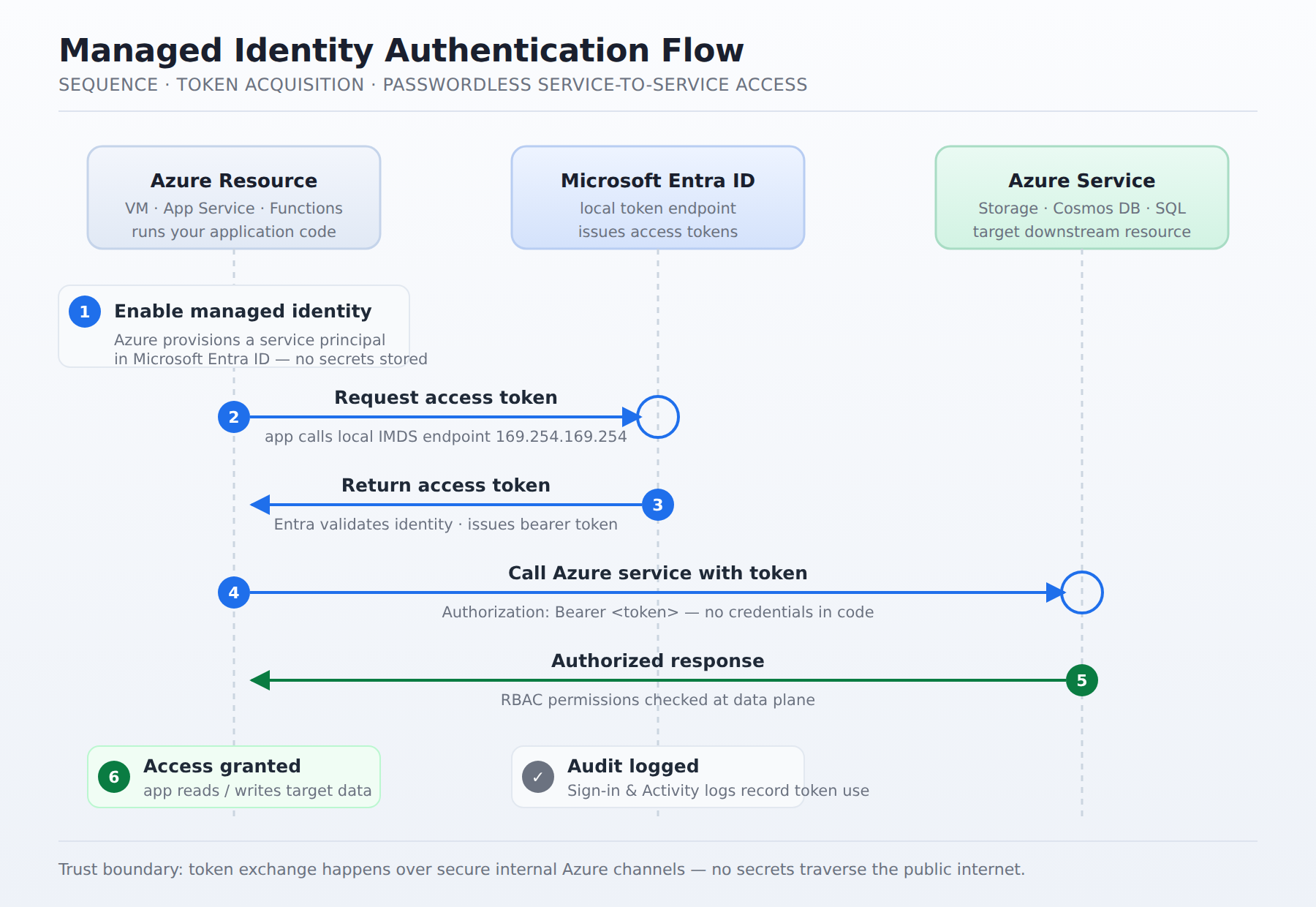
A sequence diagram showing an Azure resource requesting an access token from the local Microsoft Entra ID endpoint, then using that token to authenticate against a downstream Azure service like Storage or Cosmos DB.
A system-assigned managed identity is tied directly to a single Azure resource and shares its lifecycle, so Microsoft Entra ID automatically deletes the identity when the resource is deleted. A user-assigned managed identity is created as its own standalone Azure resource, can be associated with multiple resources, and remains active even if those resources are deleted, requiring manual deletion when no longer needed.
When an application runs on an Azure resource, it requests an access token from the local Microsoft Entra ID token endpoint, which returns a token the resource uses to authenticate against other Azure services. Authorization is then evaluated across two levels: the control plane using Azure Role-Based Access Control (RBAC) via Azure Resource Manager, and the data plane using service-specific authorization rules.
You can find and manage managed identities as service principal objects within the Enterprise applications portal of Microsoft Entra ID or by using the Microsoft Graph API. To audit them, you should verify their permissions and ensure they are not members of highly privileged groups, and administrators can use Azure Activity logs and Sign-in logs to track token requests and audit which resources accessed specific data.
When securing Azure resources, you can use managed identities to eliminate the need for credentials in your code. Azure provides two types of managed identities: system-assigned and user-assigned. A system-assigned managed identity is tied directly to a single Azure resource, such as a virtual machine. This identity shares its lifecycle with the resource, meaning Microsoft Entra ID automatically deletes the identity when you delete the resource. Conversely, a user-assigned managed identity is created as its own standalone Azure resource. You can associate a user-assigned identity with multiple resources, and it remains active even if those resources are deleted, requiring you to delete it manually when it is no longer needed.
Managed identities simplify how applications authenticate by removing the risk of hard-coded credentials. When an application runs on an Azure resource, it requests an access token from the local Microsoft Entra ID token endpoint. The token endpoint returns a token that the resource uses to authenticate against other Azure services, such as Azure Storage or Azure Cosmos DB. This token-based exchange happens over secure internal channels, maintaining a strict trust boundary between the public internet and your private services. Authorization is then evaluated across two levels: the control plane, which uses Azure Role-Based Access Control (RBAC) via Azure Resource Manager, and the data plane, which uses service-specific authorization rules.
Securing managed identities requires applying the principle of least privilege through Azure RBAC. You assign specific roles to the identity's service principal so it only has the exact permissions needed to perform its tasks. These roles can be assigned at different scopes, including the individual resource level, the resource group level, or across an entire subscription. By restricting the scope and permissions of each identity, you minimize the potential damage if a resource is compromised.
Once enabled, you can find and manage these identities as service principal objects within the Enterprise applications portal of Microsoft Entra ID or by using the Microsoft Graph API. To verify that these identities adhere to security guidelines, you should audit their permissions and ensure they are not members of highly privileged groups. For ongoing security operations, administrators use Azure Activity logs and Sign-in logs to track token requests and audit which resources accessed specific data. This logging provides visibility into the exact operations performed by the identity and helps identify anomalous access patterns.
 StudyCerts
 StudyCerts