Are you a guardian of your domain? Lean how to leverage your aptitude in security to protect Microsoft Azure technologies, with a goal of earning the Microsoft Certified: Azure Security Engineer Associate certification!
Prepare and test your skills

Prepare and test your skills
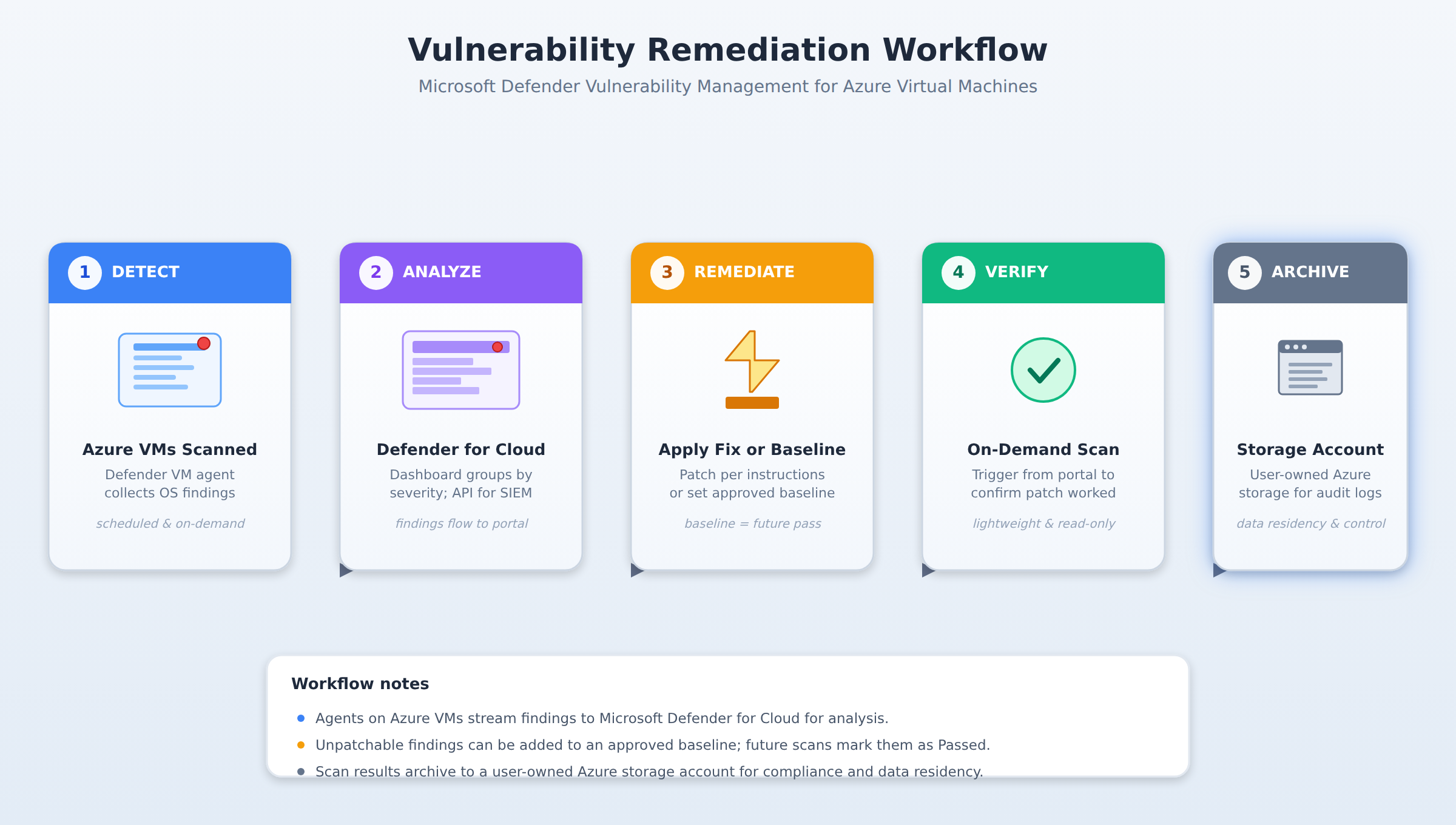
A five-step process flow showing how vulnerabilities are detected on Azure VMs, analyzed in Defender for Cloud, remediated, verified, and archived to a storage account, with a packet animating through each stage in order.
You must deploy the required agents and extensions directly to the target Azure virtual machines (VMs) to establish the pipeline through which vulnerability data flows from the local operating system to the security management plane.
Custom exclusion policies instruct the scanning engine to bypass specific directories or applications, which prevents performance degradation or false alerts on trusted files.
You can set a custom approved baseline for that specific vulnerability; once added, future scans automatically mark the finding as a pass, ensuring security alerts focus only on unexpected deviations.
You can trigger lightweight, non-intrusive on-demand scans directly from the Defender for Cloud portal to immediately verify if the patch successfully resolved the vulnerability.
To protect virtual machines, you must first onboard them to Microsoft Defender Vulnerability Management by deploying the required agents and extensions directly to the target Azure virtual machines (VMs). This deployment establishes the pipeline through which vulnerability data flows from the local operating system to the security management plane. Once the agents are active, administrators configure the scan frequency to balance the need for real-time security insights with system resource consumption. To prevent performance degradation or false alerts on trusted files, you can define custom exclusion policies that instruct the scanning engine to bypass specific directories or applications.
After the scanning agent collects system data, the findings flow into Microsoft Defender for Cloud, where security teams can analyze the results. The primary interface for this analysis is the interactive Defender for Cloud dashboard, which organizes vulnerabilities by severity and provides a high-level view of the overall security posture. For automated reporting or large-scale analysis across thousands of resources, developers can run API queries to extract raw vulnerability data into external SIEM systems.
Remediating discovered vulnerabilities follows a structured workflow that translates security findings into concrete action. Each identified vulnerability contains step-by-step remediation instructions that system administrators can execute to patch the operating system or change insecure configurations. If a specific vulnerability cannot be patched due to business requirements, administrators can set a custom approved baseline. Once a finding is added to this baseline, future scans automatically mark the finding as a pass, ensuring that security alerts focus only on unexpected deviations.
Although scheduled assessments run automatically, administrators can trigger lightweight, non-intrusive on-demand scans directly from the Defender for Cloud portal. These on-demand scans allow teams to immediately verify if a recently applied patch successfully resolved an active vulnerability without waiting for the next scheduled assessment cycle. To ensure that no virtual machines are left exposed, security teams must regularly verify scan coverage across the entire subscription.
To support compliance and data residency requirements, scan results should be integrated with secure, user-owned Azure storage accounts. Storing vulnerability data in these dedicated storage repositories ensures that security teams retain full ownership and control over their historical security logs. This configuration establishes a secure boundary where vulnerability telemetry is safely archived, decoupled from the active monitoring tools, and ready for long-term audit verification.
 StudyCerts
 StudyCerts