Intermediate
Prepare and test your skills

Intermediate
Prepare and test your skills
Stakeholder and Outside Collaborator Access Levels
Evaluate Azure DevOps Access Tiers
Azure DevOps provides different access levels for users, and you should choose the one that gives each person just enough permission to do their job. The Stakeholder level is for users who only need to view and track work items, like a project manager. The Basic access level is for team members who need full access to features like code, builds, and test plans. Users with a Visual Studio subscriber license get the same access as Basic, but this is included with their Visual Studio subscription. You evaluate a user's role and assign the lowest access tier that meets their needs, which follows the security principle of least privilege.
Analyze GitHub Outside Collaborator Scopes
When you need to give someone outside your organization access to a GitHub repository, you assign them an outside collaborator role. These roles define what they can do. The Read role lets a person view the repository's content and code. The Write role allows them to make changes, like creating branches and pushing code. The Admin role gives them full control, including managing repository settings and other collaborators. You analyze the external contributor's responsibilities and grant only the scope necessary, such as Read for a reviewer or Write for an active developer, to maintain security.
Service Principals and Identity Credentials
For automated processes, like those run by GitHub Actions, you use a service identity instead of a user account. You create a service principal in Azure for each application environment (like Dev, Test, or Prod). This service principal acts as an identity for the automation. To let GitHub Actions securely use this identity, you configure a federated identity credential. This credential creates a trust relationship between your GitHub repository and the Azure service principal, allowing secure, password-less authentication for your workflows.
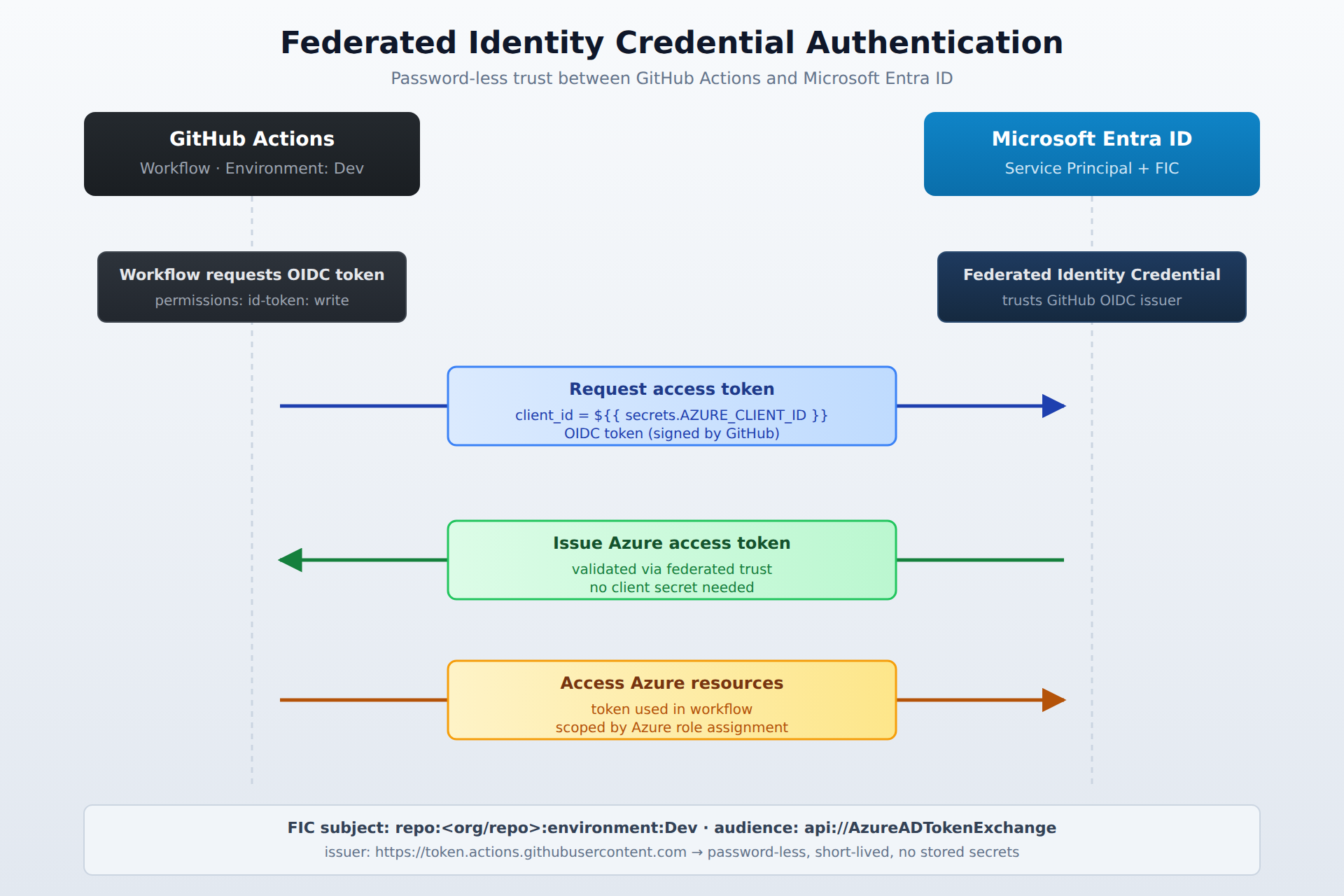
A sequence diagram showing how a GitHub Actions workflow obtains an Azure access token through a federated identity credential, exchanging a signed OIDC token for an Entra ID-issued token without using secrets.
Role Assignments
After creating a service principal, you must give it permissions to perform tasks in Azure. You do this by assigning Azure roles. For example, if the automation only needs to read resources, you would assign the Reader role. For tasks that involve deploying applications, you might assign a role like "Deployment Environments User" to the service principal for each specific environment. These role assignments control what the automated identity can do, ensuring it has the minimum required access.
GitHub Environment Configuration
In GitHub, you can organize your deployment stages using environments. You create separate environments with names like Dev, Test, and Prod. Each environment can have its own set of protection rules and secrets. You store sensitive information, like the AZURE_CLIENT_ID for your service principal, as a secret within the specific GitHub environment. This setup keeps credentials secure and ensures that your deployment workflows use the correct credentials for each stage, like test or production.
Frequently Asked Questions
What is the difference between Stakeholder and Basic access levels in Azure DevOps?
The Stakeholder access level in Azure DevOps is for users who only need to view and track work items, while the Basic access level is for team members who need full access to features like code, builds, and test plans.
When should you assign a Read role versus a Write role to an outside collaborator on GitHub?
You should assign the Read role to an outside collaborator on GitHub when they only need to view the repository's content and code, and assign the Write role when they need to make changes, like creating branches and pushing code.
How do you securely authenticate GitHub Actions workflows to access Azure resources?
You securely authenticate GitHub Actions workflows by creating a service principal in Azure and then configuring a federated identity credential, which creates a trust relationship between the GitHub repository and the Azure service principal for password-less authentication.
What is the purpose of creating separate environments like Dev, Test, and Prod in GitHub?
Creating separate environments in GitHub organizes deployment stages, allowing each environment to have its own protection rules and secrets, which keeps credentials secure and ensures workflows use the correct credentials for each stage.
How learners score on this domain
Last updated