Intermediate
Prepare and test your skills

Intermediate
Prepare and test your skills
Preventing Secret Leakage in DevOps Pipelines
Azure Key Vault Integration
Azure Key Vault is a cloud service that stores sensitive information such as API keys, passwords, certificates, and secrets in a secure vault. When pipelines need these secrets, they fetch them directly from Key Vault during runtime rather than storing them in code files or configuration that gets committed to a repository. The vault supports role-based access control (RBAC), which limits who can view or manage secrets by assigning specific roles to users and services. This separation means developers never see or handle raw secrets, reducing the chance that sensitive data gets accidentally shared. The integration works by connecting the pipeline to Key Vault through built-in tasks that retrieve secrets only when needed and never persist them to disk or logs.
Injecting Secrets at Runtime
Pipeline tasks can inject secrets into the environment at the moment they are needed, keeping them out of source code entirely. When a pipeline runs, it requests the secret from Key Vault and loads it into a temporary variable that exists only for the duration of that pipeline execution. Once the task that needs the secret completes, the temporary variable is cleared from memory. This approach ensures secrets never get written to disk, logged, or stored in any persistent location where they could be discovered later. Teams should configure pipelines to use these ephemeral variables rather than hardcoding values in pipeline definitions or scripts.
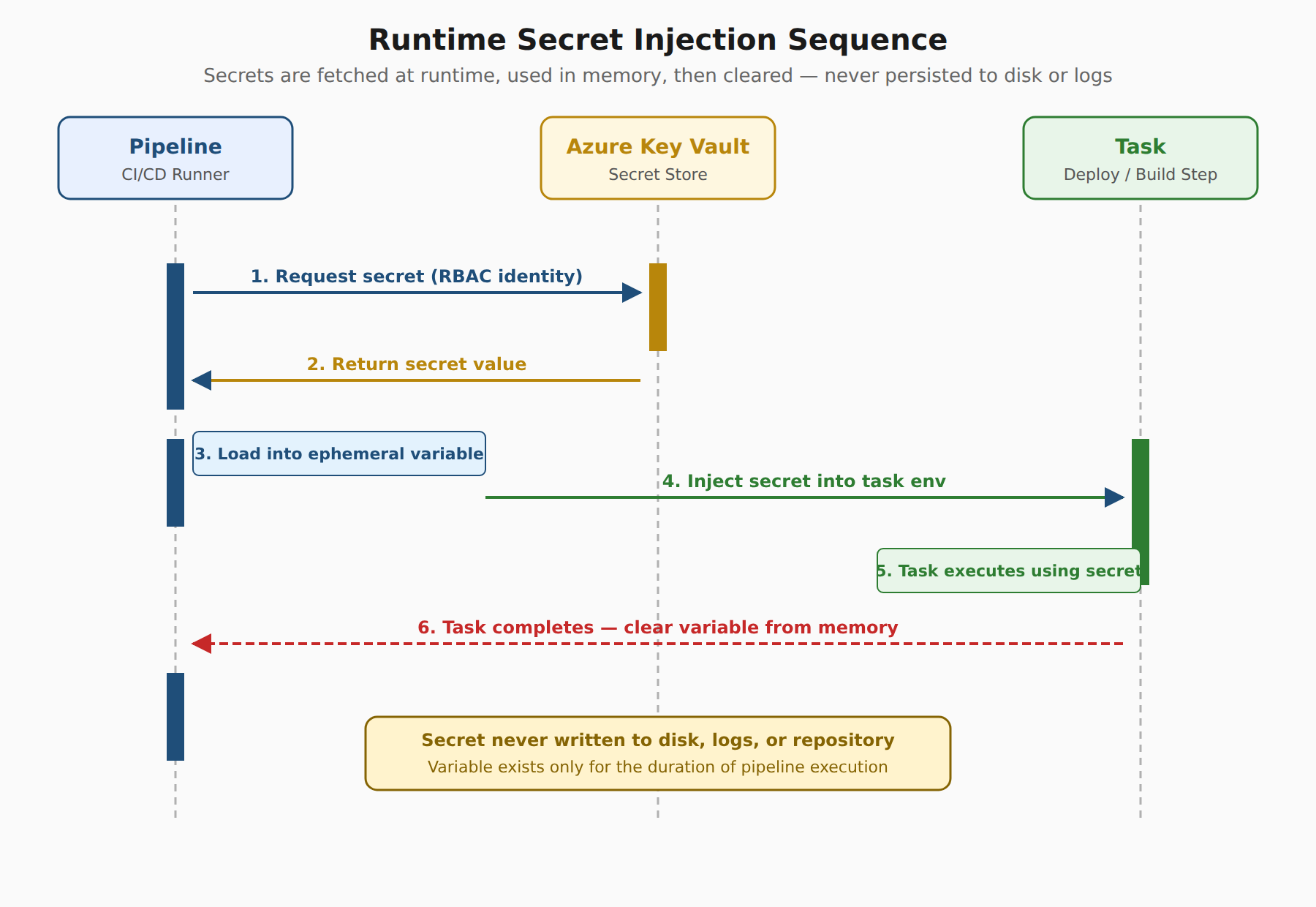
A sequence diagram showing a pipeline fetching a secret from Azure Key Vault at runtime, injecting it into an ephemeral variable, using it for a task, and then clearing it from memory so it is never persisted to disk or logs.
Automated Scanning and Leak Prevention
Automated tools scan code, configuration files, and pipeline outputs to detect any accidental exposure of sensitive information before it reaches production. If a secret somehow appears in a log file or gets committed to a repository, scanning tools can identify the leak and block the pipeline from continuing. Log redaction automatically masks sensitive values in build and deployment logs so that even if something goes wrong, the actual secret values are never visible to anyone reviewing the output. These automated checks run as part of the pipeline process, creating a safety net that catches mistakes immediately rather than relying on manual review.
Role-Based Access Controls
Role-based access controls enforce the principle of least privilege, giving users and services only the minimum access they need to perform their tasks. Administrators create policies that specify which identities can read secrets, which can manage secrets, and which have no access at all. Regular access reviews ensure that permissions are revoked when team members change roles or leave the project. In automation workflows, the pipeline's service connection should have exactly the permissions required to fetch the specific secrets it needs and nothing more. This limits the blast radius if an identity is compromised, because an attacker would only access the secrets that identity was specifically authorized to use.
Compliance and Security Monitoring
Azure Monitor tracks and audits all access to secrets, creating logs that show which identities requested which secrets and when. Security teams can set up alerts to notify them of unusual access patterns, such as a secret being requested at an unexpected time or from an unexpected location. Defender for Cloud provides security recommendations and a secure score that helps organizations understand their overall security posture and identify gaps in their secret management strategy. Continuous monitoring ensures that even if a misconfiguration slips through, it can be detected and corrected before it leads to a real security incident.
Frequently Asked Questions
How does Azure Key Vault prevent sensitive information from leaking during pipeline execution?
Azure Key Vault allows pipelines to retrieve secrets directly at runtime using built-in tasks rather than storing them in source code or configuration files. The retrieved secrets are loaded into temporary variables in memory that are cleared once the task completes, ensuring values are never written to disk or logs.
What role does log redaction and automated scanning play in secret leak prevention?
Automated scanning tools analyze code, configuration files, and pipeline outputs to detect exposed secrets and block pipelines before deployment. Log redaction complements this by automatically masking sensitive values in build and deployment logs so raw secret data is never visible during output reviews.
How should role-based access control (RBAC) be configured for pipeline service connections?
Role-based access control (RBAC) should enforce the principle of least privilege by granting a pipeline's service connection only the specific permissions needed to retrieve its required secrets. Restricting permissions in this manner limits the blast radius if an identity is compromised, preventing unauthorized access to other vault secrets.
How do Azure Monitor and Defender for Cloud support secret compliance and security monitoring?
Azure Monitor audits all access to secrets by logging which identities requested secrets and triggering alerts for unusual access patterns. Defender for Cloud complements this monitoring by providing security recommendations and a secure score to help organizations identify gaps in their secret management strategy.
How learners score on this domain
Last updated