Intermediate
Prepare and test your skills

Intermediate
Prepare and test your skills
GitHub Permissions, Branch Protection and Azure AD Integration
Configure and Validate GitHub Access Controls
Roles and Permissions
GitHub provides built-in roles such as Owner, Admin, Maintainer, and Developer, each with distinct access levels. The Owner role gives full control over the organization, including sensitive settings, while Admin can manage repositories and their settings but cannot access organization-level administrative features. Maintainers maintain repositories without being able to delete them, and Developers contribute code without managing repository settings. Customizing these roles lets you assign the exact access needed for specific tasks, reducing the risk of unauthorized changes. Roles flow from the organization level down to individual repositories, so a user's effective permissions are the result of combining their organization role, team membership, and any direct repository invitations.
Branch Protection Rules
Branch protection rules enforce required approvals and checks before code merges into critical branches. You can require pull request reviews, enforce that specified status checks pass before merging, and restrict which users or teams can push to the branch. These rules interact with the pull request workflow: a pull request cannot be merged until all mandatory reviews are completed and every required status check (such as a CI build or security scan) reports success. This protects the branch from unauthorized or unverified changes and ensures that only code meeting the team's standards reaches the main branch.
Azure Active Directory Integration
Integrating Azure Active Directory (AAD) with GitHub centralizes identity management for the entire organization. When AAD is connected, users authenticate through AAD single sign‑on (SSO) rather than using a separate GitHub account, making AAD the single source of truth for user identities. AAD conditional access policies can then control who may access GitHub resources and under what conditions—for example, requiring multi‑factor authentication from outside the corporate network. This integration lets administrators validate that access policies align with organizational security and compliance standards, and it simplifies auditing by tying GitHub activity back to centrally managed identities.
Branch Protection and PR Workflow
Process Flow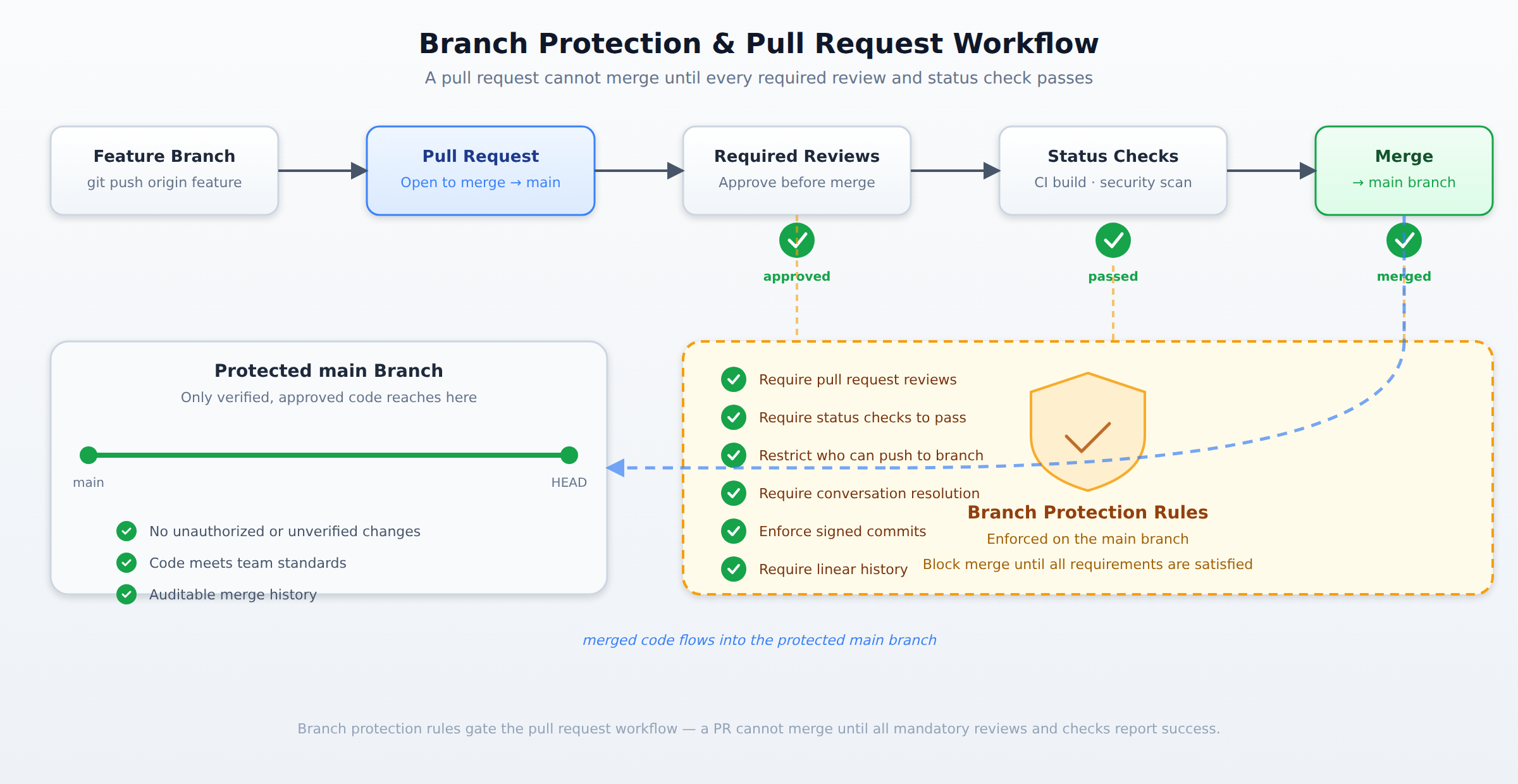
A process flow showing a pull request moving through required reviews, status checks, and branch protection rules before merging into the protected main branch.
Frequently Asked Questions
What are the key differences between the built-in organization and repository roles in GitHub?
The Owner role provides full control over the organization including sensitive settings, whereas the Admin role manages repositories and their settings without access to organization-level administrative features. The Maintainer role allows users to maintain repositories without the ability to delete them, and the Developer role permits contributing code without managing repository settings.
How do branch protection rules manage code merges in GitHub?
Branch protection rules prevent pull requests from merging until all mandatory reviews are completed and specified status checks, such as continuous integration builds or security scans, report success. These rules can also restrict which specific users or teams are permitted to push directly to a protected branch.
What are the benefits of integrating Azure Active Directory (AAD) with GitHub?
Integrating Azure Active Directory (AAD) centralizes identity management by establishing AAD single sign-on as the single source of truth for user authentication. It allows administrators to enforce conditional access policies, such as requiring multi-factor authentication from outside the corporate network, and simplifies auditing by linking GitHub activity to centrally managed identities.
Sample Question
A development team manages a critical application's source code in a GitHub repository. They need to implement a robust security and compliance plan for their main branch to ensure code quality and prevent unauthorized changes. The organization uses Microsoft Entra ID for centralized identity management.
The team has identified the following requirements:
- Direct pushes to the
mainbranch must be strictly prohibited. - All code changes must go through a pull request process, requiring at least two approved reviews before merging.
- Automated CI build and security scanning checks must pass successfully before a pull request can be merged into
main. - All GitHub users must authenticate via Microsoft Entra ID, and their access policies should be validated against corporate standards.
Which combination of GitHub and Azure features should the team implement to meet these set of requirements?
GitHub Branch Protection Rules, GitHub Organization and Team Roles, and Microsoft Entra ID integration for SAML SSO.
Azure Policy for GitHub repositories, Azure AD Identity Protection, and GitHub Actions for manual approvals.
GitHub webhooks for external validation, individual user repository collaborators, and Azure AD Conditional Access without SAML SSO.
GitHub repository-level permissions, manual code review policies, and GitHub Personal Access Tokens (PATs).
How learners score on this domain
Last updated