Intermediate
Prepare and test your skills

Intermediate
Prepare and test your skills
Building Container Images with Azure Container Registry
Multi-stage Dockerfiles and Optimization
A multi-stage Dockerfile is a key technique for creating efficient images. It uses separate build and runtime stages, allowing you to compile your application in one stage and copy only the final, necessary files into a clean, small runtime image. This process reduces the image's size and its potential security vulnerabilities. To further optimize, you should order your Dockerfile instructions to maximize layer caching, which speeds up rebuilds, and use small base images like Alpine Linux variants. A .dockerignore file is essential to prevent unnecessary files from being included in the build.
Multi-stage Dockerfile Build Process
Process Flow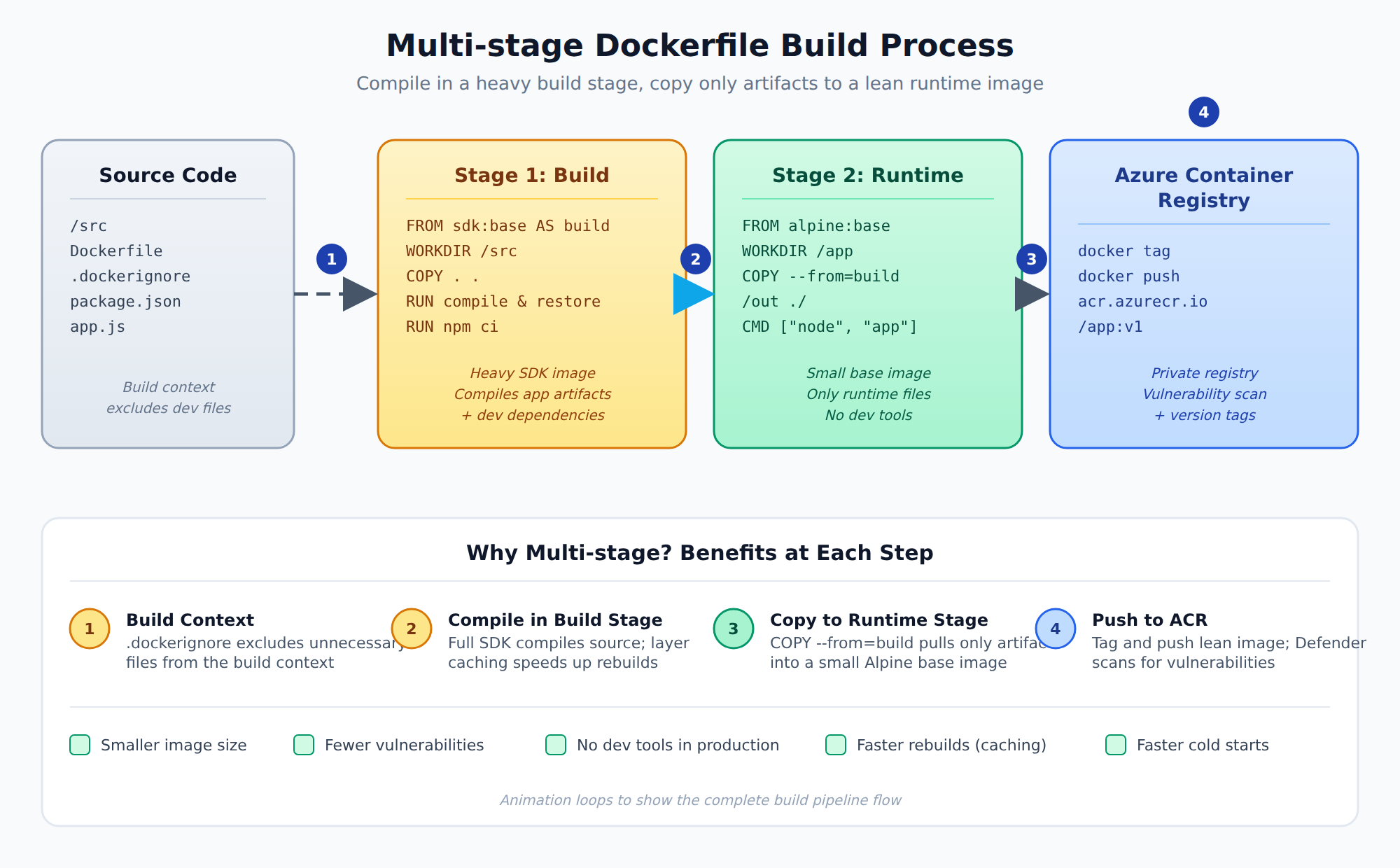
A process flow showing source code entering a build stage, compiled artifacts being copied to a small runtime stage, and the final optimized image being pushed to Azure Container Registry.
Development vs. Production Environments
During development, tools like Docker Compose are useful for local testing, as they can mount your source code as a volume for live reloading. For production, you should build lean, optimized images using multi-stage builds that exclude development tools. Configuration for different environments should be managed through environment variables, with sensitive values stored securely in Azure Key Vault rather than hardcoded in the Dockerfile.
CI/CD Integration and Security
Automating the build and deployment process with a CI/CD pipeline ensures consistent updates. Pipelines in GitHub Actions or Azure DevOps can build images, run tests, scan for vulnerabilities, and push the final image to Azure Container Registry (ACR). For security, use managed identities for authentication to avoid storing secrets. Other important security practices include running containers as a non-root user, regularly updating base images, and configuring applications to log to standard output for integration with Azure Monitor.
Deployment to Azure Services
When deploying to Azure services like Azure Container Apps or Azure App Service, your container must listen on the port specified by the PORT environment variable. You should also configure liveness and readiness probes so Azure can monitor your application's health and route traffic correctly. Using Azure Container Registry for image storage provides tight integration with other Azure services and simplifies secure authentication.
Authentication and Access Control
Azure Container Registry (ACR) is a private service for storing container images. The most secure way for Azure services to access it is by using a managed identity. This identity, which can be system-assigned or user-assigned, allows resources to authenticate without storing passwords in code. Access is controlled through Role-Based Access Control (RBAC), with roles like AcrPull (to download images) and AcrPush (to upload images). For local development, you can use the az acr login command, which provides a secure authentication token.
Registry Configuration and Security
For operational security, you should disable the registry's admin user account and rely on managed identities or service principals. You can also increase security by limiting network access to the registry, allowing only specific virtual networks or IP addresses to connect. This prevents your private images from being exposed to the public internet.
Integration and Automation
ACR integrates with other Azure services to automate workflows. For example, you can link it to Azure Kubernetes Service (AKS) so the cluster can pull images automatically. For Azure App Service, you can set up continuous deployment, where the app updates automatically whenever a new image is pushed to ACR. Using webhooks, ACR can notify other services about new image versions, helping to automate the application lifecycle.
Building and Storing Images
A container image packages your application code and its dependencies. In Azure, you store these images in a private Azure Container Registry (ACR), which you create using the Azure CLI or portal. To build a custom image, you use the Docker CLI with commands like docker build (to create the image from a Dockerfile) and docker push (to upload it to ACR). You must authenticate with ACR first, either via az acr login or within a CI/CD pipeline.
Tagging and Version Management
Managing tags is crucial for tracking different versions of your images. You use the docker tag command to assign a name and version label to an image before pushing it. Within ACR, you can list repositories and their tags using Azure CLI commands. To keep your registry organized, you should delete old or unused image versions, which also helps control storage costs.
Vulnerability Scanning
Scanning images for security vulnerabilities is a critical management task. ACR can integrate with Microsoft Defender for Cloud to automatically scan images when they are pushed. You can also configure ACR Tasks to run custom security scans. Setting up these scanning policies helps identify and fix issues before deploying containers to production environments.
Frequently Asked Questions
How does a multi-stage Dockerfile optimize container images for deployment?
A multi-stage Dockerfile optimizes images by using separate build and runtime stages to compile an application and copy only necessary files into a lean runtime image. This approach decreases the overall image size, reduces potential security vulnerabilities, and excludes development tools from the final production image.
What is the recommended method for Azure services to authenticate to Azure Container Registry (ACR)?
Azure services should authenticate to Azure Container Registry (ACR) using managed identities to eliminate the need for storing passwords in code. Access permissions are then granted through Role-Based Access Control (RBAC) roles, such as AcrPull for downloading images and AcrPush for uploading images.
How can image vulnerability scanning be implemented in Azure Container Registry (ACR)?
Azure Container Registry (ACR) can integrate with Microsoft Defender for Cloud to automatically scan container images whenever they are pushed to the registry. Custom security scans can also be configured and run using ACR Tasks to identify and address vulnerabilities prior to production deployment.
How learners score on this domain
Last updated