Advanced
Prepare and test your skills

Advanced
Prepare and test your skills
Azure Monitor Alert Rules and Automated Response
Define and Implement Alert Rules
Alert rules in Azure Monitor are the foundation of proactive monitoring. They define the conditions—such as a metric crossing a threshold or a log query returning a specific result—that trigger alerts. When an alert fires, the rule determines what happens next by specifying one or more action groups and optionally linking to alert processing rules. You can create alert rules manually for any Azure resource, or you can use Recommended Alerts to quickly enable predefined rules for a supported service. A more scalable approach is Azure Monitor Baseline Alerts (AMBA), which provides product-group and field-tested alert definitions for compute, networking, and Service Health resources. AMBA ships as deployable ARM, BICEP, or policy definitions, making it easier to enforce consistent alerting across many resources at once.
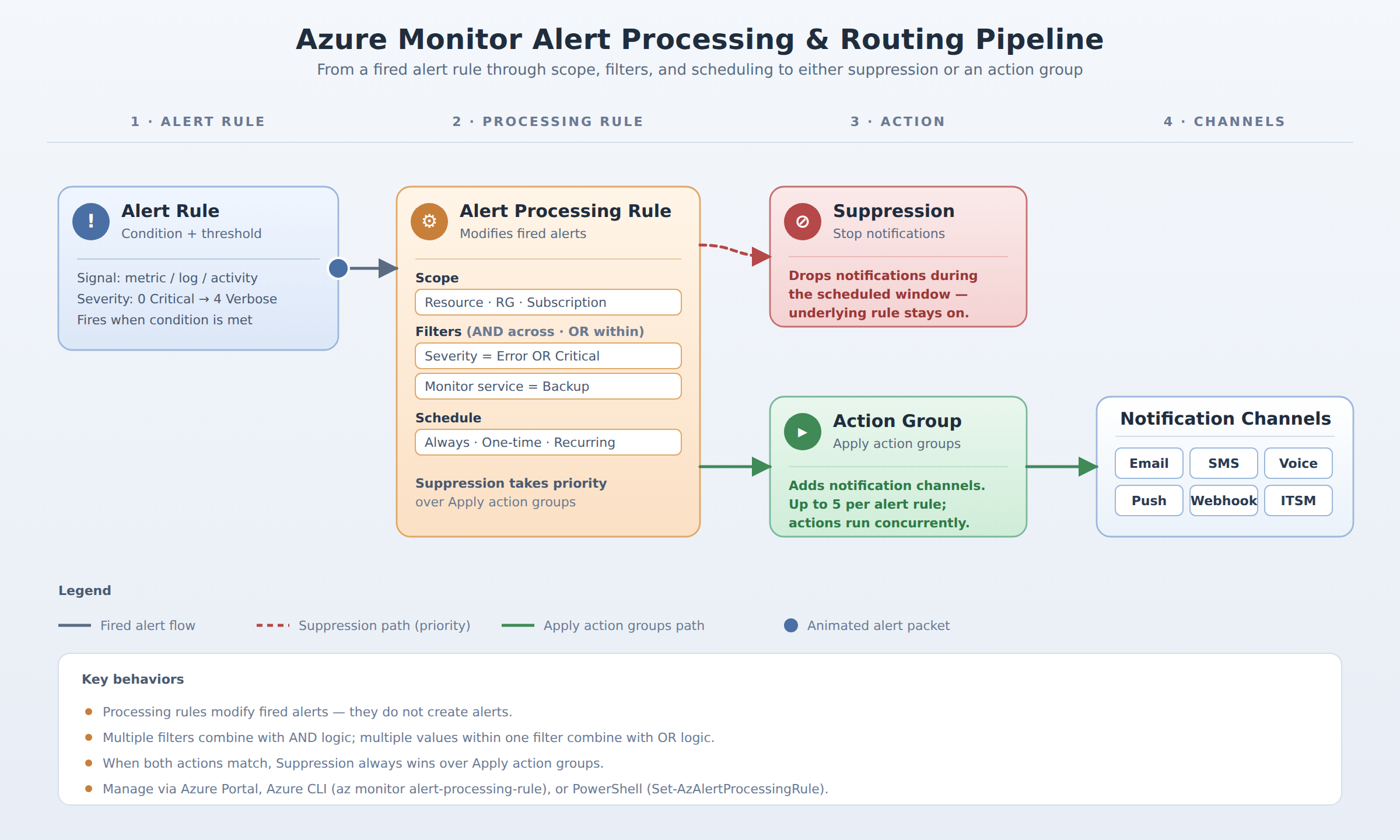
A left-to-right flow showing an Azure Monitor alert rule firing, passing through an alert processing rule that applies scope, filters, and scheduling, then routing to either suppression or an action group with notification channels.
Azure Policy takes automation further by automatically applying alert rules to every current and future resource of a given type. This ensures that no new virtual machine or storage account escapes monitoring. When you define the alert logic in a policy, the alert rules are created behind the scenes for each resource. No matter which creation method you choose, each alert rule must be associated with at least one action group to define the response—whether that is a notification, an automated task, or both.
Configure and Integrate Action Groups for Automated Response
Action groups are reusable collections of notification methods and automated actions that execute when an alert fires. Each action group can include email, SMS, push notifications via the Azure mobile app, voice calls, and more advanced integrations such as webhooks, Azure Functions, Logic Apps, Automation Runbooks, and ITSM connectors like ServiceNow. By attaching the same action group to multiple alert rules, you centralize who gets paged and which workflows run, reducing duplicated configuration. A single alert rule can reference up to five action groups, and all actions within those groups run concurrently.
Action groups support an especially useful notification channel: Email Azure Resource Manager Role sends alerts to everyone who holds a specific RBAC role rather than a fixed list of addresses. For SMS and voice, recipients can reply to unsubscribe or resubscribe without leaving the workflow. When you need to suppress notifications during planned maintenance or route alerts to different teams based on severity, you combine action groups with alert processing rules. Because action groups execute in parallel and can be deployed globally or regionally, they remain resilient even if one region experiences an outage. Service limits on email and SMS volume mean that large-scale environments should prefer automation endpoints—such as an Automation Runbook that creates an incident ticket—over human notification channels.
Design and Manage Alert Processing Rules for Advanced Alert Routing
Alert processing rules (formerly called action rules) do not create alerts; they modify the behavior of alerts that have already fired. Their two primary actions are Suppression and Apply action groups. Suppression stops all notifications during a defined window—for example, during a maintenance period—without disabling the underlying alert rules. The Apply action groups action adds extra notification channels to alerts, which is especially useful for older Azure services that do not natively support action groups.
The scope of an alert processing rule can be a single resource, a resource group, or an entire subscription. Within that scope you add Filters to narrow the rule's effect based on criteria such as severity, monitor service, or resource type. Multiple different filters use AND logic, meaning all conditions must match for the rule to apply. Within a single filter, multiple values use OR logic, so a filter monitoring severity can catch both Error and Critical in one condition. When an alert is matched by more than one processing rule, a Suppression action always takes priority over an Apply action group action. This hierarchy prevents conflicting rules from accidentally sending notifications during a suppression window.
Scheduling gives you fine-grained control over when a processing rule is active. You can set it to be Always active, use a One-time window for a specific event, or define a Recurring schedule for weekly maintenance. By combining scope, filters, and scheduling, a single alert processing rule can manage thousands of underlying alert rules. This reduces human error and ensures that high-severity incidents always reach the correct response team, while expected noise from planned work is silently dropped. Administrators can create and manage these rules through the Azure Portal, Azure CLI (az monitor alert-processing-rule), or PowerShell (Set-AzAlertProcessingRule).
Frequently Asked Questions
What are alert rules in Azure Monitor and how can they be created?
Alert rules in Azure Monitor define the conditions—such as a metric crossing a threshold or a log query returning a specific result—that trigger alerts. They can be created manually for any Azure resource, using Recommended Alerts to enable predefined rules, or through Azure Monitor Baseline Alerts (AMBA) which provides deployable ARM, Bicep, or policy definitions. Azure Policy can also automatically apply alert rules to every current and future resource of a given type.
What is the purpose of action groups in Azure Monitor and what do they include?
Action groups are reusable collections of notification methods and automated actions that execute when an alert fires. They can include email, SMS, push notifications via the Azure mobile app, voice calls, webhooks, Azure Functions, Logic Apps, Automation Runbooks, and ITSM connectors like ServiceNow. Each alert rule must be associated with at least one action group, and a single alert rule can reference up to five action groups.
What do alert processing rules do in Azure Monitor and what actions can they perform?
Alert processing rules modify the behavior of alerts that have already fired rather than creating alerts. They perform two primary actions: Suppression stops all notifications during a defined window (such as planned maintenance), and Apply action groups adds extra notification channels to alerts. When an alert is matched by more than one processing rule, a Suppression action always takes priority over an Apply action groups action.
What filtering and scheduling options are available for alert processing rules in Azure Monitor?
Alert processing rules can filter based on criteria such as severity, monitor service, or resource type, with multiple different filters using AND logic and multiple values within a single filter using OR logic. For scheduling, rules can be set to Always active, use a One-time window for a specific event, or define a Recurring schedule for weekly maintenance. The scope can be a single resource, a resource group, or an entire subscription.
How learners score on this domain
Last updated