Advanced
Prepare and test your skills

Advanced
Prepare and test your skills
Azure Resource Access with RBAC Roles
Identify and Assign Built-in Azure Roles
Azure roles are predefined sets of permissions managed by Microsoft that define what actions can be taken on resources. Since these roles are preconfigured, you cannot alter their permissions directly. Common roles include Owner, which provides full control including permission management; Contributor, which allows resource creation and management without access delegation; and Reader, which grants view-only access. A role assignment links a role to a security principal—such as a user, a group, or an application identity like a service principal—at a specific scope. This scope can range from a broad subscription down to a resource group or an individual resource, enabling administrators to enforce the principle of least privilege.
Manage and Troubleshoot Built-in Role Assignments
Azure role-based access control (Azure RBAC) manages access by securing resources through these targeted assignments. Best practices dictate assigning permissions to groups rather than individuals to minimize administrative work, limiting high-privilege roles like Owner, and using unique role IDs in automation rather than display names. Permissions flow downward through the Azure hierarchy via inheritance, meaning high-level assignments at a subscription automatically apply to all child resource groups and resources. When troubleshooting access issues, administrators must evaluate how multiple assignments interact, keeping in mind that deny assignments always override allow assignments. Tools like the Azure portal, Azure PowerShell, or the Azure CLI help audit and identify conflicting or excessive privileges.
Interpret Built-in Role Permissions and Scope
Evaluating access requires understanding both the category of the role and its defined boundary. Built-in roles generally fall into either privileged administrator roles or specialized job function roles like Virtual Machine Contributor. While Owner and Contributor operate across resources, specialized roles like User Access Administrator only manage access assignments without altering the resources themselves. Because assignments flow down from higher scopes like a management group to child subscriptions and resource groups, broad roles should be avoided at high levels. Administrators must also monitor subscription limits, which restrict environments to 4,000 role assignments per subscription and 500 per management group.
Continue with this study guide: Manage built-in Azure roles
Implement Custom RBAC Roles and Assignment Conditions
When built-in options are insufficient, you can create custom RBAC roles to define exact administrative permissions using Actions, NotActions, DataActions, and NotDataActions. This precision allows organizations to maintain strict security boundaries by granting only the minimum necessary permissions for a specific business task. To refine access further, assignment conditions introduce attribute-based access control to restrict role assignments based on resource tags, names, or security attributes. This means an administrator can allow a user to read data only if the storage target matches a specific tag, which reduces the total number of required role assignments. Creating custom roles requires the write permission for role assignments, and these roles should always be assigned at the narrowest scope possible.
Define and Apply RBAC Roles at Various Scopes
Azure organizes resources in a strict structural hierarchy that governs how access is applied and inherited. At the top sit management groups, which contain subscriptions, which in turn contain resource groups that hold individual resources. Applying a role definition to a security principal at any of these levels grants access to that resource and everything nested inside it. Because Azure RBAC uses an additive model, a user's permissions accumulate across all assignments. If a user is granted Contributor permissions at the subscription level and Reader permissions at a resource group level, their effective access remains Contributor because permissions stack together.
Analyze Role Inheritance and Effective Permissions
Role inheritance ensures that permissions automatically propagate from parent scopes down to child scopes. Once a role is assigned at a higher level like a subscription, child resources cannot revoke or block these inherited permissions; they can only receive additional permissions at their own level. A user's effective permissions are calculated by taking all allowed actions and subtracting explicitly excluded actions. Furthermore, role assignments are transitive through nested groups, meaning a user automatically inherits roles assigned to any group they belong to. This transitive nature requires administrators to carefully track group memberships to ensure the principle of least privilege is not violated.
Continue with this study guide: Assign roles at different scopes
Evaluate Role-Based Access Control (RBAC) Assignments
To maintain a secure cloud environment, administrators must regularly analyze existing role assignments to verify compliance with security policies. Tools like Microsoft Entra Privileged Identity Management (PIM) help manage and audit these permissions by designating roles as either eligible or active. Through PIM, administrators can add conditions and time limits to role activations, ensuring elevated access is only available when needed. Regular audits are critical to reevaluate access during personnel changes and prevent dormant accounts from retaining administrative control.
Determine Effective Permissions
The system calculates effective permissions through an additive model that combines control plane management permissions and data plane storage permissions. When an access request occurs, the Azure Resource Manager retrieves all active role and deny assignments for the security principal. The authorization system evaluates deny assignments first; if any matching deny exists, access is immediately blocked. If no deny is found, the system subtracts NotActions from Actions to determine the final allowed administrative capabilities. In storage environments like Azure Data Lake Storage, the system evaluates traditional Access Control Lists (ACLs) alongside Azure RBAC to determine precise file and folder permissions.
Azure RBAC Evaluation Logic Flow
Process Flow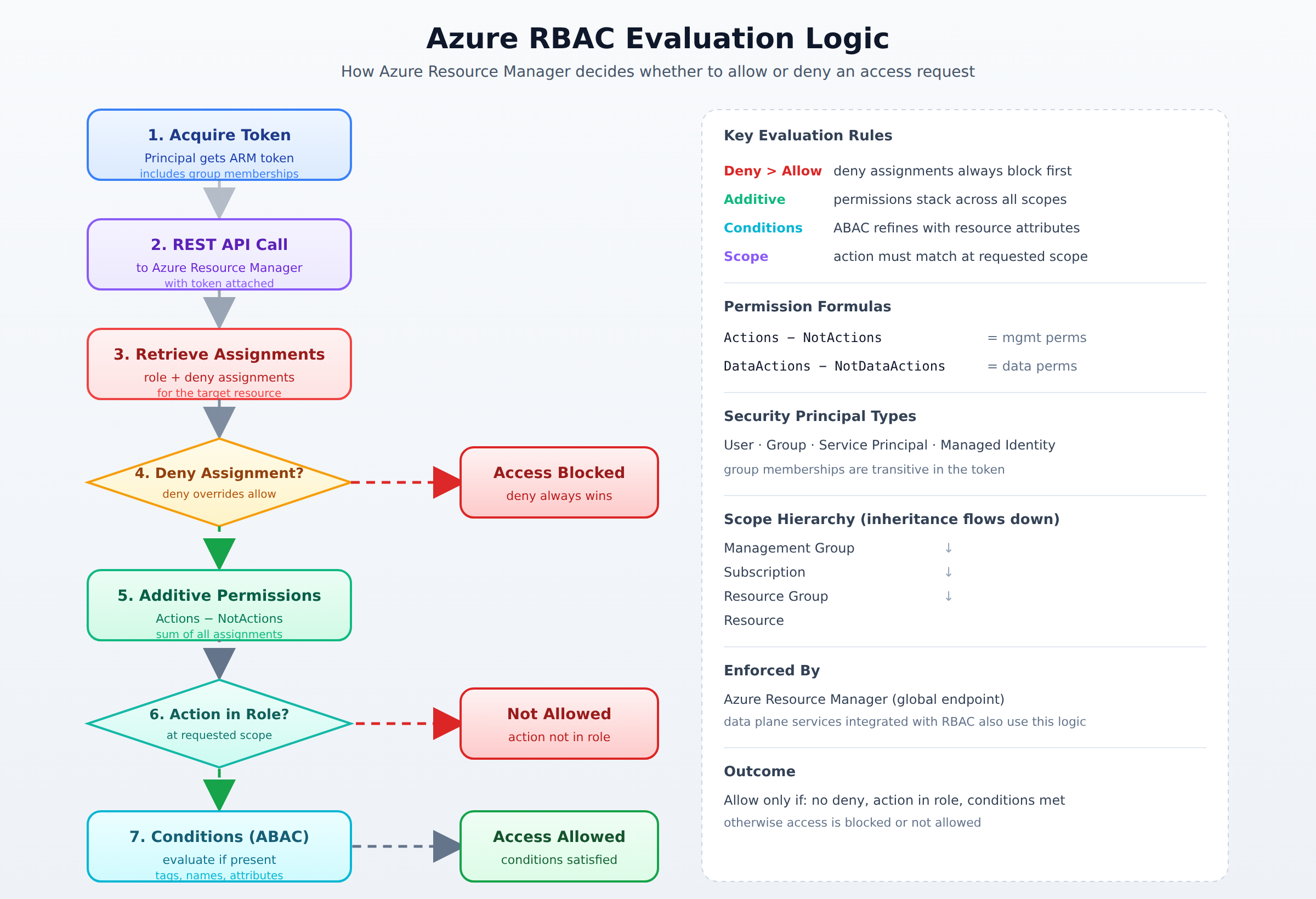
A process flow showing how Azure Resource Manager evaluates an access request in order: token acquisition, retrieval of role and deny assignments, deny check, additive permission calculation, action match check, and condition evaluation, ending in allow or deny.
Identify Non-RBAC Access Controls
Beyond RBAC, Azure resource locks provide a control plane safeguard by blocking accidental deletions or modifications regardless of a user's high-privilege role. A CanNotDelete lock allows authorized users to read and modify a resource but blocks its deletion, while a ReadOnly lock restricts users entirely to read-only access. Meanwhile, managed identities allow Azure resources to securely authenticate to other services using Microsoft Entra authentication without managing credentials. A system-assigned managed identity is tied directly to the lifecycle of a single resource, whereas a user-assigned managed identity is a standalone resource that can be shared across multiple assets. Administrators must manage these identities carefully, as updates to their group memberships can take up to 24 hours to take effect due to token caching.
Continue with this study guide: Interpret access assignments
Frequently Asked Questions
How do Azure RBAC deny assignments interact with allow assignments when determining access?
Deny assignments always override allow assignments. When an access request occurs, the Azure Resource Manager retrieves all active role and deny assignments for the security principal and evaluates deny assignments first; if any matching deny exists, access is immediately blocked.
What is the Azure RBAC role inheritance model and can child resources override inherited permissions?
Role inheritance ensures permissions automatically propagate from parent scopes down to child scopes. Once a role is assigned at a higher level like a subscription, child resources cannot revoke or block these inherited permissions; they can only receive additional permissions at their own level.
What is the difference between system-assigned and user-assigned managed identities in Azure?
A system-assigned managed identity is tied directly to the lifecycle of a single resource, whereas a user-assigned managed identity is a standalone resource that can be shared across multiple assets. Administrators must manage these identities carefully, as updates to their group memberships can take up to 24 hours to take effect due to token caching.
What are the subscription and management group limits for Azure RBAC role assignments?
Azure restricts environments to 4,000 role assignments per subscription and 500 per management group. Administrators must monitor these limits when planning access strategies across their Azure environment.
Subdomains
Azure Role-Based Access Control (RBAC) is the system that controls who can do what in Azure. It works by assigning roles to users, groups, service principals, or managed identities. When built-in …
Role-Based Access Control (RBAC) in Azure is a system that provides fine-grained access management of Azure resources. It allows administrators to assign roles to users, groups, and applications t…
Azure roles are predefined sets of permissions that control what a user can do with Azure resources. These roles are created and managed by Microsoft, so you cannot change their permissions. Commo…
How learners score on this domain
Last updated