Advanced
Prepare and test your skills

Advanced
Prepare and test your skills
Understanding ARM Templates and Bicep Deployments
Declarative Infrastructure Tools
Azure Resource Manager (ARM) templates and Bicep files automate the deployment and management of cloud resources. These tools use a declarative syntax, meaning you define the desired final state of your infrastructure without writing the step-by-step commands to build it. While ARM templates are written in JSON, Bicep is a domain-specific language designed to simplify the authoring process with a much cleaner syntax. Bicep files automatically compile into JSON ARM templates during the deployment phase, ensuring full compatibility with all Azure services.
Core Template Elements
An infrastructure-as-code file is organized into specific functional sections that work together to configure your environment. Parameters allow users to input custom values during deployment, which makes templates highly reusable across different projects. Variables store calculated values that can be reused across the template to avoid repetitive code. The resources section lists the actual Azure components to deploy, while the outputs section returns information from those resources once the deployment completes.
ARM Template Element Data Flow
Process Flow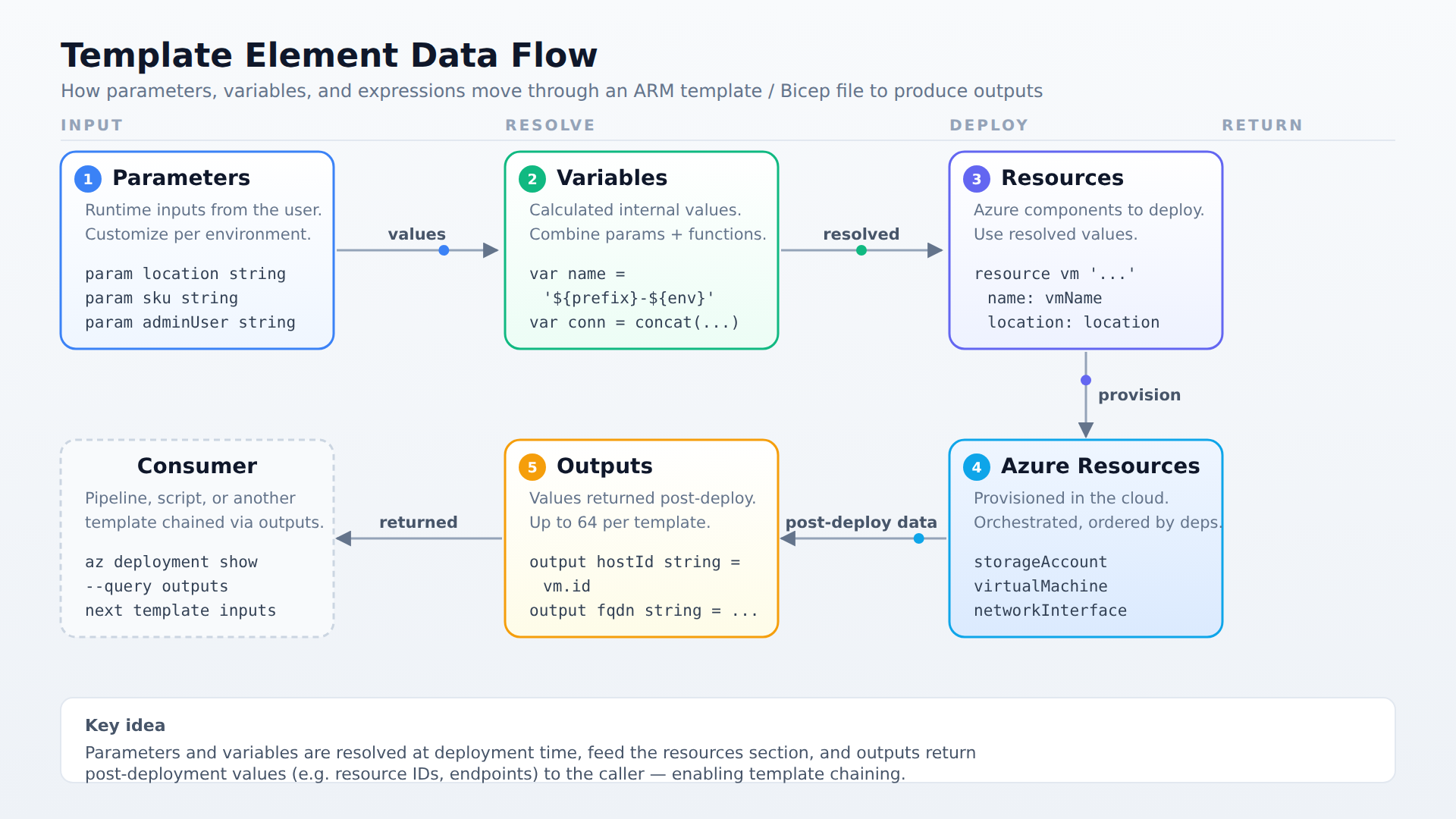
A process flow showing how parameters, variables, and dynamic expressions feed into the resources section, which deploys Azure resources that then produce outputs.
Advantages of Infrastructure as Code
Deploying infrastructure using these automated tools provides several key operational benefits:
- Idempotency guarantees that running the same template multiple times always results in the identical resource state.
- Orchestration allows Azure to automatically determine the deployment order and deploy independent resources at the same time to speed up the process.
- Modularity enables administrators to break complex templates into smaller, reusable components that are easier to manage.
- Immediate support ensures that Bicep can configure any new Azure resource type or API version as soon as Microsoft releases it.
Customizing Deployments with Parameters
Parameters act as the primary way to customize a deployment at runtime without changing the underlying template code. They allow the same template to safely target different environments, such as development, testing, and production, by accepting different inputs. Administrators can define parameters using various data types such as strings, integers, booleans, arrays, objects, or secureString for sensitive data like passwords. In Bicep, parameters are declared using the param keyword, whereas ARM templates define them in a dedicated "parameters" block.
Simplifying Configurations with Variables
Variables are internal values calculated within the template to simplify complex expressions and reduce code duplication. They are often used to combine parameter values, constants, and built-in functions to construct resource names or connection strings. Using variables makes templates significantly easier to read, maintain, and update over time because change is managed in a single place. In Bicep, variables are declared with the var keyword, while ARM templates group them inside a "variables" section.
Extracting Post-Deployment Data with Outputs
Outputs are values returned to the user or automation pipeline after Azure finishes deploying the resources. They provide critical post-deployment data, such as a virtual machine's public IP address, a storage account's endpoint, or resource IDs. These outputs are highly useful for verifying the success of a deployment or chaining multiple templates together by passing outputs as inputs to another template. Each template can return up to 64 outputs, and each output can be configured to generate conditionally based on the deployment state.
Generating Dynamic Values
To ensure templates remain flexible across different environments, developers use dynamic expressions and built-in template functions. These expressions calculate values at runtime, allowing a template to adapt dynamically based on parameters or deployment locations. For example, a template function can generate a globally unique name for a storage account during deployment to prevent naming conflicts. Combining these functions with variables ensures that configurations remain consistent yet uniquely tailored to each target environment.
Managing Resource Dependencies
Azure Resource Manager coordinates deployments by analyzing resource dependencies to determine the correct order of operations. In JSON ARM templates, you must explicitly declare these relationships using the dependsOn property to prevent Azure from creating a resource before its prerequisite exists. Bicep simplifies this lifecycle management by automatically detecting implicit dependencies when one resource references the symbolic name of another. Resources that share no dependencies are deployed in parallel, reducing overall deployment time.
Validation and Preview Lifecycles
Before committing changes to an Azure environment, administrators should run validation checks to prevent failures. The preflight validation phase automatically checks the template syntax and configuration rules before any resources are modified. Additionally, the what-if operation compares the template against the live environment to generate a preview of the changes. This preview displays whether resources will be created, updated, ignored, or deleted, giving administrators a safe way to evaluate the deployment impact.
By combining structural elements like parameters and variables with dynamic expressions and dependency management, administrators can build robust deployment pipelines. These tools work together to ensure that complex Azure environments are provisioned safely, predictably, and efficiently. Mastering these concepts is the key to managing infrastructure as code reliably at scale.
Frequently Asked Questions
What is the difference between an Azure Resource Manager (ARM) template and a Bicep file?
Azure Resource Manager (ARM) templates are written in JSON, while Bicep is a domain-specific language designed with a cleaner syntax to simplify authoring. Bicep files automatically compile into JSON ARM templates during deployment, ensuring full compatibility with all Azure services.
What are the advantages of using Azure Resource Manager (ARM) templates or Bicep files for infrastructure as code?
Using these tools provides idempotency, which guarantees identical resource states from multiple runs, and orchestration, which speeds up deployment by running independent resources in parallel. They also offer modularity for reusable components and immediate support for new Azure resource types or API versions as soon as Microsoft releases them.
How do parameters, variables, and outputs function within an Azure Resource Manager (ARM) template or Bicep file?
Parameters allow users to input custom values at deployment time to make templates reusable across different environments. Variables store calculated values internally to simplify complex expressions and reduce code duplication. Outputs return information from deployed resources after completion, such as a virtual machine's public IP address, for verification or chaining templates.
How does Bicep simplify resource dependency management compared to JSON Azure Resource Manager (ARM) templates?
In JSON ARM templates, you must explicitly declare resource dependencies using the dependsOn property. Bicep automatically detects implicit dependencies when one resource references the symbolic name of another, simplifying lifecycle management.
How learners score on this domain
Last updated