Advanced
Prepare and test your skills

Advanced
Prepare and test your skills
Azure Storage Firewalls, Private Access and SAS Tokens
Default Access and Firewall Rules
By default, an Azure Storage account allows traffic from all networks. To restrict this, you must change the default action to deny. Once denied, you must create explicit firewall rules to permit traffic from specific sources. These rules only affect data plane operations like reading or writing blobs; control plane operations, such as managing the account, are not blocked.
Virtual Network and IP Network Rules
You can allow access from specific Azure subnets using virtual network rules. To do this, you must first enable the Microsoft.Storage service endpoint on the subnet, which keeps traffic on Azure's private network. Alternatively, you can use IP network rules to permit traffic from specific public internet IPv4 addresses. Small IP ranges must be added as single addresses, not as a CIDR block.
Trusted Service Exceptions
Certain authorized Microsoft services, like Azure Backup or Monitor, can bypass these firewall restrictions. This "trusted services" exception allows them to connect securely for management tasks. This exception remains functional even if you completely disable all public network access to the storage account.
Service Endpoints and Private Endpoints
Azure offers two main methods for secure network integration. Service endpoints extend your virtual network's identity to the storage service, routing traffic over the Azure backbone while still using public IP addresses. Private endpoints assign a private IP address from your virtual network directly to the storage account. This blocks all public access and allows secure connections from on-premises networks via VPN or ExpressRoute.
Comparing the Integration Methods
Service endpoints apply to all storage accounts in a region, while a private endpoint isolates access to a single, specific storage account. Private endpoints provide stronger data exfiltration protection but come with extra cost and require manual management of private DNS records. Service endpoints are generally simpler to deploy as they don't require these DNS changes.
Security Best Practices and Troubleshooting
For troubleshooting, first verify that DNS correctly resolves the storage account name to its private IP address when using private endpoints. Always configure virtual network rules alongside firewalls, and implement role-based access control (RBAC) via Microsoft Entra ID instead of relying on shared keys. Enforce secure transit by requiring HTTPS for all connections to the storage account.
Benefits of Virtual Network Rules
Virtual network rules are preferred over public IP filtering because they completely prevent any public IPs from reaching the storage account. This significantly reduces the attack surface, ensuring that only traffic originating from your authorized, private subnets can access the data.
Configuration Process and PowerShell Commands
The configuration process involves two main steps: enabling the service endpoint on a subnet and then creating a corresponding network rule on the storage account. In PowerShell, you use commands like Set-AzVirtualNetworkSubnetConfig to add the endpoint and Add-AzStorageAccountNetworkRule to create the rule. Finally, you update the default action to deny using Update-AzStorageAccountNetworkRuleSet.
Shared Access Signature (SAS) tokens provide limited, time-bound access to storage resources without sharing your account key. The token is a signed URL that specifies the allowed permissions, resources, and validity period. You give this URL to clients, who can then perform the specified actions on blobs, files, queues, or tables.
Types of SAS Tokens
There are three types. A Service SAS grants access to a specific resource (like a single container) and is signed with the storage account key. An Account SAS provides broader access across multiple services within the account and is also signed with the account key. A User Delegation SAS is signed with Microsoft Entra credentials, applies only to blob storage, and is the most secure option as it avoids using account keys entirely.
Creating and Configuring SAS Tokens
When creating any SAS token, you must define its permissions (like read or write), set a strict expiration time, and can optionally restrict access to specific IP addresses. These constraints are built directly into the signed URL itself.
Best Practices for Generating SAS Tokears
Always enforce HTTPS to prevent interception of the token URL. Grant only the minimum permissions necessary for the task, and set expiration times as short as possible—ideally one hour or less for ad-hoc tokens. Using IP restrictions adds an extra layer of network-based control.
Revoking SAS Tokens
Revocation methods differ by SAS type. For a User Delegation SAS, you revoke the associated user delegation keys. For Service SAS tokens linked to a stored access policy, you can revoke them instantly by modifying or deleting that policy. Ad-hoc SAS tokens (not linked to a policy) cannot be revoked early and remain valid until they expire.
Security Implications
The User Delegation SAS is the most secure and is recommended whenever possible because it uses Microsoft Entra ID authentication. When you must use Service or Account SAS tokens (which rely on Shared Key authorization), you must follow strict practices: enforce HTTPS, use very short expiration times, and associate Service SAS tokens with stored access policies for manageability and revocability.
Determining Appropriate Application
Choose the SAS type based on your needs. Use a User Delegation SAS for Blob Storage when clients authenticate via Microsoft Entra ID. Use a Service SAS for granular access to a single service when you need the benefits of a stored access policy. Use an Account SAS only for complex scenarios requiring cross-service access or specific administrative operations.
Time Management and Clock Skew
Set near-term expiration times to limit risk if a token is leaked. To account for clock skew (time differences between machines), set the token's start time at least 15 minutes in the past. Design client applications to automatically renew tokens before they expire to avoid service interruptions.
Stored Access Policies and Revocation
For Service SAS tokens, implement a Stored Access Policy (SAP). This server-side policy lets you centrally manage permissions and expiration. Its key benefit is revocability: you can instantly invalidate all tokens linked to the policy by deleting it or setting its expiry to a past time, without needing to rotate your storage account keys. You can have up to five policies per container.
Least Privilege and Secure Distribution
Always follow the principle of least privilege. Grant only the permissions absolutely required, scope the token to a single blob or container instead of the entire account, and force the use of HTTPS. Distribute SAS tokens only over secure channels to prevent man-in-the-middle attacks.
Expiration Policies and Monitoring
You can configure a SAS expiration policy at the storage account level. This sets a recommended maximum validity period for any SAS generated for that account. Use Azure Monitor and storage logs to track how requests are authorized and to identify tokens that exceed policy limits or exhibit other suspicious activity.
A stored access policy is a server-side template used to centrally manage groups of service-level SAS tokens. You define permissions (like Read, Write, List) and timeframes within the policy. These policies only work with service SAS tokens, not with account or user delegation SAS. You can create up to five policies per resource container (like a blob container or file share).
Lifecycle and Revocation
You create and manage policies using the storage account access keys (Microsoft Entra ID is not supported). Once active, you can update a policy's expiry or permissions, and all associated SAS tokens will inherit the changes. The most powerful feature is immediate revocation: if a token is compromised, you can invalidate all tokens linked to a policy by deleting the policy or setting its expiry to a past time, which is not possible with ad-hoc SAS tokens.
Supported Azure Storage Resources
Stored access policies can be applied to Blob containers, File shares, Queues, and Tables. They provide a server-side layer of control for the service SAS tokens you issue for these resources.
Creating a Stored Access Policy
Creating a policy requires using the Set Container ACL operation, authorized with the storage account's Shared Key. You define a policy with a unique ID, a start time, an expiry time, and a permission string. This policy then acts as an enforceable template; any service SAS referencing it cannot specify permissions or expiry outside the policy's limits.
Centralized Management and Enhanced Security
Integrating a Stored Access Policy with a Service SAS provides centralized control. The SAS inherits the policy's constraints. The major security advantage is the ability to revoke or modify access after the SAS is issued by changing the underlying policy, which instantly affects all linked tokens.
Policy-Based Constraints and Operational Efficiency
The policy acts as a security guardrail. You can set a policy with a long expiry for management flexibility but generate individual short-lived SAS tokens from it. This structure simplifies security management, as you control the rules from a single point rather than in every distributed token.
Configure Access Policies and Permissions for Key Usage
Storage account access keys provide full control over all data via Shared Key authorization. They are a security risk and should be disabled in favor of Microsoft Entra ID authentication. Use Azure Role-Based Access Control (RBAC) to control who can view or regenerate keys; roles like Owner and Contributor include this permission, while the Reader role does not. For temporary access, use Shared Access Signatures (SAS), preferring the User Delegation SAS type for blob storage as it doesn't use account keys.
Evaluate Key Security and Compliance Requirements
Protecting access keys is critical. Never hard-code them in applications. Use Azure Key Vault for secure storage and automated rotation. Key rotation is a core compliance requirement; Azure provides two keys (Key1 and Key2) so you can regenerate one while applications use the other, avoiding downtime. Follow the principle of least privilege and use managed identities where possible.
Rotate and Regenerate Access Keys
To rotate keys safely, first update your applications to use Key2. Then, regenerate Key1. Next, update applications to use the new Key1. Finally, regenerate Key2. This sequence ensures continuous access. You can rotate keys via the Azure portal, PowerShell (New-AzStorageAccountKey), or Azure CLI. Only users with specific RBAC permissions, such as the Storage Account Key Operator Service Role, can perform this action.
Continue with this study guide: Manage access keys
Azure Files can authenticate users with their on-premises Active Directory Domain Services (AD DS) credentials for a seamless hybrid experience. You must domain-join the storage account to your AD using tools like the AzFilesHybrid PowerShell module. Proper DNS configuration is essential for clients to find the storage endpoint and domain controllers. Authentication uses Kerberos.
Access control has two layers. First, assign share-level permissions using Azure RBAC roles to control who can connect. Second, manage directory and file-level permissions using traditional Windows NTFS permissions (ACLs) inside the share. On-premises clients connect over Port 445 (SMB), which often requires a VPN, ExpressRoute, or Private Endpoint because many ISPs block this port.
This method uses Microsoft Entra ID identities to authenticate users to Azure file shares, with no on-premises domain connection required. You start by assigning share-level permissions using specific Azure RBAC roles for the file share. Once a user has this access, you can configure directory and file-level permissions using Windows ACLs on the files and folders themselves.
For clients to authenticate, each machine must be configured to retrieve Azure AD Kerberos tickets, which can be pushed via management tools. For services like Azure File Sync, you can use a managed identity instead of storage account keys, allowing the service to authenticate securely without manual key management.
Permission management for Azure Files is a two-tier process where both share-level (RBAC) and directory/file-level (NTFS) permissions are combined, with the most restrictive taking effect.
At the share level, use precise Azure RBAC roles scoped to the file share (fileshares), such as Storage File Data SMB Share Reader. This follows the principle of least privilege. After a user is granted share access, NTFS permissions provide fine-grained control inside the share. These Windows ACLs are preserved during migration and can be managed with tools like File Explorer or the icacls command. An administrator may need to mount the share with the storage account key initially to set these ACLs before identity-based access is fully configured.
Storage Account Key Rotation Sequence
Process Flow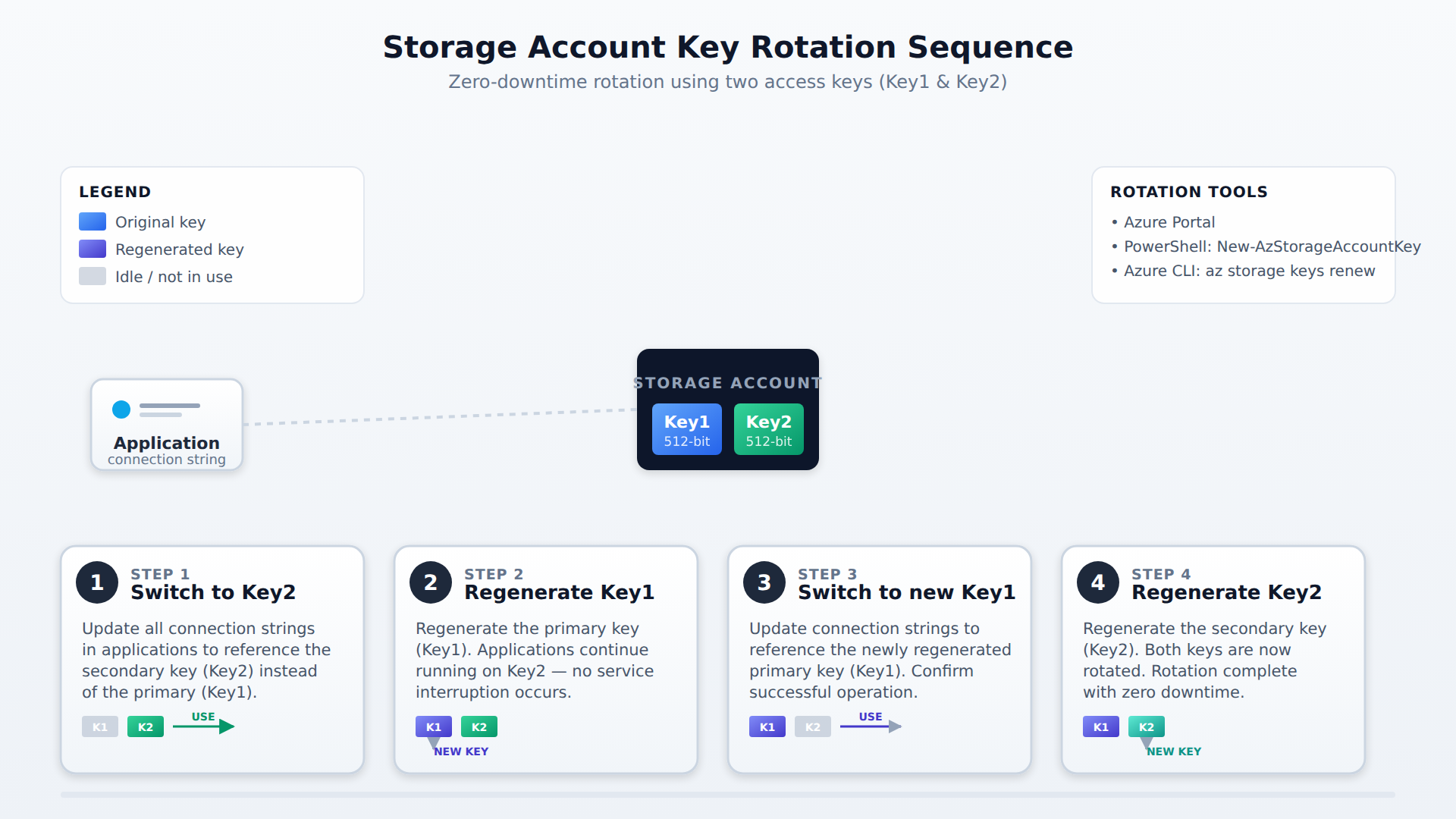
A four-step process flow showing how to rotate Azure storage account access keys without downtime by switching applications to Key2, regenerating Key1, switching back, and regenerating Key2.
Frequently Asked Questions
What is the difference between service endpoints and private endpoints for Azure Storage accounts?
Service endpoints route traffic over the Azure backbone using public IP addresses and apply to all storage accounts in a region without requiring private DNS changes. In contrast, private endpoints assign a private IP address from a virtual network directly to a single storage account, blocking all public access and offering stronger data exfiltration protection at an extra cost with manual DNS record management.
What are the differences between User Delegation, Service, and Account Shared Access Signature (SAS) tokens?
A User Delegation SAS is signed with Microsoft Entra ID credentials, applies only to Blob Storage, and is the most secure option because it avoids using account keys entirely. A Service SAS grants access to a specific resource and is signed with the storage account key, while an Account SAS is also signed with the account key but provides broader access across multiple services within the storage account.
How can an administrator revoke a Service Shared Access Signature (SAS) token before it expires?
An administrator can instantly revoke a Service SAS by associating it with a stored access policy and then deleting the policy or setting its expiration to a past time. Ad-hoc SAS tokens that are not linked to a stored access policy cannot be revoked early and remain valid until their expiration time.
How do share-level and NTFS permissions interact when securing Azure Files?
Azure Files uses a two-tier permission model combining Azure Role-Based Access Control (RBAC) at the share level with Windows NTFS access control lists at the directory and file level. Both permission layers are evaluated together, and the most restrictive setting takes effect.
Subdomains
Storage account access keys are 512-bit keys that Azure generates for each storage account, and they provide full control over all data in that account through a method called *Shared Key authoriz…
Azure Files can be configured to authenticate users with their existing on-premises Active Directory Domain Services (AD DS) credentials. This creates a seamless hybrid experience. To set this up,…
Shared Access Signature (SAS) tokens allow you to grant limited, time-bound access to Azure storage resources without exposing your storage account key. The token is embedded in a signed URL that …
Azure Storage accounts use firewall rules to provide granular network access control on public endpoints. By default, accounts allow traffic from all networks, so administrators must change th…
A stored access policy is a server-side template used to centrally manage groups of service-level shared access signatures (SAS). These policies allow administrators to define and enforce specif…
How learners score on this domain
Last updated