Start here! Get your feet wet with the Microsoft cloud and begin your journey to earning your Microsoft Certified: Azure Fundamentals certification!
Prepare and test your skills

Prepare and test your skills
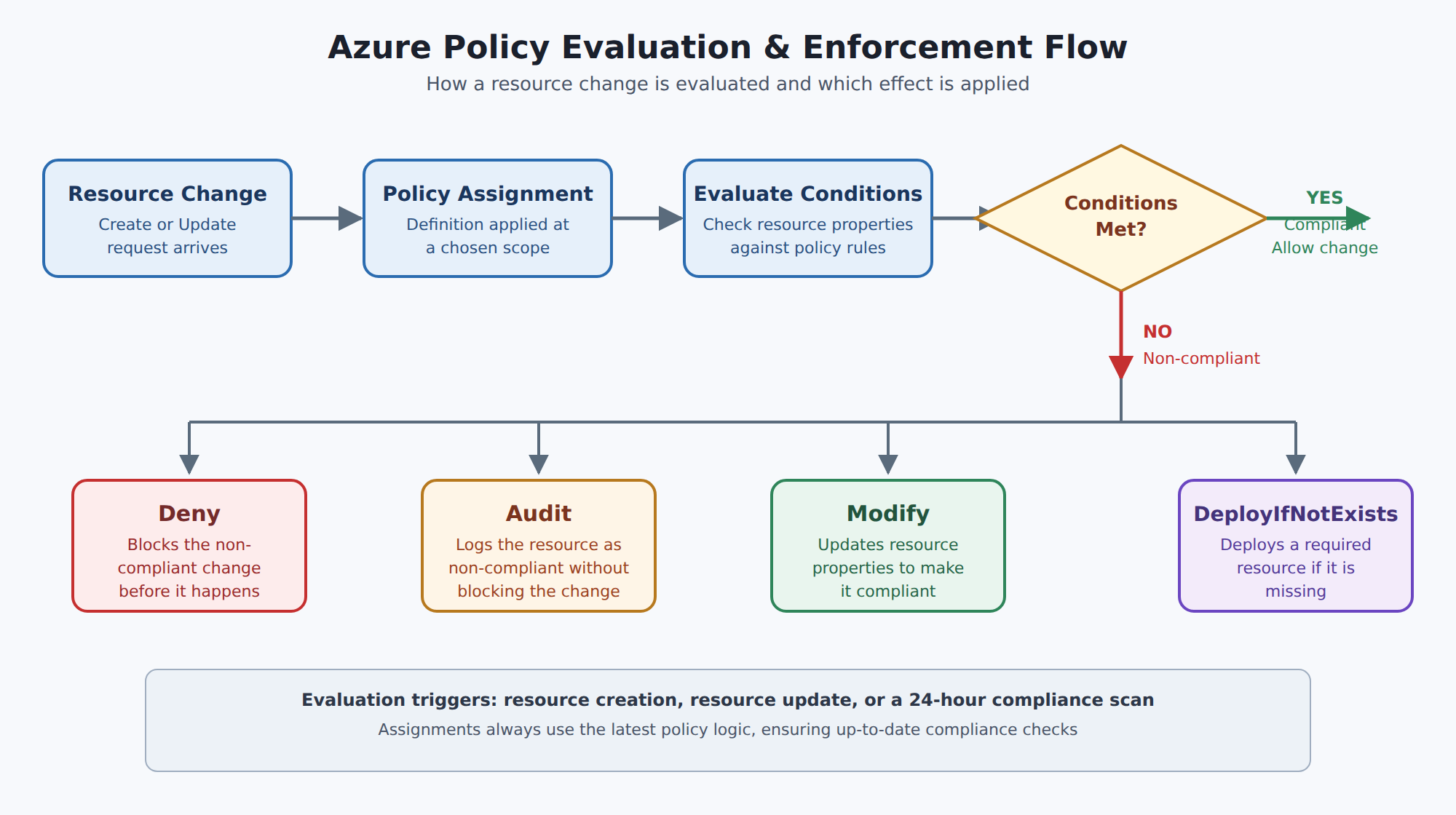
A horizontal process flow showing a resource change request being evaluated against an assigned policy definition, then branching to one of four effects: Deny, Audit, Modify, or DeployIfNotExists.
Azure Policy evaluates resource state and enforces compliance rules regardless of who makes a change, whereas Azure role-based access control (Azure RBAC) manages user permissions by controlling what actions individuals can perform. Even if a user has RBAC permission to deploy a resource, Azure Policy can deny or audit the deployment if it violates organizational standards.
An initiative definition is an Azure Policy object that groups multiple related policy definitions into a single package to achieve an overarching governance goal. Using initiatives simplifies policy management because organizations can assign, add, or remove rules as a single unit without creating separate assignments for each policy.
Azure Policy can apply effects such as Deny to block non-compliant resource creation, Audit or auditIfNotExists to log non-compliance without stopping operations, Modify to automatically update resource properties, or DeployIfNotExists to deploy required compliant resources.
Azure Policy assignments can be applied at management group, subscription, or resource group scopes. All child resources automatically inherit these assignments from parent scopes, though administrators can configure exclusions for specific subscopes when exceptions are required.
Azure Policy is a service in Azure that helps organizations enforce standards and maintain compliance across their cloud resources. It evaluates the state of resources by examining properties in Azure Resource Manager and other providers. Azure Policy works independently of who makes changes, focusing only on whether resources follow the defined rules. This helps ensure that all deployed resources meet business and regulatory requirements.
Azure Policy complements Azure role-based access control (Azure RBAC) by focusing on resource state instead of user permissions. While Azure RBAC controls what actions a user can perform, Azure Policy ensures that the resulting resources remain compliant. Even if a user has permission to deploy a resource, Azure Policy can deny or audit the change if it violates a rule. This combination provides full scope control over security and governance in Azure.
The main Azure Policy objects include policy definitions, initiative definitions, and assignments. A policy definition contains conditions and an effect such as Deny (blocks non-compliant resources), Audit (logs resources that do not meet the rules), Modify (updates resources to comply automatically), or DeployIfNotExists (deploys a resource if it is missing). Initiative definitions group multiple policy definitions under a single goal, making it easier to manage large sets of rules. Assignments apply those definitions or initiatives at a chosen scope, such as a subscription or resource group.
A policy definition is the foundation for enforcing rules in Azure Policy. Each definition includes conditions to check and an effect that runs if those conditions are met. You can use built-in policy definitions or create custom ones to match your needs. Common built-in policy definitions include Allowed Locations (which denies resource creation to specific regions), Allowed Resource Types (which limits which resource types can be deployed), and Add a Tag to Resources (which automatically applies a required tag when one is not specified).
An initiative definition groups multiple policy definitions into a single package to achieve an overarching goal. This makes it easier to manage and assign related policies as one unit. For example, an initiative named Enable Monitoring might include policies for Monitor unencrypted SQL Databases, Monitor OS Vulnerabilities, and Monitor Missing Endpoint Protection. Using initiatives lets you add or remove policies without creating new assignments, which simplifies policy management.
A policy assignment applies a policy definition or initiative to a specific scope, such as a management group, subscription, or resource group. All child resources inherit the assignment, but you can exclude subscopes if needed. The scope determines where policies are enforced, and child resources automatically follow parent assignments. Exclusions let you carve out exceptions for trusted teams or workloads. Assignments always use the latest policy logic, ensuring up-to-date compliance checks.
Azure Policy helps organizations enforce organizational standards and regulatory requirements by evaluating resource properties and ensuring they comply with defined conditions. It operates at the Resource Manager level, examining the state of resources regardless of who made changes. With policy definitions, you set conditions and an effect that automatically applies when resources are created or updated. This design provides transparency because policy definitions, initiatives, and assignments are visible to all users within their scope. As a result, Azure Policy helps maintain compliance across an entire subscription or resource group without manual checks.
By using Azure Policy, organizations gain several advantages. For security, it automatically blocks non-compliant resources and reduces human error. For cost management, it restricts SKUs, locations, and resource types to control spending. For operational efficiency, it automates remediation and governance tasks, freeing teams to focus on innovation. Overall, Azure Policy strengthens governance, supports regulatory compliance, and ensures that all deployed resources adhere to corporate standards, making cloud management more predictable and secure.
Azure Policy is a governance service in Azure that helps enforce organizational standards and assess compliance at scale. Through its compliance dashboard, teams get an overview of how resources match company rules and can drill down for details. Azure Policy also supports bulk remediation for existing resources and automatic remediation for new ones to keep environments compliant. This service is essential for meeting regulatory requirements and ensuring consistent resource configurations.
Azure uses policy definitions written in JSON to describe business rules, such as allowed locations or required tags. Multiple definitions can be grouped into a policy initiative to simplify management. After creating definitions or initiatives, you perform a policy assignment by choosing a scope like subscriptions, resource groups, or management groups. You can even exclude subscopes if certain resources should not be governed by that policy.
Once assigned, Azure Policy evaluates resources during creation, update, or on a 24-hour schedule to check compliance. If a resource does not meet a rule, Azure Policy applies an effect defined in the policy, which can Deny the change, Log the non-compliance, Modify the resource before or after changes, or Deploy related compliant resources. Effects are the core mechanism that controls how Azure responds to violations of policy rules.
Azure offers many built-in policies for common governance needs, such as ensuring resource deployment only to certain regions, enforcing consistent tagging standards, and requiring diagnostic logs to be sent to a Log Analytics workspace. When built-ins do not cover your scenarios, you can create custom policies tailored to specific organizational requirements. By understanding definitions, initiatives, assignments, evaluations, and remediation, you can effectively implement and manage policies to keep your Azure environment secure and compliant.
Azure Policy is designed to help organizations maintain governance and compliance by evaluating resource properties against business rules. It works alongside Azure RBAC to enforce what resources can be created or updated, regardless of who makes the change. By using policy definitions and assignments, you can set rules at different scopes, such as management groups, subscriptions, or resource groups. This transparency ensures that all users can see which policies apply to their environment.
To track compliance, Azure Policy supports audit and auditIfNotExists effects that record whether resources meet policy requirements without blocking operations. These effects let you gather data on resource compliance and see which workloads might need attention. Policy evaluation occurs whenever resources are created, updated, or when policy assignments change. You can view the compliance status in the Azure portal, where non-compliant resources are clearly marked.
Identifying non-compliant resources happens through continuous policy evaluations and the Azure Policy compliance dashboard. When a policy is assigned, Azure Policy examines each resource and flags those that violate the defined conditions. You can drill down into reports to see which resources and which rules caused non-compliance. This helps teams prioritize fixes and understand where governance gaps exist.
Remediation tasks can be automated using the deployIfNotExists and modify effects, which take action when a resource does not comply. For example, a policy might automatically add missing tags or deploy diagnostic settings. To perform these tasks, the policy's managed identity needs the right Azure RBAC permissions to create or update resources. To get the most out of Azure Policy, start with audit to understand current compliance levels before enforcing rules. Group related policies into initiative definitions to simplify management and scale governance across large environments. Always grant only the minimum permissions needed for remediation and review assignments regularly to keep your Azure environment secure and compliant.
An organization wants to enforce several governance requirements across its cloud infrastructure, including restricting deployment regions, enforcing specific virtual machine sizes, and requiring standard resource tags.
To simplify governance, the cloud administration team wants to group these individual policy rules into a single logical item that can be managed and assigned together across their subscriptions.
Which Azure Policy component should the administrators create to group these rules?
 StudyCerts
 StudyCerts