Start here! Get your feet wet with the Microsoft cloud and begin your journey to earning your Microsoft Certified: Azure Fundamentals certification!
Prepare and test your skills

Prepare and test your skills
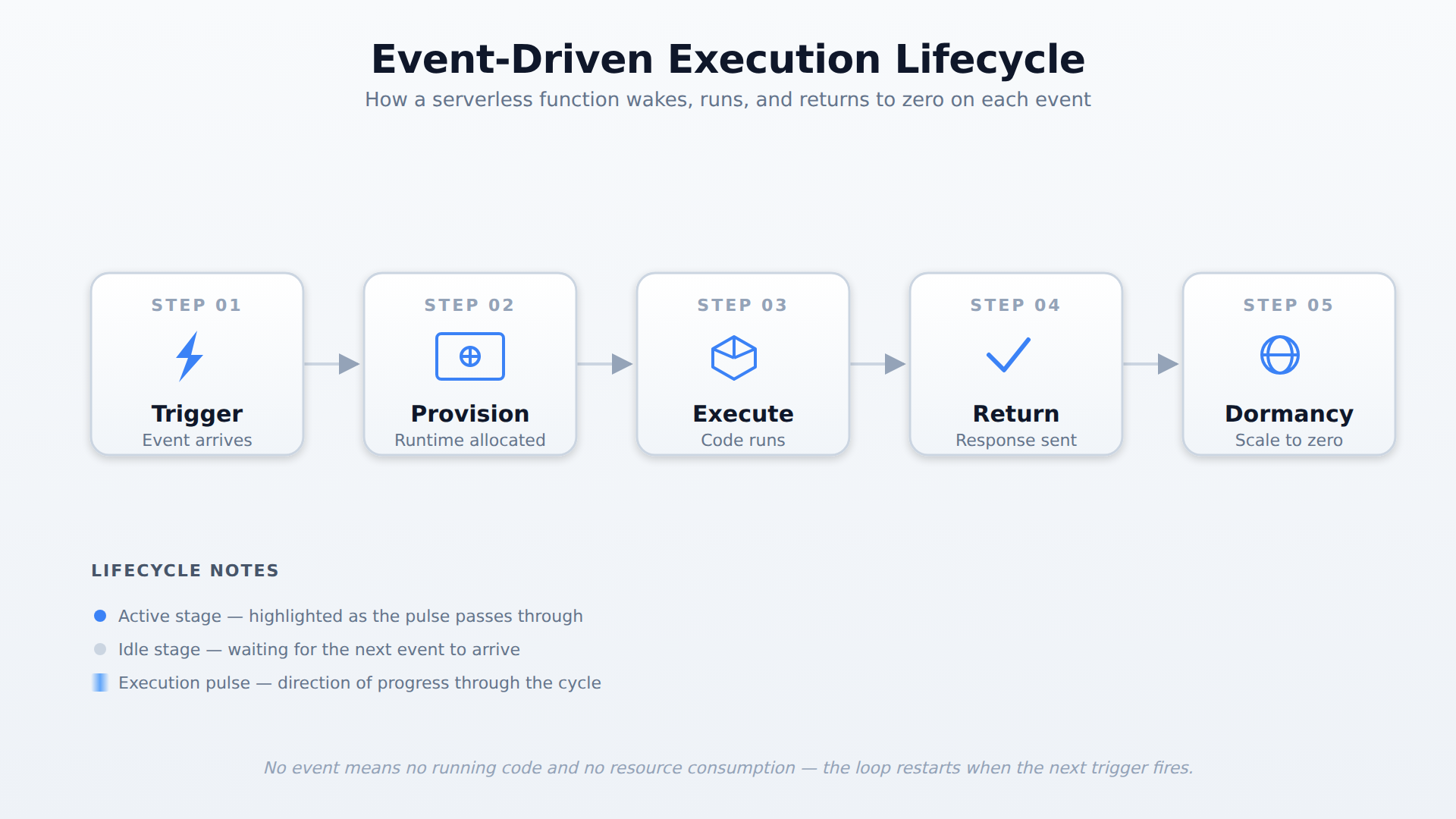
A horizontal process flow with five stages — Trigger, Provision, Execute, Return Response, and Dormancy — showing how a serverless function wakes on an event, runs, returns a result, and scales back to zero. A pulse travels through the stages in order to indicate the direction of the lifecycle.
Azure Functions is a serverless compute service that lets you run small blocks of code in the cloud, automatically scaling based on incoming events, while Azure Logic Apps focuses on orchestrating workflows and integrating applications using a visual designer and over 1,400 prebuilt connectors with minimal coding. Both can work together, for example an event can trigger a Logic App workflow that then calls an Azure Function to perform a complex data calculation.
In the consumption-based billing model, you pay only for the actual resources your code uses while running, based on metrics such as execution time and the amount of memory consumed during execution. If an application receives no requests for hours, no serverless code runs and the bill for that period is zero, eliminating the risk of paying for idle, over-provisioned infrastructure.
Cold start latency is a delay that occurs when a dormant serverless function is triggered after a period of inactivity, because the platform must provision a new runtime environment before the code can execute. This limitation may not suit applications requiring sub-millisecond response times.
Serverless computing is a cloud model where the cloud provider fully manages the infrastructure, allowing developers to focus on writing code instead of configuring servers. In this model, the platform automatically handles availability, scaling, and patch management. This allows organizations to build and deploy applications quickly without the overhead of maintaining physical or virtual hardware.
The core principles of serverless computing center on ease of use and efficiency. First, server management is completely hidden from the developer. Second, the platform provides automatic scaling to meet real-time demand. Finally, it uses a pay-per-execution model, meaning you only pay for the exact resources your code uses while running.
Azure applies these fundamentals to several services, including Azure Functions, Azure Logic Apps, and the Azure SQL Database serverless tier. In the database serverless tier, compute resources automatically scale between a configured minimum and maximum number of vCores. The database will pause during periods of inactivity and resume when new requests arrive, ensuring you do not pay for idle compute time.
In a traditional cloud model, developers must provision, configure, and update virtual machines to run their applications. With serverless infrastructure abstraction, Azure completely hides these underlying servers from the developer. The cloud provider takes care of hardware allocation, operating system updates, security patching, and physical security boundaries.
Because the infrastructure is abstracted, developers do not need to worry about capacity planning or operating system maintenance. They simply upload their application code or define their workflows, and Azure determines where and how to run them. This boundary allows development teams to redirect their energy from operations to writing valuable business logic.
One of the defining features of serverless computing is its ability to scale resources automatically. When application demand increases, the serverless platform instantly provisions additional compute resources to handle the incoming workload. Conversely, when demand drops, the platform automatically scales those resources back down, even reducing them to zero when there is no activity.
This automatic scaling happens dynamically without any manual intervention from administrators. It ensures that applications remain highly responsive during sudden traffic spikes while preventing the waste of resources during quiet periods. The platform seamlessly manages the resource lifecycle from a provisioning state to a terminated state behind the scenes.
The consumption-based billing model is a financial cornerstone of serverless computing. Unlike traditional cloud hosting, where you pay a flat rate for running virtual servers constantly, serverless charging is based on actual usage. This pay-per-execution model ensures that costs are incurred only when your code is running and actively processing requests.
Azure calculates these costs using metrics such as execution time and the amount of memory consumed during execution. If an application receives no requests for hours, no serverless code runs, and the bill for that period is zero. This model eliminates the risk of paying for idle, over-provisioned infrastructure, making it highly cost-efficient for unpredictable workloads.
Serverless architectures are fundamentally event-driven, meaning they only run in response to specific occurrences called triggers. Traditional servers run continuously, listening for requests even when no work is being done. In contrast, serverless components remain dormant until a designated event, such as an HTTP request, a file upload, or a message in a queue, activates them.
When an event triggers the platform, it provisions the necessary compute environment, executes the code, and then shuts down the environment when the task is complete. This execution model creates a clear dependency: no event means no running code and no resource consumption. This event-driven design allows systems to process data efficiently and react instantly to real-time events.
Azure provides several specialized services designed to implement serverless designs. Azure Functions is a serverless compute service that lets you run small blocks of code, known as functions, in the cloud. You can write these functions in various programming languages, and they automatically scale up or down based on incoming events.
Another core service is Azure Logic Apps, which focuses on orchestrating workflows and integrating applications with minimal coding. Using a visual designer, you can build logical workflows that start with a trigger and execute a sequence of steps. Logic Apps features over 1,400 prebuilt connectors to link Microsoft services, databases, and third-party applications.
These services frequently work together to build reliable, maintenance-free cloud solutions. For example, an event can trigger an Azure Logic App workflow, which then calls an Azure Function to perform a complex data calculation. This integration makes it easy to build highly scalable, multi-step applications without managing any underlying servers.
Event-driven processing is a highly common use case for serverless architectures. For instance, Azure Functions can react instantly to files uploaded to blob storage or messages arriving in a queue. This allows applications to process data immediately upon receipt without keeping a dedicated virtual machine running constantly.
Another valuable scenario is real-time data transformation, where serverless components process streaming data on the fly. Services like Azure Stream Analytics or Azure Functions can filter and enrich IoT telemetry data as it flows into the cloud. The system scales out dynamically to handle bursts of data and scales back down when the stream slows, balancing performance and cost.
Serverless is also ideal for building microservices architectures, where large applications are broken down into small, independent functions. Tools like Azure Event Grid and Azure Logic Apps coordinate communication and route events between these microservices. This design reduces code coupling, simplifies maintenance, and enables development teams to deploy updates to individual services without risking system-wide outages.
One of the primary benefits of serverless computing is reduced operational overhead. Since Azure manages the physical infrastructure, patching, and OS scaling, development teams can focus entirely on writing high-quality code. This shift in responsibility significantly accelerates deployment times and simplifies long-term application maintenance.
However, serverless architectures also introduce certain limitations that developers must consider. A key limitation is cold start latency, which is the delay that occurs when a dormant serverless function is triggered after a period of inactivity. This delay happens because the platform must provision a new runtime environment before the code can execute, which might not suit applications requiring sub-millisecond response times.
Additionally, serverless solutions can lead to vendor lock-in, as the code and workflows often rely heavily on proprietary cloud services and APIs. Debugging and monitoring can also be more complex because the developer does not have direct access to the underlying servers. Fortunately, integrating diagnostics tools like Azure Monitor and Application Insights helps track performance metrics and diagnose application errors.
To implement a serverless solution in Azure, developers must first choose a suitable trigger, such as an HTTP request or a scheduled timer. Next, any required package dependencies, like NuGet or NPM packages, are added to the code project. Finally, developers configure the application settings in the Azure portal and deploy the code using tools like Visual Studio Code, the Azure CLI, or automated pipelines.
Once the solution is running, monitoring its health is essential to ensure reliability and performance. Azure Monitor provides critical metrics, such as invocation counts, execution durations, and failure rates, and allows administrators to set up alerts for automated notifications. For deeper troubleshooting, developers use Application Insights to view execution logs, trace end-to-end request flows, and diagnose code-level errors.
A software development team is building an event-driven notification microservice in Azure. The team wants to deploy and run their application code without configuring operating systems, managing virtual machine hardware, or provisioning underlying compute infrastructure.
Which cloud computing model delivers this complete abstraction of server management?
 StudyCerts
 StudyCerts