Fascinated by the world of cloud databases? Explore the methods for structuring, scaling, and securing database solutions on Google Cloud as you gear up for the Professional Cloud Database Engineer exam!
Prepare and test your skills
Prepare and test your skills
Online migration moves data from a source to a target with minimal disruption by relying on continuous replication, which copies data changes as they happen. This approach achieves near-zero downtime, making it suitable for high-priority workloads that cannot tolerate long outages. The Database Migration Service (DMS) is the primary Google Cloud tool for this task, handling schema, data, and metadata for databases like MySQL, PostgreSQL, and SQL Server. DMS supports both one-time migrations and continuous flows, reducing complexity while maintaining security and data integrity.
Change Data Capture (CDC) technology tracks every update on the source in real-time, capturing new entries or modified records. For PostgreSQL, the pglogical extension handles these updates efficiently. When the final cutover occurs, the target database is perfectly synchronized with the source. Different Google Cloud services offer features to support high availability during migration: Cloud SQL uses cross-region replicas, Spanner provides point-in-time recovery (PITR), and Bigtable replicates across zones. Choosing the right tool depends on database size, engine version, and required migration speed.
A successful strategy must include fallback scenarios to protect against unexpected issues. A simple fallback switches applications back to the original source if the new system fails. Another option is reverse replication, where writes to the new target are sent back to the source to keep both in sync. Testing these plans through a dry run is a critical step to ensure a safe transition.
Fallback procedures are plans to return to a safe state if a migration fails. Engineers can choose from several strategies: a simple fallback switches applications back to the original source; reverse replication keeps the source in sync with the new target for a return path; forward replication sends data to a third instance as a backup. These methods provide a clear reversion path if performance degrades after cutover, maintaining system consistency.
Post-migration validation ensures the moved data is accurate and complete. Engineers use data verification frameworks to run comparison queries and check table row counts. Monitoring and alerting tools like Cloud Monitoring track resource use and system health. Defining success criteria before migration starts confirms the new environment is stable.
Many Google Cloud services offer built-in recovery tools. Point-in-Time Recovery (PITR) in Cloud SQL and Spanner allows restoring data to a specific moment. BigQuery uses snapshot decorators to recover tables from up to seven days in the past. These features provide a safety net during the days following a production cutover.
Successful migrations require careful contingency planning and extensive testing. Performing a dry run helps teams understand task durations and identify bottlenecks. Operations playbooks guide staff through failover and fallback steps. Timeboxing migration tasks ensures teams know when to trigger a fallback to avoid unplanned extended outages.
Offline migration is used when a business can afford an extended outage, meaning the database is taken offline during the move. This approach is chosen when data volume is too large for a quick online sync or when network speed is slow. Most offline paths involve moving data into Cloud Storage first, which acts as a staging area before final import.
To move data, engineers use native database utilities that create portable files in formats like SQL, Avro, or Parquet. Common methods include Cloud SQL export and import, Bigtable table exports to Cloud Storage, and Firestore managed export and import. Data flows from the source database into Cloud Storage, then into the target database during the maintenance window.
For massive amounts of data, a bulk transfer may require special hardware. The Transfer Appliance is a physical high-capacity server used to move up to a petabyte of data when the internet is too slow. For data already in other clouds, the Storage Transfer Service automates the movement of billions of files. Choosing between these options depends on total data volume and available network bandwidth.
Successful execution requires a solid migration plan with a dedicated team and clear technical requirements. You must calculate transfer time based on data size and network speed to ensure the maintenance window is long enough. Post-migration validation steps, such as comparing row counts and running sample queries, confirm correct data import. A well-tested offline plan ensures the extended outage results in a clean, reliable database on Google Cloud.
Reverse replication needs a secure and reliable connection between Google Cloud and the original source database. You create this pathway using services like Cloud VPN for an encrypted tunnel over the internet or Dedicated Interconnect for a direct, private link. This network design is critical for keeping data consistent during a fallback, allowing changes to flow from the cloud instance back to the on-premises environment.
Several methods establish connectivity depending on your needs. Cloud VPN is common for encrypted public internet connections, while VPC Peering allows direct private IP communication between networks. For routing traffic through a secure jump server, you can use Forward-SSH tunnels. Each option offers different balances of isolation, performance, and complexity.
Protecting data in transit is essential. You must configure Firewall rules to allow only authorized traffic, such as from the Cloud SQL instance’s IP address to the source database. Additionally, using SSL/TLS certificates encrypts the data so it cannot be read if intercepted. These security layers work together to defend your database infrastructure.
A replica failover is a disaster recovery action where a cross-region replica instantly becomes the new primary database if the original region fails. This keeps applications available. Advanced strategies keep the original primary instance in the replication loop so it can later rejoin as a replica once its environment is restored.
A switchover is a planned, zero-data-loss operation used to return to the original primary database. During a switchover, the current primary is set to read-only mode to prevent new data while the target replica catches up. You must monitor the replication lag until it reaches zero, confirming all updates are copied. Once complete, the original roles are safely restored.
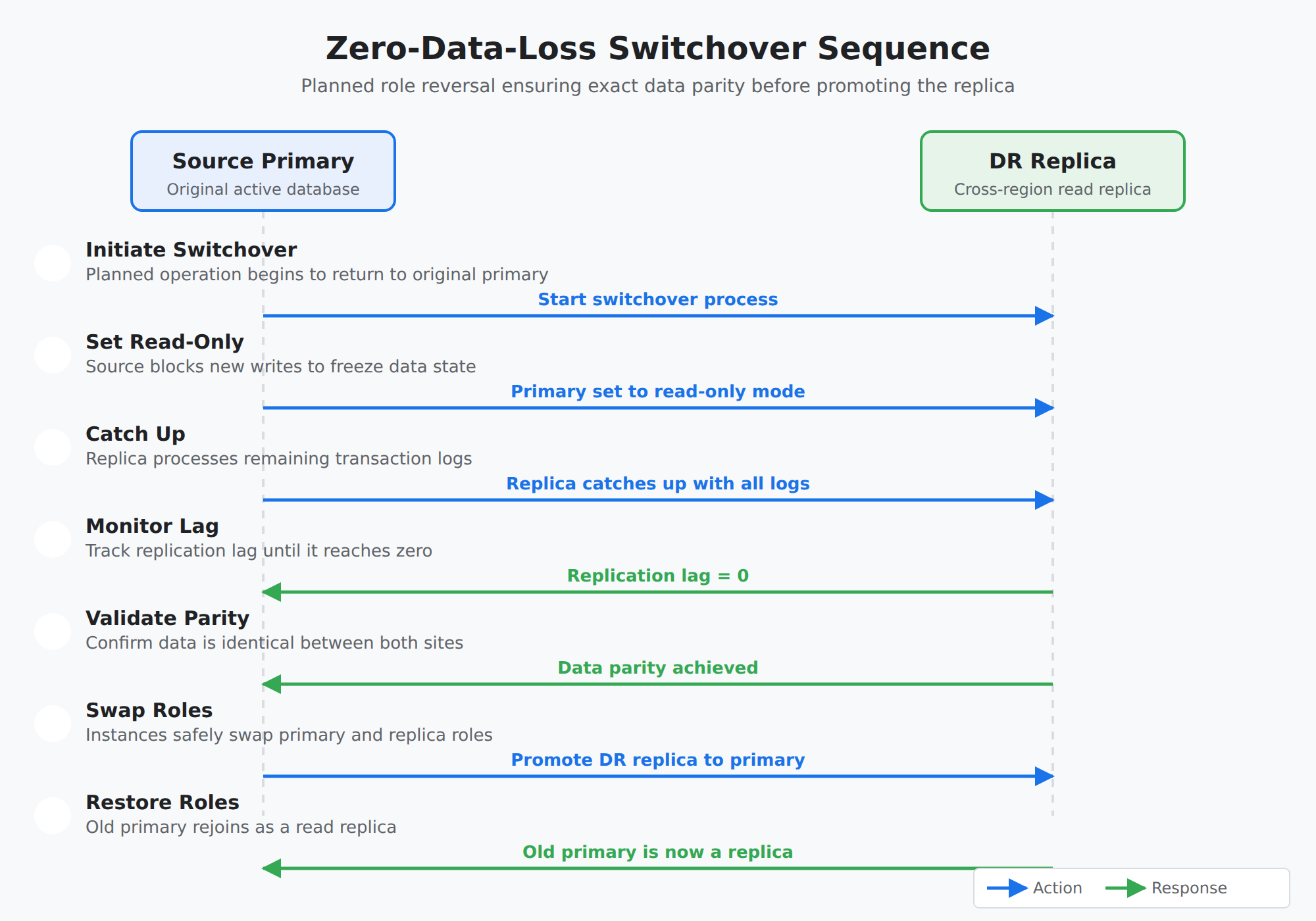
A sequence diagram showing the seven-step zero-data-loss switchover process between a source database and a target replica, including setting read-only mode, draining replication lag to zero, validating data parity, and promoting the replica.
Reverse replication sends data changes from a Cloud SQL instance back to an external source database. This is a key part of a fallback strategy, allowing you to return to your original environment if needed. By keeping the source in sync, you maintain data consistency and minimize potential downtime.
For PostgreSQL databases, the main tool is the pglogical extension, which uses logical decoding to extract changes from the database logs. To enable this, you must configure specific database flags on the Cloud SQL instance: cloudsql.logical_decoding to enable change extraction, cloudsql.enable_pglogical to activate the extension, and max_replication_slots to reserve space for the replication stream.
For MySQL, replication relies on binary logs that record all database changes. These logs must use row-based logging to capture specific data changes accurately for the external replica. You also need to enable Global Transaction Identifiers (GTIDs), which give every transaction a unique ID across the entire setup, making it easier to track progress and recover from errors.
Setting up the connection requires specific networking and security steps. The external server’s firewall must allow traffic from the outgoing IP address of the Cloud SQL instance. You must also create a dedicated replication user on the cloud instance with the correct permissions: REPLICATION SLAVE privilege for MySQL or the REPLICATION attribute for PostgreSQL users. Using SSL/TLS certificates to encrypt data in transit is a critical security requirement.
Once replication is active, you must monitor it to ensure success. A key metric is the replication lag, which shows how far behind the source database is. It’s a best practice to configure a maintenance window to prevent updates from interfering with the data flow. You should also maintain at least 20% free storage on the instance to handle the extra logs generated during replication.
Advanced Disaster Recovery (DR) is a service feature that simplifies moving database workloads back to an original source. It uses a designated disaster recovery (DR) replica, which is a cross-region read replica prepared for recovery. This setup ensures the original primary instance is not deleted but stays connected as a replica to the new primary.
During an outage, you perform a replica failover to immediately promote the DR replica to be the primary. The system updates a write endpoint, which is a DNS name that automatically points applications to the IP address of this new primary. Once the original site is healthy again, the old primary can rejoin the group as a read replica and start receiving updates.
To achieve a zero data loss fallback, you use a switchover operation instead of a simple failover. In a switchover, the current primary is made read-only so no new data is written while the target replica catches up. The instances only swap roles after the replication lag drops to zero, confirming that data parity has been achieved between both sites.
Monitoring data integrity requires tracking lag metrics and the health of all database instances. Before executing the transition, you must validate that both the primary and DR replica are online and healthy. Key validation steps include verifying the primary’s health status, confirming it has entered a read-only state, and ensuring the DR replica has fully caught up with all transaction logs. This guarantees the data is identical before the final switch.
For a successful fallback, the DR replica must have processing power and memory equivalent to the original primary. It is also important to enable High Availability (HA) on this replica so it can safely handle production traffic. Following these steps allows for a smooth failback, returning the entire database setup to its original state without business interruption.
When moving a database to a new platform, you must convert its structure and its data. The structure, defined by DDL (Data Definition Language), includes tables and indexes. The data itself is manipulated using DML (Data Manipulation Language). A successful migration ensures the new system works exactly like the old one, which requires careful mapping.
This task is more complex in heterogeneous migrations, like moving from Oracle to Cloud SQL for PostgreSQL. You must account for differences in SQL dialects, where commands and functions vary. A major challenge is data type mapping, finding compatible types in the target database for every type in the source. Proprietary objects like stored procedures or triggers may need to be rewritten.
Google Cloud’s Database Migration Service (DMS) provides tools to simplify this. Its conversion workspace offers an interactive editor and automated assistance to identify and fix conversion issues. Using these tools reduces human error and speeds up the process. For moving the data and code, orchestration tools like Cloud Data Fusion, Dataflow, and Cloud Composer can build and manage the entire migration pipeline.
During a continuous migration, Change Data Capture (CDC) replicates DML changes in real-time. However, DDL changes (like adding a new column) often are not automatic. Engineers must plan to manually apply these structural changes, sometimes by pausing writes, to keep the source and target databases in sync until the final switch.
A fallback plan is a strategy to return to the original database if the migration fails. Having this backup is critical for business continuity, as it prevents data loss and extended downtime. The plan must define clear triggers for when to stop the migration and revert.
Technical strategies for rollback include reverse replication and dual-write architectures. Reverse replication sends data changes from the new cloud database back to the original source after the cutover. A dual-write architecture has the application write data to both the old and new databases simultaneously during the transition, providing a live backup.
The migration approach impacts rollback complexity. A big bang migration moves everything at once; if it fails, you must restore from a backup, causing significant downtime. Continuous replication migrations are easier to roll back from, as you can often just stop the replication and point applications back to the still-live source with minimal data loss.
Execution relies on a detailed T-minus plan, a step-by-step schedule listing every task and its owner. This plan must include specific contingency scenarios for potential problems at each stage. After the cutover to the new system, a defined monitoring period begins. If verification tests fail or performance is poor, the team executes the pre-planned contingency steps to either retry or perform a full rollback. Keeping the old source environment running for a set period after migration is a vital safety net.
Managing a database migration requires orchestrating the workflow and keeping data synchronized. Change Data Capture (CDC) is a key method for this, tracking and applying data changes from the source to the target in near real-time. This continuous synchronization ensures data consistency right up to the final switch.
Google Cloud offers services to orchestrate this process. The Database Migration Service (DMS) is a managed service that handles data extraction and secure transport for both homogeneous and heterogeneous migrations. For more complex, multi-step workflows, Cloud Composer uses Directed Acyclic Graphs (DAGs) to schedule and monitor tasks. Other tools like Cloud Data Fusion and Dataflow can transform and move data within the pipeline.
A successful cutover—the final switch from the old to the new system—aims for minimal downtime. Planning involves identifying maintenance windows and doing dry runs to estimate task times. A phased cut-over migrates different parts of the workload in stages to reduce risk. Monitoring migration metrics in the Google Cloud console is essential to track health and progress. Reducing DNS Time-to-Live (TTL) values before cutover helps reroute application traffic faster.
The orchestration plan must also include fallback scenarios. A simple fallback switches applications back to the source database if the new target fails. More advanced strategies like reverse replication keep the source database updated with changes from the target even after cutover, making a return easier. Testing the fallback plan is as important as testing the migration itself to ensure system availability.
Choosing the right tool depends on the source of the data and the total volume to be moved. The BigQuery Data Transfer Service is the primary tool for analytical migrations, specifically for moving data from third-party warehouses like Amazon Redshift or Teradata. For general file moves, the Storage Transfer Service is used to bring data from other clouds or local systems into Cloud Storage. These tools automate the process and help maintain data integrity during the transition.
When moving massive amounts of data, physical hardware or specialized agents may be necessary to overcome network limits. The Transfer Appliance is a high-capacity hardware device used to migrate up to a petabyte of data when internet speeds are too slow. For online moves from on-premises systems, Storage Transfer Service agents can be installed to manage large-scale transfers efficiently. These options ensure that business operations continue without interruption while data moves to the cloud.
For migrations involving different database engines, specialized Extract, Transform, and Load (ETL) tools are often required. These services help manage the transition by allowing for complex data cleaning and reorganization. Key tools include Dataflow, a serverless service for processing and enriching data streams; Cloud Data Fusion, a graphical tool for building managed data pipelines; and Dataproc, a service for running Apache Spark and Hadoop clusters to process large datasets. Using these tools ensures that the target schema is optimized for Google Cloud’s specific architecture.
Migrating to globally distributed systems like Cloud Spanner requires specific assessment and conversion steps. The Spanner Migration Tool (SMT) and HarbourBridge are used to evaluate existing schemas and perform data migrations from MySQL, PostgreSQL, or Oracle. These tools help map data types correctly to ensure the new database performs with high efficiency. For NoSQL workloads, HBase tools assist in moving data directly to Bigtable while preserving the original data structure.
Ensuring data accuracy after a migration is a critical final step. The Data Validation Tool (DVT) is an open-source CLI tool that compares tables between the source and target environments. It uses multi-leveled validation functions to check for consistency in counts, sums, and averages across different database types. This process helps engineers confirm that no data was lost or corrupted during the heterogeneous migration process.
The Database Migration Service (DMS) is the primary serverless tool used to move database workloads from external environments into Google Cloud. It simplifies the process by automating the setup and management of migration jobs for MySQL, PostgreSQL, and SQL Server. Using DMS helps ensure data integrity and reduces manual effort. When choosing a migration path, you can select between creating a new Cloud SQL or AlloyDB instance or using an existing one. DMS supports continuous migration, which keeps the destination database synchronized with the source in near real-time using replication. This approach is ideal for maintaining operational continuity and minimizing downtime during the final cut-over.
Manual export and import processes involve creating files like SQL dumps or BAK files and moving them to Cloud Storage. While these methods offer significant control, they often require more downtime and manual intervention than serverless options. Serverless exports are often preferred because they offload the work to a temporary instance, which prevents performance issues on the primary database during the move.
For complex scenarios, third-party tools provide Change Data Capture (CDC) capabilities to stream updates. Striim offers high-performance, low-latency data movement for heavy workloads. Debezium is an open-source platform specialized for capturing changes from transaction logs. Fivetran provides automated, no-code pipelines that handle schema changes automatically. Selecting the right tool depends on your specific needs for scalability and cost.
A successful migration requires a Technical Design Document (TDD) to outline Recovery Time Objectives (RTO) and Recovery Point Objectives (RPO). It is also important to address metadata limitations, such as the DEFINER clause in MySQL, which can cause import failures if users do not exist on the target. Testing the migration with a dry run is a critical best practice to ensure the application behaves correctly after the move.
Online migration uses Change Data Capture (CDC) to replicate data in real-time. This process starts with an initial data dump, followed by the continuous processing of any new changes made to the source. A key metric to monitor is the replication delay, which measures the time difference between a write on the source and its appearance on the destination. This method is ideal for meeting strict Recovery Time Objectives (RTO) to minimize service gaps.
Offline migration involves a one-time migration where a point-in-time snapshot is moved to Google Cloud. During this process, administrators must stop all writes to the source database to ensure data stays consistent. This often leads to significant application downtime while the data is being transferred and loaded into the new system. Offline migrations are often simpler to perform but require a larger window for the cutover phase.
Various tools help with these transitions depending on the database engine and source location. Database Migration Service (DMS) automates migrations for engines like MySQL, PostgreSQL, and Oracle. Datastream is a serverless service used for Change Data Capture to sync data across different cloud environments. Key offline tools include Storage Transfer Service for moving large datasets from external storage providers and RIOT, a command-line utility for live migration of Redis-compatible sources. Choosing the correct tool is essential for keeping the business running during the transition.
The final step in an online migration is the promotion operation. This action disconnects the destination instance from the source and makes it the primary database for all application traffic. Before starting a promotion, engineers must ensure the replication delay is at or near zero to prevent data loss. This transition point is known as the cutover, where the application officially begins using the Google Cloud database.
A replica failover immediately promotes a replica to the new primary database during an outage, whereas a switchover is a planned operation designed for zero data loss. During a switchover, the active primary is placed into a read-only state until replication lag reaches zero, ensuring data parity before swapping database roles.
Reverse replication for PostgreSQL requires configuring the Cloud SQL flags cloudsql.logical_decoding, cloudsql.enable_pglogical, and max_replication_slots to activate the pglogical extension. The setup also requires creating a replication user with the REPLICATION attribute, allowing traffic from the outgoing IP address of the Cloud SQL instance through the external firewall, and encrypting data in transit with SSL/TLS certificates.
An offline migration should be used when the workload can tolerate an extended outage, particularly when data volume is too large or network bandwidth is too slow for an online sync. Online migrations are preferred when strict Recovery Time Objectives (RTO) require continuous Change Data Capture (CDC) replication to achieve near-zero downtime.
 StudyCerts
 StudyCerts